The post Influencing the Future of Education with AR/VR appeared first on Test.Evelyn.
]]>Likewise, teachers try hard to make their teaching lessons interactive, exciting, and engaging. The teachers do that so that they are well-received by their students.
Generation Y was easier. They have grown up seeing technology transitions. But, on the other hand, Generation Z has taken birth in the lap of technology, while generation alpha has been talking about technology since infancy!
This is the age of augmented reality and virtual reality. We are all over the notion of building a super Ed-Tech system that breaks the ordinary. Our parents learned from books, we learned from e-books, pdfs, and now kids learn from an environment that blends the virtual world with the real world.
What is Augmented Reality Vs. Virtual Reality
It is a phenomenon where the imagination or elements pop out to the real world and give a real-life experience to an individual.

Source: Google
Like a fish can be seen in a person’s garden through digital technology by overlaying the fish(digital world) onto the person’s garden(real world). Likewise, virtual reality can be experienced by putting a VR device on the eyes.

Virtual reality is the concept of incorporating oneself into a digital world. It is a virtual world far away from reality. Augmented reality is reality going one step further, while virtual reality is a step into a different world.
How AR/VR can affect Education
Research shows that the Ed-tech industry is growing annually by approximately 18%.
This means that people are thinking about education in ways that could only have been expected almost a decade ago.
Learning about the human body through an augmented human body structure that can be seen from all sides is way more interesting than learning from a 2-D image in a book. Every body part can be extracted, magnified, and understood precisely.
Students in a design class can see which decor piece can look good in a particular corner by superimposing different digital decor pieces in a real corner on a digital device.

Bringing computer-generated graphics into reality can give students a real yet highly immersive experience. In fact, it can break their effort to imagine how something would look.
Virtual reality can take learning to another level. It can prevent the effort to go anywhere and learn simply through an eye-wear device.
Virtual reality does not bring a fish out of the ocean into our garden like augmented reality. Instead, it takes the person into the sea to see all the fish.
You may also like Virtual Reality Widening the Scope of Education
The extent of technology can go so far; we could only imagine it as kids. AR/VR can help students in a small town see the world virtually without going anywhere.
Why AR/VR is the answer to teaching the Next-Gen
Attention span is already compromised. Students can focus less on the text and carry shorter spans on visuals. AR/VR makes learning more colorful and closer to reality. Students like to learn through experiences rather than memorization.
Also Read How to Make Content for Students with Short Attention Spans
They would love to see how a man used to walk in the early days and write perfect answers on tests. On the other hand, they would detest learning how an early man looked and then describing it in detail.
Visual memory is considered better and longer than verbal memory. So, for the students, especially the Gen alpha, AR/VR is one of the best ways to teach.
Tools for students to incorporate AR/VR in their learning
Students can choose from various tools from the digital libraries that can help them get an immersive experience in education.
Apps like Quiver help students color objects and see object animation. Tools like Arloon Chemistry help to arrange and rearrange the molecules to understand chemical reactions and formulae.
Certain apps can induce an augmented reality experience for students, like the Blippar app. This app allows students to bring an object in a picture alive digitally.
Medical students can benefit from HoloAnatomy, the application that helps to learn medical circumstances through AR simulation. It allows the students to understand the human body in depth with the visual experience.
Investment in AR/VR
There are specific free tools that students can conveniently use in their classes. However, some devices come with costs, and every student might be unable to afford these apps. However, a school might be able to invest in some of these AR applications, which enhance the learning and teaching experience. Schools can think of this as an investment. A teacher’s job would become less complicated as it would become more accessible for teachers to explain concepts to students and have all their attention.
It would only come to reason when the school districts and the administration care to unleash the power of technology and make it accessible to students to improve teaching methods.
The post Influencing the Future of Education with AR/VR appeared first on Test.Evelyn.
]]>The post E-Learning Video Solution Providers for Quality Video Content appeared first on Test.Evelyn.
]]>To get video based solutions, visit our page here.
What is Video-Based Learning?
Video Based solutions are the roadmap towards modern-day education. With the advancement of time and technology, the attention span of an average student is recorded to be rapidly decreasing. The solution to this is video based solutions which can not only improve the retention rate but can also make a particular topic interesting and fun to understand. With animated cartoons and engaging videos, students are more likely to be more attentive in their studies.
How to Ensure an Effective Video-Learning Solution? Step by Step Lessons Development
E-learning video service providers maintain a certain flow chart for the development of the lessons. With the help of these steps, they are catering to the very needs of the students. Here are the briefings of the steps of the process flow.
- Requirements are the key to starting. It is essentially what the students need. That is why assessing requirements is the first step to take.
- Identification is crucial. Why is that, though? Without that, the provider will not cater to the students’ needs in the long term. By identifying which are essential lessons, they can easily channelize the video.
- Assigning the SME is probably the most critical point because they are the video’s driving force anyway. With the help of an experienced SME, the video will capture attention.
- E-learning service providers now have to look for the video category. Then comes the documentation and scripting. Three of these are essential. First, every video is made for a purpose, and these steps will decide that purpose. It will also settle down the target audience of the video.
- Designing and developing alongside the screenplay is an essential step. Designing and development will give an edge to the video. A bright and precise screenplay will help the providers to engage the students for a long time.
- The shooting of the video is a great option and has a no-brainer. But, again, shooting with a quality crew and equipment is essential.
- Last but not least, QnA. Now there are debates over these issues of question and answers. But in the long run, it is important. Students will get the opportunity to interact with the teachers during this segment. That will allow them to find their doubts wash away.
How Did Video Solutions Help Model E-Learning?
In the modern world of technology, video solutions are the best way to move forward. E-learning is a platform where students can come and join instantly. Rather than providing them with text-based solutions, it is better to put up a video. The video solution revolutionized the modeled e-learning for the long term. It made it easy, simple, and authentic.
Factors to Effectuate the Learning Process with E-Learning
There are three crucial things to remember before implementing the video solutions. Firstly, are the students comfortable with it? If not, then it will be of no use. This is because the students need to learn and study simultaneously for their betterment. Secondly, the videos should not be heavy.
Now, what does that mean? That means that e-learning service providers need to produce videos that are not boring and fun to watch. Last but not least, the videos are well crafted. SME or the subject matters expert will have a huge role here. The videos should be well documented and engaging to watch.
Final Thought
So here we have listed the best practices and developments for good video solutions creation. You can use this as a checklist or integrate it in your video solutions creation services. In case you want video solutions for any curriculum, you can get in touch with us at info@evelynlearning.com or visit our page here.
The post E-Learning Video Solution Providers for Quality Video Content appeared first on Test.Evelyn.
]]>The post Pedagogical Practices To Suit Various Learning Styles appeared first on Test.Evelyn.
]]>To Begin, what exactly are Learning Styles?
Almost all educators would be familiar with the concept that everyone has a preferred method of absorbing knowledge. Students will learn more easily if an educator teaches them in their chosen style. This concept has been around since the 1970s and well-intentioned teachers and dedicated students who want to learn effectively still carry it forward. It is no wonder that everyone wants to learn faster and more efficiently.
Unfortunately, there is no convincing proof that there are different learning styles.
In truth, the best evidence points in the opposite direction. The notion that people perform best when trained in a way that corresponds to their unique “learning style” — Auditory, Kinesthetic, Visual, or a combination of the three — is generally dismissed. According to multiple studies, learners do not profit from their own learning style. Teachers and students have different ideas about what learning styles work best for them, and we have no insight into how much we learn from various approaches.
The Myth of Learning Styles
Every student will differ in terms of skill, interest, and prior experience, but not in terms of learning styles. According to research, when people have a favorite style of presentation, it is typically for a task or topic in which they have a high level of talent and already feel good.
One may think they are an Auditory learner if they are good at music, or a Visual learner if they are creative. While one can prefer a certain method of learning, there is no proof that it can help them learn more effectively.
The myth of learning styles appears to be as widespread as ever. The learning styles paradigm can also be harmful to education in a variety of ways, according to various previous studies. Even though all students will profit from learning by multiple methods, educators expend time and money tailoring lessons to specific learning styles for different students. Even if it will not help them excel, students study in ways that correspond to their perceived learning style.
However, it is not obvious why educators want to believe in them. It is possible that the theory is heavily reinforced during teacher training; it is also possible that teachers are dealing with their students in the same way that their teachers interacted with them. Alternatively, it is possible that efforts to dispel the theory have become close to zero, struggling to reach educators.
Best Teaching Practices to Suit Various Learning Styles
Educators are well aware that no two students are alike, and that there is a wide range of learning styles. As a result, an educator’s teaching style may have a significant effect on a student’s ability to understand and comprehend. This is why teachers must be familiar with a variety of learning styles.
Is Shawn’s preferred method of learning pictures and graphics? It is possible that he is a Visual learner.
Is it true that Kevin learns best by attending seminars, asking questions, and engaging in group discussions? He may be an Auditory learner.
Is it more convenient for Jack and Katie to collect knowledge by reading, taking notes, and writing reports or essays? They may be Reading/Writing learners.
What about Joel, for instance? She is very hands-on and seems to love disassembling and reassembling items in order to learn by doing. It is possible she is a Kinesthetic learner.
That is one common breakdown of the learning styles continuum, but it is by no means the only one. Most teaching types fall into one of two categories: Teacher-Centered or Student-Centered. Here is a breakdown of the differences between teacher-centered and student-centered instruction:
• Teacher-Centered Approach:
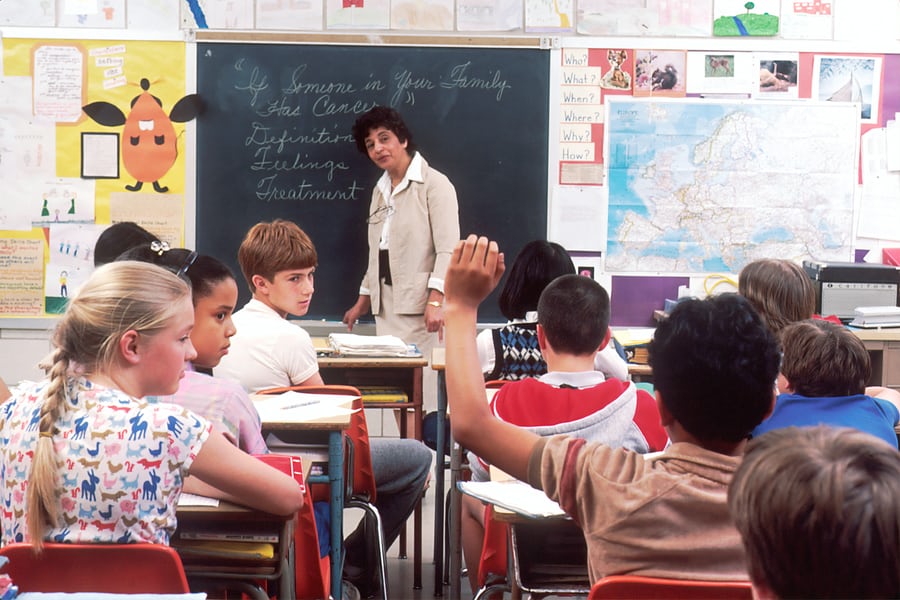
The Teacher-Centered approach to education is a teaching style that views the teacher as the authority in charge of imparting information to students through lectures or direct instruction. Students are passive actors or “empty vessels” in this approach (also known as “sage on the stage”). They listen and absorb information.
This Teacher-Centered approach to teaching is the most common, but it is not always the strongest. And, as educators learn more about how to involve students of all learning styles, the teacher-centered approach is becoming less common.
• Student-Centered Approach:
The Student-Centered approach is a teaching style that fosters greater harmony between the instructor and the student by allowing both to participate in the learning process. The instructor is often referred to as the “guide on the side” in this strategy.
While the teacher retains authority, he or she is more likely to serve as a facilitator, coaching and assisting students in their studies. This method promotes student autonomy while also allowing students to engage with one another. Under the student-centered approach to teaching, there are a few styles to consider:
• Approach Based on Inquisitiveness
Students lead the way and receive instruction from their teachers in this Student-Centered learning style. Moreover, this approach promotes flexibility, autonomy, and hands-on learning.
• Approach Based on Co-operation
Cooperative learning is a Student-Centered method of instruction that emphasizes group work and social development. The cooperative model, like the inquiry-based style, promotes individuality and hands-on learning, but places a premium on peer-to-peer collaboration and culture.
Many teaching resources categorize the best teaching styles into the five key categories mentioned below:
1) Authoritative or Lecturer Style
The Authoritative teaching style is based on the conventional Teacher-Centered approach. This includes lecture sessions and one-way presentations. Students are expected to pay attention, process information, take down notes, and ask questions in this approach (also known as the “chalk and chat” style).
2) Coach or Demonstrator Style
The Demonstrator style, which is common in math, science, and music, emphasizes “showing” rather than “telling,” with teachers more likely to back up their points with examples, tests, demos, or multimedia presentations.
3) Activity Style or Facilitator
The facilitator/teacher is focused on encouraging students to learn for themselves and assisting them in developing critical thinking and learning skills. It is a Student-Centered approach that entails designing learning plans. It includes classes that enable students to explore and discover course material in unique and innovative ways.
4) Group or Delegator Style
The Delegator style of teaching is well-suited for curricula that include or emphasize group activities, as it places much of the responsibility for learning on the students, who are motivated to collaborate on projects related to the lesson themes (think science labs, debates, etc.). The instructor is an involved spectator in this style, guiding students in the right direction.
5) Blended or Hybrid Style
The Hybrid approach combines elements of the above-mentioned models, often blending the teacher’s personality and interests with the students’. While this method is considered inclusive because it allows teachers to adapt their teaching styles to the needs of their students within the subject matter, some educators claim it risks diluting the learning process by putting less emphasis on in-depth research than a single, concentrated approach.
Final Thoughts
The aim of the discourse above is not to categorize the organic practice of classroom teaching into tidy categories. We do not wish to label educators as one “type” of teacher or another, but rather to investigate various methodologies in order to improve our collective understanding of the teaching experience.
It all comes down to getting to know the students and using the respective skills and intuition to figure out the best ways to involve individual students and whole classes with the curriculum. What works for one student or community may or may not work for another.
That is why, in order to be the most successful instructor possible, educators must have a clear understanding of the various student learning styles. They must have a solid grasp of the various teaching styles and strategies available.
Image Sources: Shutterstock and Unsplash
For more information on different teaching practices, visit our blog.
Create. Engage. Inspire.
The post Pedagogical Practices To Suit Various Learning Styles appeared first on Test.Evelyn.
]]>The post Universal Design for Learning: A Practical Guide appeared first on Test.Evelyn.
]]>Universal Design for Learning is based on three principles:
- Engagement (taking advantage of learners’ interests and motivations);
- Representation (giving content in a variety of formats);
- Action and expression (offering learners with a variety of ways to express themselves)
Universal Design for Learning is a paradigm for reducing physical and emotional barriers to learning and ensuring that all students have an equal opportunity to succeed. Educators provide information in a variety of ways with UDL. This includes lectures, dialogues, demonstrations, resources, and more. Automatic doors and closed captioning are two instances of how Universal Design for Learning has influenced daily living outside of the classroom.
What is Universal Design for Learning?
Universal Design for Learning is a style of thinking about teaching and learning that aims to provide all students with an equal chance at success. This method allows students to access, engage with, and demonstrate their knowledge in a variety of ways. This method of creating lesson plans benefits all children, but it may be particularly beneficial to children with learning and thinking disabilities.
The purpose of Universal Design for Learning is to eliminate any obstacles to education and provide all students with equal opportunities to succeed. It’s all about incorporating flexibility that may be tailored to each student’s unique skills and needs. That is why this approach is beneficial to all children.

This kind of instruction does not specifically cater to students who learn and think in different ways. However, it can be especially beneficial for the 1 in 5 children who suffer from these problems, even those who have not yet been formally identified. It can also be extremely beneficial to English language students.
Even if one has never heard of the term “Universal Design,” they’ve almost certainly seen examples of it in their daily life. Closed captioning on televisions, for instance, allows those with hearing problems to read the text of what is being said on screen. In the classroom, Universal Design for Learning offers the same level of adaptability. Teachers can effectively teach a diverse set of students by implementing UDL principles. They do so by allowing learners to acquire material in a variety of ways and allowing them to demonstrate their understanding in a range of methods.
Methodology of Universal Design for Learning
Rather than laying out a common approach for teaching everyone, Universal Design for Learning provides an adaptive framework for connecting each student to the learning process. All of this may seem intimidating, and the UDL hypothesis is undoubtedly ambitious. Thankfully, it has broken down its standards into three simple categories that instructors may work with. These are the following:
-
Representation:
Students must first be able to access the resources in order to participate in the learning process. The Universal Design for Learning suggests that information be made available in multiple formats. Textbooks, for one, rely heavily on images. Providing text, audio, video, and hands-on learning, on the other hand, allows all children to access the content in the manner that best suits their learning abilities.
Everyone would have a choice for whatever format they want to study in. Others may prefer a combination of formats to properly cement the concept.
-
Action and Expression:
According to Universal Design for Learning, children should be given multiple opportunities to interact with the material and demonstrate what they’ve learnt. Students can have the option of taking a pencil-and-paper examination, giving an oral presentation, or working on a group project, for instance.
-
Engagement:
UDL urges teachers to explore a variety of approaches to motivate their pupils. Teachers can maintain students’ interest by allowing them to make choices and offering them assignments that are relevant to their life.

Educators accomplish this mostly through connecting themes and activities to the interests of students and allowing them to infuse their excitement into projects. Gamification and clearly defined levels of achievement and challenges are also effective ways to engage pupils in their study. Making skill improvement feel like a game and providing opportunities for pupils to get up and walk around the classroom are two other typical tactics.
Effectiveness of Universal Design for Learning
Moving on, what are the main advantages of implementing Universal Design for Learning in a class, institution, or town?
-
Making Learning more Pertinent:
Universal Design for Learning actively targets students’ desire and drive to learn. It does this by making knowledge more relevant to students’ interests and daily activities. This can assist learners become more engaged in the learning process. At the same time, this also reinforces their knowledge and inspires them to continue studying throughout their lives.
-
Accessibility:
The flexibility and variety of UDL are its most major advantages. It is possible to alter activities and materials to account for everyone’s strengths and weaknesses. As a result, learning becomes more accessible and pleasant for everyone.
-
UDL Supports Various other Research-based Learning Methodologies:
Universal Design for Learning is not incompatible with other methodologies and practices. It incorporates and supports many modern research-based techniques to teaching and learning. This includes collaborative learning, blended learning, multisensory teaching, and student-centered learning, to mention a few.
-
Low Cost:
A UDL curriculum is designed from the start to match the needs of the entire class. This eliminates the need for costly, time-consuming, and after-the-fact curriculum changes.
-
Empowerment:
Universal Design for Learning empowers both teachers and students. It provides a framework for teachers to adapt material to the learner rather than forcing the learner to adapt to the material. This is a significant result since it allows the entire classroom to take control of the instructional format and, as a result, be more effective.
-
Taking Control over your Education:
UDL gives students the expertise and technologies they need to select the best learning options for themselves. There is little spoon feeding, and educators encourage pupils to take care of their own learning. This also allows children to evaluate their individual learning needs and figure out how they absorb information most effectively. This is critical for academic and professional success.
Concluding Remarks
Educators know that their learners have a diverse range of interests, backgrounds, and talents in any class. They can approach the subject in a variety of ways if they plan with this range in mind. Information is frequently delivered in multiple media with Universal Design for Learning, including text, audio, and hands-on activities.
Universal Design for Learning is a viable approach as it helps you foresee and plan for all the students from the beginning of the class. It can assist an educator in ensuring that all students, not just a select few, have access to and participate in learning. To acquire a more accurate picture of what students know, it urges teachers to give a variety of examination forms, such as oral presentations and group projects. It also seeks for new ways to keep students engaged.
Image Sources: Shutterstock and Unsplash
For more information on Universal Design for Learning, visit our blog.
Create. Engage. Inspire.
The post Universal Design for Learning: A Practical Guide appeared first on Test.Evelyn.
]]>The post Using Math Tools in Online Teaching appeared first on Test.Evelyn.
]]>In high school, the emphasis in math classes shifts to college and career preparation through advanced algebra, calculus, test preparation, and plenty of real-world problem solving.
In this article, we’ll show you a few of the most intriguing math apps that every educator can use in the online classroom. These applications and tools meet or exceed static math exercise by providing the personalization, monitoring, and variation that can equip kids for learning beyond high school, whether teachers require a math tool for students to flip the classroom or involve learners in a discussion.
1) GeoGebra
GeoGebra is a computer tool that allows students to solve problems in a dynamic way. It is appropriate for students at all levels of study, from beginners to experts. Geometry, algebra, spreadsheets, graphing, statistics and analysis, and calculus are all included in this user-friendly software. GeoGebra’s community is rapidly growing, with millions of users throughout the world. They are the leading provider of dynamic mathematical software throughout the world. If an educator is interested in using math tools in online teaching, they should give this one a try.
2) Stepping Stones 2.0: Comprehensive Mathematics
Stepping Stones 2.0 combines print and digital resources to provide instructors more options when it comes to teaching K-6 math. Additional practice, effective tactics, visual examples, and instructor support are all included in SS 2.0. For using math tools in online teaching and stressing or reteaching a concept, the instructor can use SlateCast to broadcast a resource onto the class whiteboard.
3) Geometry Pad
Geometry Pad is a fun method to study and practice geometry and fundamental constructions. It’s like having a personal tutor when it comes to learning mathematics. Students can show their geometric constructs, take measurements, utilize the compass, and explore a variety of geometric shapes with relative ease.
Students can alter the attributes of forms, zoom in, save their progress, and make side notes. Geometry Pad is a fantastic tool for teaching math online to students of all ages and in a variety of mathematical subjects.
4) FluidMath
FluidMath is the first “pen-centric” iPad and dynamic whiteboard math platform. While solving difficulties and engaging with tough subjects, students and teachers can write in their own handwriting. FluidMath has received numerous accolades, and its numerous features make it an excellent resource for instructors and students in any math school.
Instructors may design engaging educational materials for schools, and students can grasp mathematical topics. FluidMath is an excellent choice when it comes to using math tools in online teaching and may be thought of as a brilliant piece of math paper.
5) Shapes 3D
Shapes 3D is an Augmented Reality app that teaches geometry. Prisms, pyramids, revolution solids, and Platonic solids are all possible. Start with a simple figure and work your way up until you reach the most complex ones. This tool aims to enhance the teacher’s abilities and provide opportunities to demonstrate things that aren’t possible to demonstrate with physical tools or in the classroom. Shapes 3D is another excellent alternative for educators who wish to use math tools in online teaching.
6) Math is Fun
Math is Fun strives to make math pleasurable and amusing, as the name suggests. To assist students in their study, the site includes puzzles, games, quizzes, worksheets, and a forum. The challenges and solutions are all given in simple language, allowing kids to study on their own without the need for an adult or teacher to “translate.”
7) Virtual Nerd
Virtual Nerd is a program that may be used in any math class. The only thing you’ll need is an internet-connected device. The creators of Virtual Nerd have kept students of all ages in mind. You may discover a variety of movies on their website that explain a variety of mathematical difficulties. They show you how to address these challenges step by step in these videos. This is, in fact, a virtual instructor.
This is a simple tool that teachers can use to help students solve mathematical problems. If pupils don’t comprehend their teacher’s explanation, they might be able to understand it by watching a Virtual Nerd video.
8) Desmos
Students can use Desmos, a free online graphing calculator, to graph functions, plot data, and assess equations. To help pupils get the most out of the calculator, the site also provides arithmetic examples and even artistic art. The website and app are incredibly user-friendly, with a comprehensive help center; and families don’t have to worry about spending a lot of money on a graphing calculator using Desmos.
Desmos also allows students to build their own math concepts. The students can discuss the with one another. The activity builder allows not only students but also teachers to create their own activities and ideas. Teachers can then provide the appropriate material to meet the needs of their students.
9) CueThink
CueThink is a cutting-edge app for students in grades 2 through 12. On the one hand, it aims to engage children who are currently performing well, while also assisting kids who are struggling with math. With a growing perspective, they want pupils to see problems as possibilities.
Teachers might assign kids math problems from a so-called “problem bank.” Each student’s responsibilities are tied to a specific level, ensuring that they are appropriate for them. Students build and present their solutions using a specified method. CueThink is a virtual community where students can collaborate in groups. They can learn from one other, both from their successes and their mistakes, thanks to these groups.
10) Prodigy Math Game
Prodigy Math Game is an online arithmetic game based on Pokémon, designed for kids in grades 1 through 8. Students must design their own avatar, which they can change as they move through the game. Students will play this game at home because it is an enjoyable game, doubling their math practice time.
11) ByteLearn
ByteLearn is a digital teaching assistant for math that helps students step-by-step in solving math problems, providing help and feedback the way that a teacher would. Teachers create practice assignments for their students and get targeted insights into their students’ knowledge gaps and misconceptions.
Teachers can see the skills students have been working on, how much time they spent playing the game, and what they found challenging, due to reports. The most significant advantage of this math software is that students may use it anywhere if they have an internet connection, making it ideal for all educators interested in using math tools into online teaching.
To sum up, these are the top math apps for math tutors who wish to use math tools in online teaching. These are the tools to use if you want to teach your students something new or if you want them to study anything at their own pace.
Impact of Using Math Tools in Online Teaching
In math classrooms, technology offers exciting new ways to teach. Through engaging and interactive media, we can improve the learning process and bring concepts to life. Additional assistance may be provided to meet the requirements of all learners and to provide customized learning experiences.

With better access to technology for math, students can have a more personalized learning experience. Because no two students are the same, technology can assist individual students find content and resources that are tailored to their specific requirements. Lessons, tutorials, screencasts, and other instructional resources can be seen by children on their own devices and at their own pace. So, if one student is still stumped on a topic while another is ready for a new challenge, using math tools in online teaching can help each of them take the next logical step.
Teachers should consider using math tools in online teaching to assist students see how concepts learned in the classroom may be used in real-life situations. Students can communicate with people outside of the classroom to help widen their understandings and viewpoints about what they are studying by incorporating technology into the math classroom.
Concluding Remarks
With good cause, some of the top educators we know are relocating their entire work online. Tutoring kids online minimizes the waste of time spent driving between visits, which can eat into crucial tutoring time.
Using math tools in online teaching will encourage students to engage in self-exploration and show them how arithmetic is woven into the fabric of their lives. Students can also take control of their academic performance and build a favorable relationship with a subject that they previously felt indifferent about by using these tools and applications.
Image Sources: Shutterstock and Unsplash
For more information on using math tools in online teaching, visit our blog.
Create. Engage. Inspire.
The post Using Math Tools in Online Teaching appeared first on Test.Evelyn.
]]>The post Video Hosting Platforms for Online Courses appeared first on Test.Evelyn.
]]>Why Use Video Hosting Platforms?
Videos take up a lot of storage space. This hinders the speed of servers and has an impact on the video quality. Also, not all platforms can provide an appropriate audience for a video-based course. Consequently, it is important to choose a video hosting platform with a relevant audience.
Moreover, the demand for high-definition videos is on a constant rise. These high-quality videos take up more hardware storage. As a result, they require a dedicated server capable of handling a significant amount of traffic. Uploading videos on a website can be taxing for a server, which affects the entire functionality of a platform. Hence, using a video hosting platform is more convenient.
Top 7 Video Hosting Platforms
There are many video hosting platforms offering a plethora of hosting options. Many of these are free to use with a paid upgrade option to avail advanced features.
The top 7 video hosting platforms have been described below.
1. YouTube
YouTube is the largest video-sharing platform with over 2 billion users worldwide. Also, it is the second-largest search engine after Google. It contains numerous video lessons uploaded by its various users. This platform provides several convenient features, including automatic transcription for more accessibility. Most YouTube videos are easily downloadable, which means a course can easily be copied and distributed. Consequently, there are more privacy breaches. However, the paid version of YouTube offers security options with ad-free services and other premium features.
Another feature is the search engine visibility of YouTube videos. This signifies that users can discover videos simply with a Google search. It makes YouTube one of the best video hosting platforms for online courses.
2. Vimeo
Vimeo is a professional interface for video sharing. Although it offers comparatively less upload space and customization, more privacy controls are available to the users. It provides powerful video analytics and high-quality videos without ads. Also, the video download option is only available if the creator enables it. This protects the videos and content from unwanted distribution. This platform is beneficial for creative professionals, including educators who wish to share their work with a large audience.
Although there are fewer customizations available in the free version, Vimeo offers four types of upgrade plans based on a user’s requirements. Upgrading to a paid version offers more customization and comes with more cloud storage space.
3. Wistia
Wistia is a professional digital marketing platform. It offers a wide range of marketing tools, including a built-in call to action button. Users can upload videos and embed links to their website in between. It offers a completely customizable embedded player that highlights videos from the same user. However, there are no video recommendations from other channels. It is also useful for CRM integration and custom branding because it helps create a custom audience for different social media platforms.
4. Facebook
Facebook is a ubiquitous social media platform and one of the most prominently used platforms for video hosting. It offers the biggest audience with a large number of visitors each day. Users can showcase their creativity by creating and uploading videos on Facebook. Moreover, it supports different aspect ratios and provides unlimited file storage. Although there are fewer options available to embed videos, Facebook is still useful for creating brand awareness.
5. WordPress Video Hosting
WordPress offers video hosting options in its premium and professional plans. Users must install the Jetpack plugin to access unlimited video hosting options. WordPress accepts videos in different formats, namely, .MOV, .MPEG4, MP4, .AVI, and others. Also, it offers a customizable embedded video player with video stats available on the WordPress dashboard.
A drawback of WordPress video hosting is that it does not have the premium features that other video hosting platforms offer. Also, it does not have an established audience. As a result, WordPress video hosting might not seem a good idea for someone targeting a large audience in less time.
6. Brightcove
Brightcove is a paid video hosting platform that has a fast server and powerful live-streaming options. It is a scalable solution used by many Fortune 500 companies because it does not have any resolution limit and supports all aspect ratios. It also supports all upload sizes without any issues. However, the storage depends on the plan selected.
In conclusion, Brightcove is a complete enterprise solution that supports advanced integrations for large-scale marketing and communications.
7. Dailymotion
Dailymotion is somewhat similar to YouTube. It is a platform with over 300 million unique users. This platform provides free unlimited video hosting with advanced security options. The host can protect their videos with passwords or make them private. Also, users enjoy unlimited file storage and can upload videos in the desired formats.
However, the maximum upload limit is restricted to 2GB with a maximum video length of one hour. There is less competition so building an audience becomes easy. However, there are frequent ads and issues with embedding videos on the websites.
Final Note
There are a variety of video-hosting platforms available for various unique users for free or at a low cost. Choosing the right platform requires a thorough analysis of the needs and requirements of the user. They can then compare and choose a suitable platform that serves their purpose.
Read more about Video Learning here.
Research articles: Wondershare Filmora and Kinsta
Images:
For more information on Video-Based Learning, visit our blog.
Create. Engage. Inspire.
The post Video Hosting Platforms for Online Courses appeared first on Test.Evelyn.
]]>The post Video Learning Styles: An Introduction appeared first on Test.Evelyn.
]]>The reason video-based learning outshines any other method of teaching-learning is that it allows better learner engagement. It also stimulates faster and better understanding. To achieve these outcomes, educators must possess a sound knowledge of the various video learning styles. Here are some video learning styles that satisfy the learning needs of discrete learners.
Different Video Learning Styles
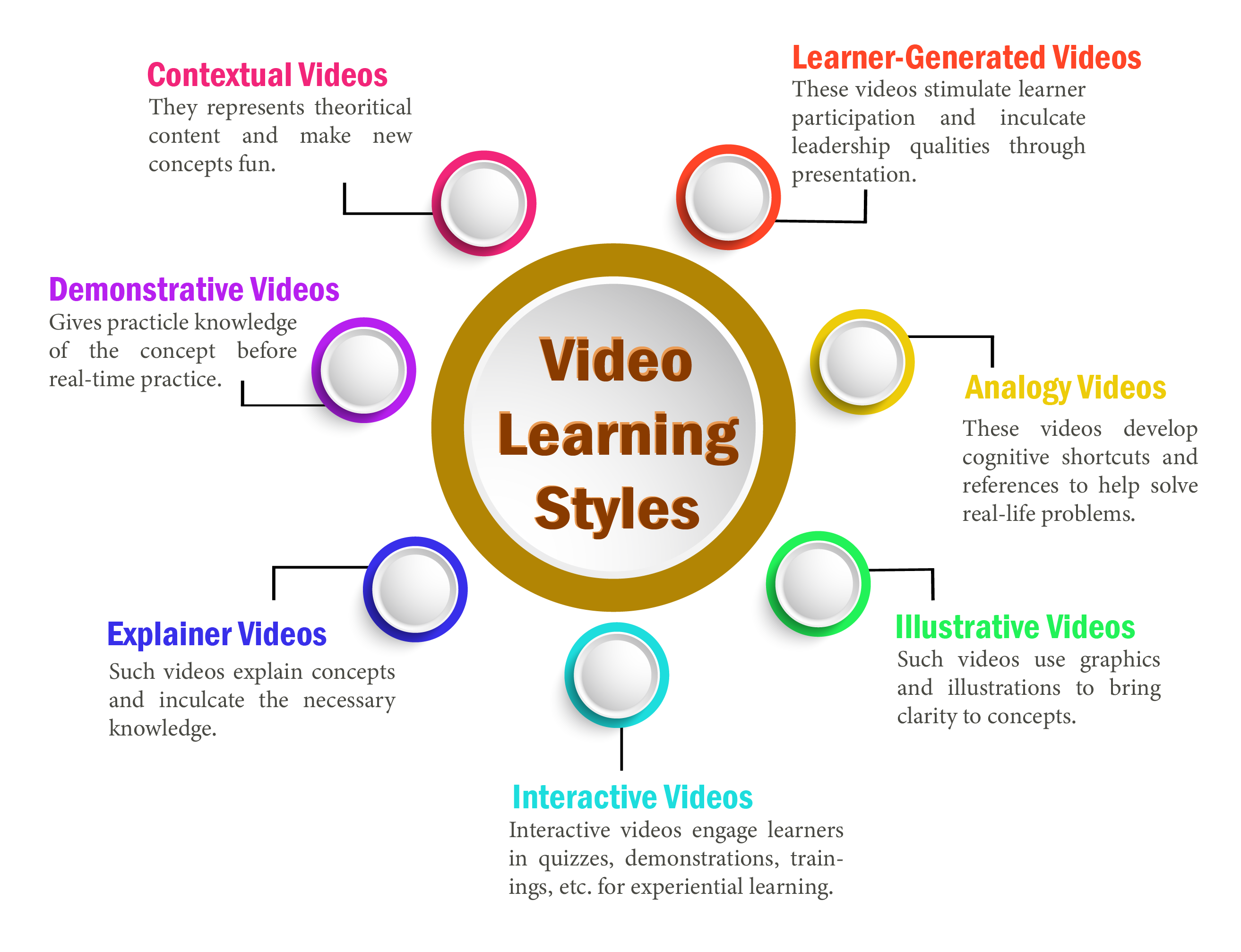
i) Contextual Videos
Contextual video learning style is a powerful way of introducing e-learning. It helps create a tech-friendly environment for learning that promotes learner participation. Also, learners gain autonomy to proceed further in learning at will with the help of videos.
Moreover, such videos are perfect for theoretical content. They help students learn faster and better by reducing text rigidity and making the information easier to consume. They make the introduction of new concepts easy and fun.
ii) Demonstrative Videos
Demonstrative video learning style follows the learning by doing approach. Such videos are useful for providing practical knowledge of a subject before learners try it on their own. This signifies that demonstrative videos help share a skill before learners acquire the relevant experience. The virtual environment brings forth the steps and risks of the activity. Consequently, learners get a virtual experience of performing an exercise in real-time.
Moreover, it prepares learners to practice precaution measures while performing the actual practical experiment.
iii) Explainer Videos
Explainer video learning style uses animation, slides, live videos, and other ways to explain concepts. Such videos explain complex concepts and inculcate in learners the necessary knowledge regarding those concepts. Moreover, this video learning style influences learning to a great extent with its usability and effectiveness in teaching and learning.
iv) Interactive Videos
The concept of interactive videos is comparatively new in video-based learning. Interactive videos are not only useful for learning but also for corporate training. They help address the multiple learning needs of various learners. Additionally, as the name suggests, interactive videos interact with learners in different ways to engage them. This interaction can be in the form of quizzes, demonstrations, or skill training.
Furthermore, the most fundamental benefit of this video learning style is that it enhances learner participation and promotes longer retention. In turn, it helps produce better learning results.
v) Illustrative Videos
Illustrative videos employ illustrations and graphics to bring clarity to concepts. In addition to this, illustrative examples help define topics and concepts, leading to a better understanding so that learners retain more. Educators can create such videos with simple illustrations, images, and graphics. As a result, they are extremely cost-effective. Additionally, illustrative videos are compatible with different devices and are lightweight. Their function is not limited by restricted internet bandwidth on a multitude of devices.
vi) Analogy Videos
Analogy video learning style helps develop cognitive shortcuts and references to solve real-life problems. Learners get to learn multiple concepts within the course without switching between topics. This makes it easier to relate one concept with another in a multidisciplinary environment. Also, learners can conclude learning with a cumulative analysis of the concepts. This learning style promotes holistic learning and longer retention.
vii) Learner-Generated Videos
Learner-Generated videos provide a stimulus for learner participation. Learners share videos through the Internet to showcase their knowledge. These videos work as a medium to transfer knowledge to other learners as well. Moreover, it promotes social learning and helps inculcate leadership qualities in learners.
Furthermore, such videos also ignite the interest of peer learners, cutting down the monotony of learning.
Video-based learning is a fun way to promote learning and enhance retention. It reduces cognitive stress and engages learners. There are a variety of areas where video learning proves to be the go-to method. And these areas extend to the workplace as well. However, educators must be familiar with various video learning styles to create effective video lessons/courses.
Research article: EdTechReview
Images: Shuterstock and Freepik
To explore more e-learning options, visit our blog.
Create. Engage. Inspire.
The post Video Learning Styles: An Introduction appeared first on Test.Evelyn.
]]>The post Creating Video-Based Educational Courses appeared first on Test.Evelyn.
]]>Steps to Create a Video-Based Education Course
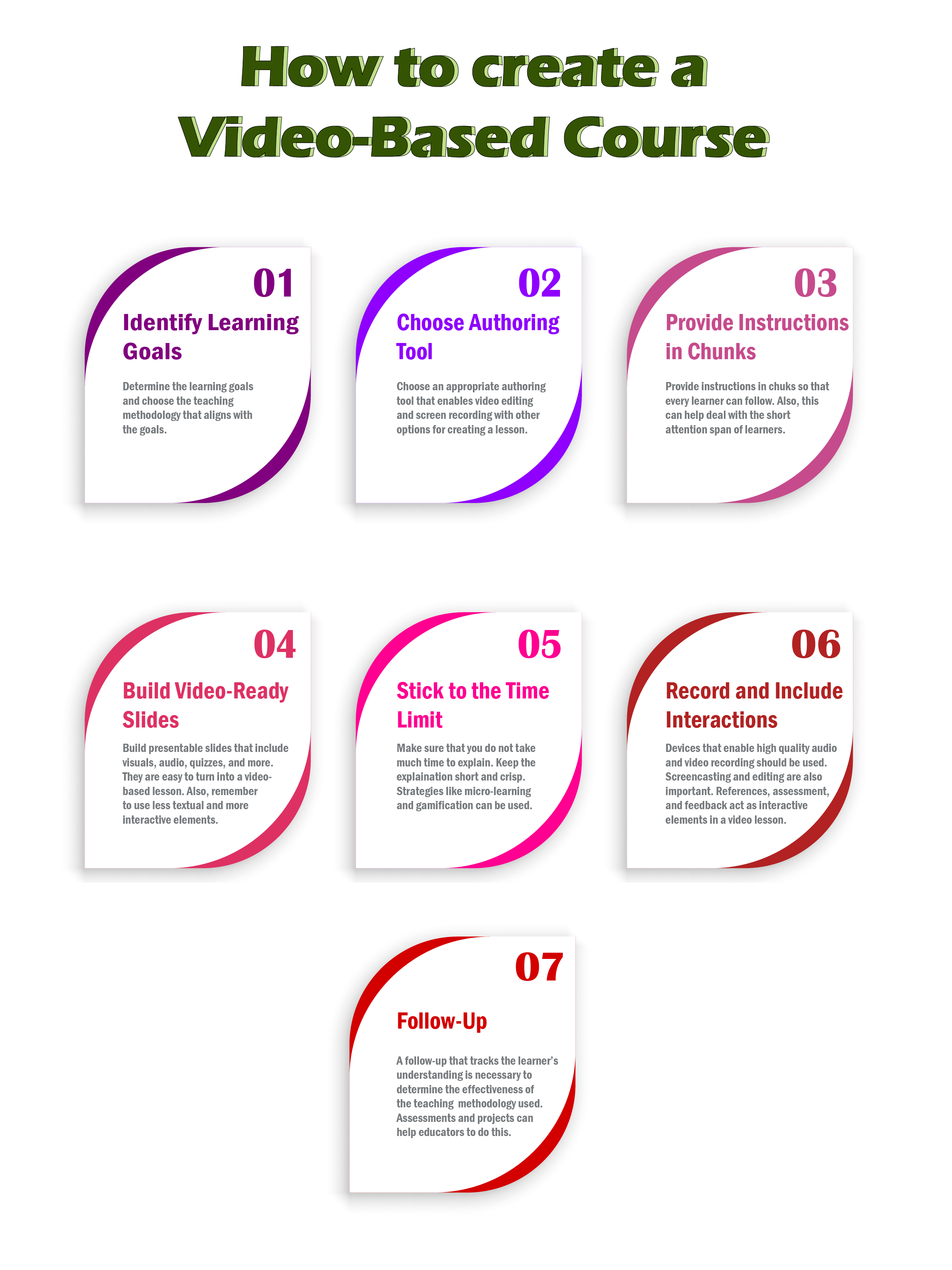
Step-1: Identify the Learning Goals
Identification of the learning goals is the first step for creating a video-based course or lesson. Educators must first determine what the learners wish to achieve through a lesson/course. This helps identify the appropriate teaching methodology that aligns with the teaching and learning goals.
Educators can also consult a subject-matter expert or a graphic designer for professional advice on creating a video-based course.
Step-2: Choose the Correct Authoring Tools
To use the video-based education method, educators must be familiar with different authoring tools and their use. These authoring tools assist in creating digital content for various purposes. They also allow educators to develop various forms of digital content with ease. This digital content covers everything from a simple MS Word document to video lessons on complex STEM concepts. Thus, choosing the correct authoring tool that enables video editing along with screen recording becomes essential.
Several authoring tools on the Internet offer these features for free or with a minimum fee to access certain features. For instance, Camtasia Recorder allows educators to create different types of videos with pre-built templates. It also provides video recording and editing. Khan Academy uses Camtasia Recorder to create and edit educational videos.
Other options include SmoothDraw3, Articulate 360, Adobe Captivate, Lectora, and so on.
Step-3: Provide Instructions in Chunks
An average learner’s attention span is about 8 seconds, which is a short period. Expecting young learners to sit for a 90-minute video lesson is out of the question. Also, learners find it difficult to follow a large set of instructions in one go. A well-organized class with crisp and meaningful chunks of information works better to engage learners.
Moreover, learners prefer several small videos instead of a single long video. Some platforms that offer video-based learning include Khan Academy, Lynda, Udemy, Coursera, TED-Ed, and more.
Step-4: Build Video-Ready Slides
Presentation is the key to engaging learners. It provides better learning outcomes as learners immerse themselves in the learning process. Educators often use digital means to supplement in-class learning. However, presentations are not sufficient for video-based education because the supplementary material contains more textual information, which the teacher explains. However, in video-based education, educators do not involve themselves directly in the class. The entire process of learning takes place through on-screen videos. Thus, it becomes difficult to capture learner attention with text-only slides. Therefore, educators must include more visuals and other interactive elements like quizzes and puzzles instead of text.
For instance, a science lesson on Resonance Structures of Benzene containing visuals that include chemical compound structure is easier to understand than just plain text. Text-only information on such complex topics can confuse the learners. Also, learners are likely to be uninterested in learning such complicated concepts through text. As a result, video-based courses also affect learning outcomes.
Step-5: Stick to the Time Limit
As mentioned earlier, a typical learners’ attention span is small. This signifies that they cannot sit and watch educational videos for long. Consequently, it is crucial to stick to the time limit while creating video-based lessons. Educators can use different strategies like micro-learning and gamification to improve learner engagement. Additionally, eLearning localization is an excellent strategy to cater to the learning needs of diverse learners.
Moreover, several small videos with digestible chunks of information are better than longer ones. Khan Academy presents the most significant example of this form of learning. They offer lessons in the form of short videos with relevant information about the topic.
Step-6: Record and Include Interactions
Recording a lesson is an essential part of creating a video-based course. Various tools available on the Internet allow educators to perform different functions of video-based education. These functions range from recording and screencasting to video editing.
Additionally, including interactions in the form of references, assessments, and feedback is essential. Such forms of interaction help create a link between learners and the concepts they are learning. It eventually renders better learning outcomes.
Step-7: Follow Up
The final step is to follow up with learners about what they have learned. This step includes tracking the results based on their performance in the assessment tests. Also, follow-up helps educators decide whether the teaching methodology applied is fruitful or not. Moreover, it provides a clear picture of the learner’s performance throughout the course.
The steps and guidelines mentioned for creating video-based education courses can help educators establish useful video-based lessons/courses. Above all, a crucial step to follow is to be genuine while delivering the lesson. The impact of the educator’s personality leaves a significant mark on learners and their learning.
Moreover, educators must know the essentials of delivering an e-lesson before they work with video-based education. This can help provide the initial experience required to teach a lesson/course effectively.
Reference Websites: Edutopia and ELearning Industry
Images: Shutterstock and Freepik
To explore more e-learning options, visit our blog.
Create. Engage. Inspire.
The post Creating Video-Based Educational Courses appeared first on Test.Evelyn.
]]>The post Benefits of Video Based Learning appeared first on Test.Evelyn.
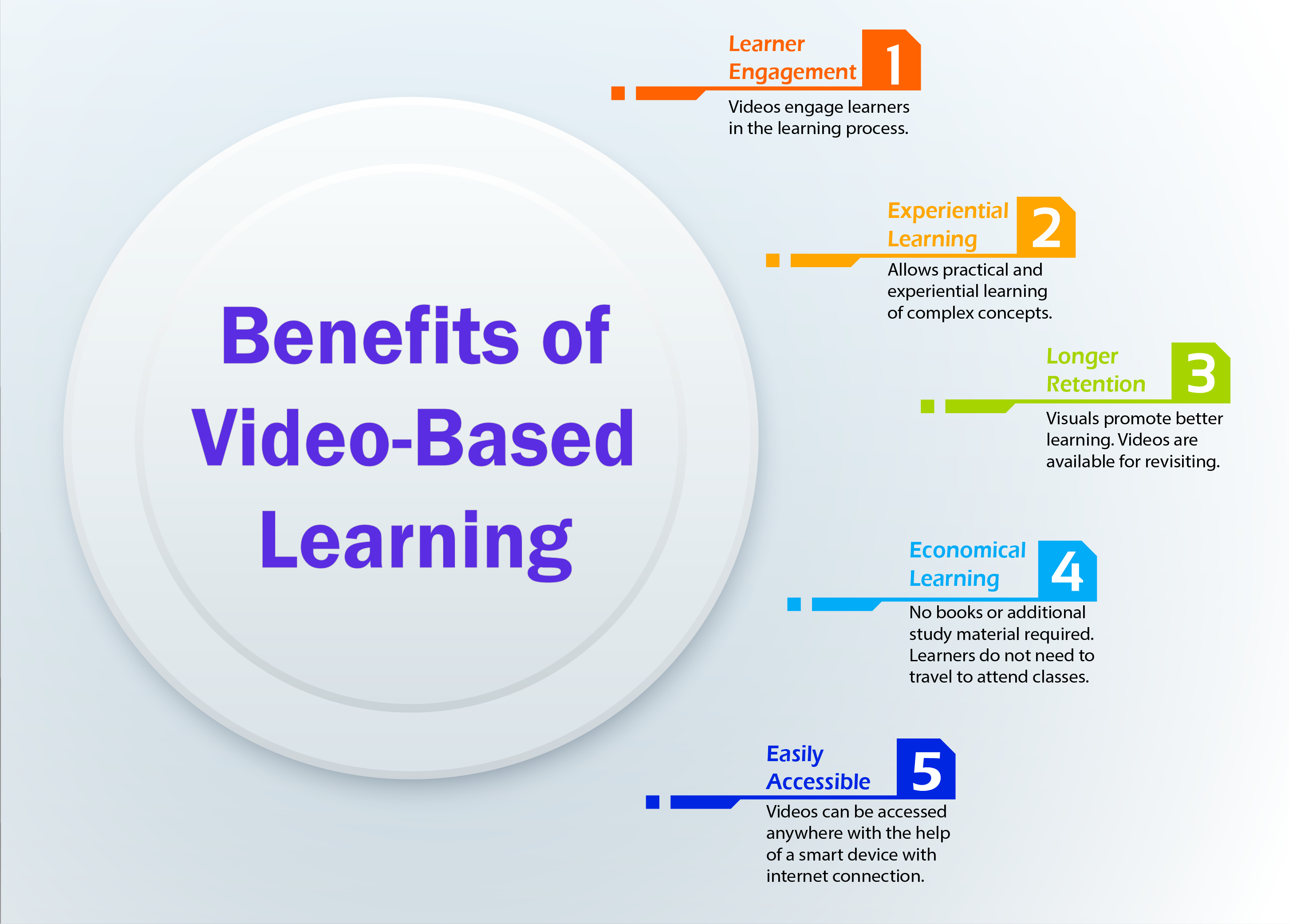
]]>What are the Benefits of Video-Based Learning?
a) Learner Engagement
Videos are an interactive way of learning. Learners are likely to engage more with videos in contrast to text-only content. This is because videos include visuals that paint a clear picture of concepts. Also, educators can use non-verbal cues to their benefit in such type of courses. Non-verbal communication such as intonation when combined with questioning skills promotes engagement. This strategy is not only effective for in-class teaching but also works for video-based learning.
Moreover, videos grasp learner attention with the help of colorful and interactive visuals. As a result, learners remain constantly engaged with the visuals while learning.
b) Experiential Learning
Learning by doing is the key to achieve the best learning outcomes. The practical knowledge of a concept is necessary along with theoretical knowledge, but this practical knowledge is limited to certain subjects. For instance, learners cannot dissect a human body by themselves to study human anatomy. However, videos provide a solution for such situations that limit learning. Learners can learn about anatomy through videos that show the human body through virtual reality. In this way, the actual practical learning takes place with the help of videos.
c) Longer Retention
Videos are an amalgamation of text, visuals, and sounds. All these form the basis of learning. Studies suggest that the average adult retains 10% of what they hear, 20% of what they read, and 80% of what they see. This is because the human brain processes visual information better than verbal or written information. Consequently, when the brain receives information in a combination of text, visuals, and sounds, it becomes easier to retain.
Furthermore, videos are much more engaging than mundane classroom lectures. Learners interact with the content on the screen and are free to revisit the lessons/courses at their will. This means that they are free to practice the concepts based on their convenience. This eventually leads to better learning and retention.
d) Economical Learning
Video-based learning is an economical learning solution. Learners have access to various educational videos available on the Internet. Most of these videos are available for free or at minimum charges. Also, video-based learning does not require traveling or attending classes physically. This helps learners save time and money that would otherwise be utilized.
Moreover, there is no requirement for books and other study material. Only a good Internet connection and a smart device can serve as the tools for receiving knowledge.
e) Easily Accessible
Videos are one of the most easily accessible resources in the current era. This is thanks to technology and the Internet, which provide easy access to all online services. Learners can access any videos on the concepts they wish to learn without having to spend much time finding a teacher. Moreover, videos are always available for reviewing to recapitulate a lesson/concept.
Additionally, technology enables educators to create learning videos on their own. There are various tools available on the Internet that help create an e-learning course.
(Read our blog on Creating a Video-Based Learning Course for more information.)
Future of Video-Based Learning
Auditory learning is gradually becoming a thing of the past. The Internet presents various new learning possibilities. Consequently, eLearning is gradually becoming a go-to learning method. It serves learners with different e-learning styles with an amalgamation of various teaching/learning methods. Video-Based Learning is a great way of administering knowledge. This is because videos immediately grasp the learners’ attention.
Although videos are a part of eLearning, they also supplement in-class learning. Various forms of blended learning (including the flipped classroom) use eLearning to supplement in-class learning. This yields better learning outcomes and also promotes better retention.
Video-based learning will have more consumers in the future, which is due to its ease of usability and application in a wide gamut of industries. It is not only useful for learning but also serves various corporate training and learning needs. Additionally, with technology and resources gradually becoming available to all, creating educational videos will be much easier in the future. As a result, it has great potential to play a prominent part in the future of eLearning.
Research Website: ELearning Industry
Images: Shutterstock and Freepik
To explore more e-learning options, visit our blog.
Create. Engage. Inspire.
The post Benefits of Video Based Learning appeared first on Test.Evelyn.
]]>The post Video-Based Learning: Definition, Emerging Trends, and Usage appeared first on Test.Evelyn.
]]>A study has proven that the human mind retains more information when imparted via visual means. Therefore, video-based learning is becoming an effective tool for learning and is yielding better results than traditional learning. Through this article, we will explore video-based learning and its various dimensions in detail.
What is Video-Based Learning?
Video-based learning, put simply, refers to the learning that takes place with the help of videos. Nowadays, the physical presence of a teacher and students is not necessary for learning. Video-based learning is one such means of learning that supports this newly found global dimension of learning.
Since these video lessons are easily available over the internet, creators need to put together easily comprehensible lessons with more retention rates and the least possibility of deviation. They should include eye-catching graphics, clear audio with great intonation, and error-free content in their videos to yield the best results.
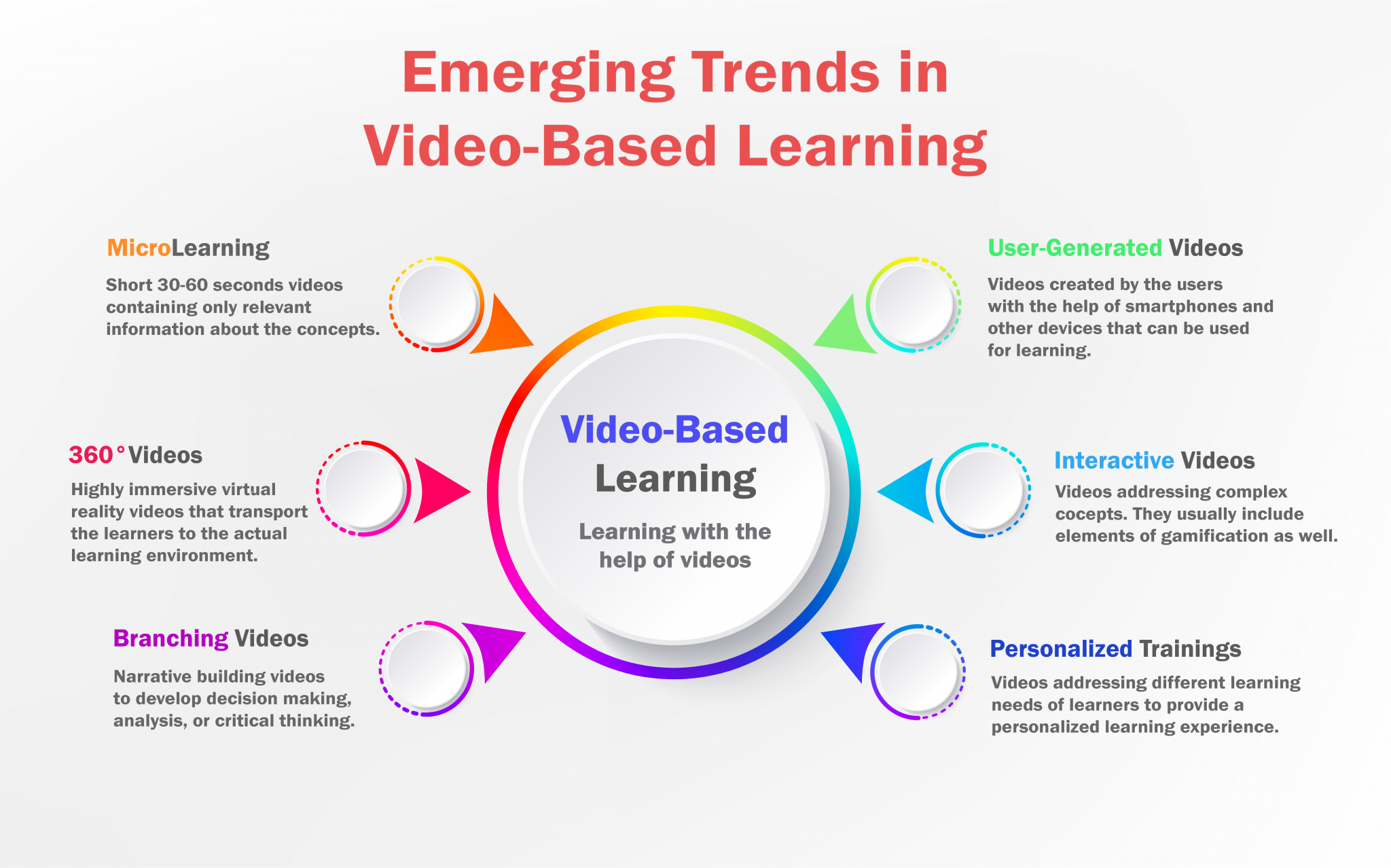
Emerging Trends in Video-Based Learning
Although technology eases learning, it becomes a distraction as well. The internet brings everything to a screen with a click, but it has many disadvantages as well. The biggest of these is the decreasing attention span of learners, especially that of the millennials. Millennial learners need quick bites of information and cannot stand long hours of lectures. Therefore, video-based learning proves to be one of the most effective ways to learn.
Various innovations in this type of learning make it a game-changing learning method. Some of these trends are as follows:
a) Microlearning Videos
Microlearning videos include short videos addressing the main concept. Such videos are shorter, approximately 30-60 seconds, and give brief information about a concept. Therefore, learners do not have to sit for long hours and cram unnecessary information in the name of learning.
Moreover, microlearning videos are target-specific and prove to be an effective training method.
(Refer to our blog on Micro-Learning for more information.)
b) Interactive Learner Experience
Interactive learning is a way of engaging learners in the lesson/course. This promotes better learning and retention. This trend emerges with the acknowledgment of the fact that learners cannot remember everything included in a lesson/course. Also, long hours of learning are usually boring. Thus, making a lesson/course interactive is necessary.
Some methods to make an interactive lesson/course include gamification, inserting annotations, quizzes, and more.
c) Video-Based Branching Narratives
Video-based branching narratives focus on building a story. Learners decide how the story unfolds by perceiving its negative and positive consequences. As a result, this video-based learning trend provides a multitude of choices and interactive points for better learning.
Why Use It?
Videos are the most influential consumer engagement method. There are endless possibilities that only videos can achieve. They help create comparatively more engaging, interactive, and fun lessons/courses. Additionally, learners prefer videos over lengthy articles. This alludes to the fact that we retain visual information for a longer time. Also, concepts sound more appealing in the visual form. Thus, learners develop stronger mental connections with the engagement of multiple senses.
Furthermore, this innovative method is useful for both education and corporate training purposes. This feature makes it an even more dynamic way of learning.
Research websites: Next Day Animations and CommLab India
Images: Shutterstock and Freepik
To explore more e-learning options, visit our blog.
Create. Engage. Inspire.
The post Video-Based Learning: Definition, Emerging Trends, and Usage appeared first on Test.Evelyn.
]]>