The post The Best Online Q&A Platforms For Students To Ask Questions appeared first on Test.Evelyn.
]]>It is interesting how students can leverage digital technology to learn from various books, scholarly material, and professors anywhere in the world; a practice that can transcend learning beyond classrooms.
Ed-tech companies have developed interactive platforms where the technology has left every study resource at the student’s disposal. This, in turn, has promulgated self-study among students. Online content is a good source of study but the students might also have some doubts while studying, which gives rise to the need for a mentor. Using online Q&A(questions and answers) platforms, students can ask questions or clarify their doubts.

Q&A with Experts on Chegg’s Website
Importance of Q&A Platforms
Q&A platforms prove to be quite helpful for the students in multiple ways-
- Online Q&A platforms deliver answers to the academic queries of students from anywhere in the world via subject experts, which helps them understand a topic from different perspectives.
- Q&A platforms are not time-specific. A student can ask questions at any time and tutors or subject experts can answer at any time. There are also some platforms that promise to get quick or instant answers.
- Q&A platforms help students to ask any number of questions on any subject that the website offers.
There are other Online Q&A platforms through which one can ask questions to other individuals in a community. These platforms are open to the public eye and scrutiny, where anyone can ask and answer those questions. Platforms like Quora and Stack exchange fall under this category.
However, these platforms contain more generic than academic questions because of who responds to them. Not all people answering these questions are subject experts. This is the raison d etre that students seeking an academic solution, find it challenging to be sure of the credibility of their answers.
The Deciding Factors
Other platforms offer solutions from experts. These services are often provided by Ed-tech companies with online learning portals and courses. We would rate some of the renowned Q&A platforms on the five factors mentioned below:
- Do the eLearning platforms that offer Q&A services proofread or moderate their content before sending it to the students?
- One question can have multiple answers, such as in subjects like Management. Allowing only one answer can affect the quality of the content. The platform should allow multiple answers to one type of question to support content breadth.
- Do the answers to the questions get feedback from other qualified educators or just the students? Content that students rate cannot be an appropriate practice. They may not have the complete knowledge to judge an answer, which is why they ask questions in the first place.
- Do the platforms harbor an honor code that takes appropriate action when the students use the study material for unethical reasons like cheating?
- Do they have an instant chat service or just a ‘Post a question’ service?

*24HourAnswers allows students to post their questions to connect with the tutors. The tutors quote a price for the question and give the answer in the time that the student demands.
Content moderation is a complex question because platforms only mention that the answers that the subject experts give; they hardly explicitly mention anything about quality-checking the answers of the experts themselves.

Q&A display box on CourseHero homepage
Chegg, CourseHero, Brainly, and Numerade give verified material for studying. But, they don’t offer a ‘live chat’ feature which the students could use to clarify their doubts in real time.

Q&A feature on Bartleby
Answer Scope
There are some questions where more than one answer is possible as they are subjective in nature, such as human resources or humanities. However, some platforms like Chegg allow different answers for similar questions posted twice on the website. Websites like Numerade allow students to have further discussions on the same question as they allow everyone to see the comments on the topic of discussion.
Brainly is like a crowd-work platform where the students can also contribute by giving answers to other students and is just like a classroom discussion.
Who Rates The Posted Solutions?
Solutions that are posted on the platforms are mostly rated by students as part of their feedback. If the students give a red flag or a thumbs down to a solution, meaning that they are not satisfied with the answer, it can reduce the credibility of the subject expert.
Where Is The Honor!
Not all platforms play an active role in prohibiting the use of their website for cheating in class or getting ready-made homework. Some websites have an investigative order but some just put a disclaimer in the name of honor code, expressing that making wise use of the website is the student’s responsibility.
It is true that students should use content responsibly, but as these websites are used by younger students as well, the platforms should ensure that their content is not used for unscrupulous purposes like cheating.
Considering the parameters mentioned and the customer reviews evaluated, we believe that the Educational companies still have a long way to go as far as successful Q&A platforms are concerned.
The post The Best Online Q&A Platforms For Students To Ask Questions appeared first on Test.Evelyn.
]]>The post E-Learning Video Solution Providers for Quality Video Content appeared first on Test.Evelyn.
]]>To get video based solutions, visit our page here.
What is Video-Based Learning?
Video Based solutions are the roadmap towards modern-day education. With the advancement of time and technology, the attention span of an average student is recorded to be rapidly decreasing. The solution to this is video based solutions which can not only improve the retention rate but can also make a particular topic interesting and fun to understand. With animated cartoons and engaging videos, students are more likely to be more attentive in their studies.
How to Ensure an Effective Video-Learning Solution? Step by Step Lessons Development
E-learning video service providers maintain a certain flow chart for the development of the lessons. With the help of these steps, they are catering to the very needs of the students. Here are the briefings of the steps of the process flow.
- Requirements are the key to starting. It is essentially what the students need. That is why assessing requirements is the first step to take.
- Identification is crucial. Why is that, though? Without that, the provider will not cater to the students’ needs in the long term. By identifying which are essential lessons, they can easily channelize the video.
- Assigning the SME is probably the most critical point because they are the video’s driving force anyway. With the help of an experienced SME, the video will capture attention.
- E-learning service providers now have to look for the video category. Then comes the documentation and scripting. Three of these are essential. First, every video is made for a purpose, and these steps will decide that purpose. It will also settle down the target audience of the video.
- Designing and developing alongside the screenplay is an essential step. Designing and development will give an edge to the video. A bright and precise screenplay will help the providers to engage the students for a long time.
- The shooting of the video is a great option and has a no-brainer. But, again, shooting with a quality crew and equipment is essential.
- Last but not least, QnA. Now there are debates over these issues of question and answers. But in the long run, it is important. Students will get the opportunity to interact with the teachers during this segment. That will allow them to find their doubts wash away.
How Did Video Solutions Help Model E-Learning?
In the modern world of technology, video solutions are the best way to move forward. E-learning is a platform where students can come and join instantly. Rather than providing them with text-based solutions, it is better to put up a video. The video solution revolutionized the modeled e-learning for the long term. It made it easy, simple, and authentic.
Factors to Effectuate the Learning Process with E-Learning
There are three crucial things to remember before implementing the video solutions. Firstly, are the students comfortable with it? If not, then it will be of no use. This is because the students need to learn and study simultaneously for their betterment. Secondly, the videos should not be heavy.
Now, what does that mean? That means that e-learning service providers need to produce videos that are not boring and fun to watch. Last but not least, the videos are well crafted. SME or the subject matters expert will have a huge role here. The videos should be well documented and engaging to watch.
Final Thought
So here we have listed the best practices and developments for good video solutions creation. You can use this as a checklist or integrate it in your video solutions creation services. In case you want video solutions for any curriculum, you can get in touch with us at info@evelynlearning.com or visit our page here.
The post E-Learning Video Solution Providers for Quality Video Content appeared first on Test.Evelyn.
]]>The post Facebook Now Wants to Rope in Education Companies in Its ‘Metaverse’ appeared first on Test.Evelyn.
]]>The decision by Facebook/Meta to change the nature of modern education is not an empty promise. Facebook Reality Labs will invest a whopping $150 million in an educational program to improve tech development and training. It will use augmentation and virtual reality tools as the primary means to achieve its goals.

What is Meta-Facebook?
For most people, the concept of a metaverse is a mere fantasy. It refers to a virtual reality space where people can embed themselves to get an all-around immersive experience. In a typical video game, you control the character. However, in a metaverse, you are the character!
Related Post: Virtual Reality as a Game-changer in Education
Metaverse and Education
Even for a company as big as Meta, achieving such a feat is tricky, due to which it will partner with Coursera and edX. Together, they will promote the Spark AR Curriculum of Meta using augmentation and virtual reality. These companies will convey more information regarding their partnership and goals in the coming weeks.
Even though the introduction of the metaverse, a concept emerging in fiction, seems like a shock, one should have expected Mark Zuckerberg to implement it. Zuckerberg has always displayed a keen interest in virtual reality. In 2014, Meta, then known as Facebook, bought the VR company Oculus for $2 billion.
Is It Realistic?
The depiction of the metaverse in Zuckerberg’s video has a combination of technologies geared towards education. At 31:00, a girl learns astrophysics by looking at the planets up close, zooming in on Saturn’s rings. Instead of reading from the screen, the girl interacts with the solar system. While the idea of such an in-person experience sounds good on paper, is it for everyone?
Virtual reality sets require a lot of space and money. The VR sets by Meta have failed to capture the market and have even discontinued one of their products called Rift. However, Meta still sells the Oculus Quest 2 and claims the sales have improved without releasing any data.
All things included, investing capital to integrate virtual reality and education during a pandemic seems like a bad idea. Officials prefer to invest their resources into something better than manufacturing expensive VR sets and materials.
Irrespective of the idea, the metaverse will not become a reality for the next decade or so. Andrew Bosworth, the VP of Facebook Reality Labs, suggests “the metaverse is not a single product that one company can build alone.” The firm has also explained that no one company will own the metaverse.
Also Read: Most Interesting Edtech Trends of 2021 That Are Here to Stay
To read other interesting posts about technology, education, and research, visit our blog.
Create. Engage. Inspire
The post Facebook Now Wants to Rope in Education Companies in Its ‘Metaverse’ appeared first on Test.Evelyn.
]]>The post Most Interesting edtech trends of 2021 That Are Here to Stay appeared first on Test.Evelyn.
]]>Concepts like Virtual Classrooms, Artificial Intelligence and Augmented Reality– which seemed like distant dreams just yesterday started getting adopted as part of the curriculum and general learning strategies. In short, it would not be wrong to say that Covid-19 jump started the digital revolution of the education sector which followed in 2021. Here are a few e-learning stats from 2021-
- Since 2020, 98% of universities have shifted to online classrooms.
- Almost half (49%) of remote learners anticipated enrolling in online courses after their campuses return to normal operations.
- 96% of administrators said that faculty development is a top priority in the coming year.
- Overall, a majority (74%) of students thought that online learning was better than or equal to on-campus learning; 64% of remote learners felt this way, too.
Having said that, let’s see what are the hottest edtech trends from the bygone year?
And what is around the corner?
Read on below.
-
Tech Enabled Immersive Learning
One of the biggest and the most notable edtech trends that saw a noticeable rise in 2021 is the rise of the Immersive learning and Extended Reality (XR) which is an umbrella term for Augmented Reality (AR), Virtual Reality (VR) and the combination of related technology.
These technologies play a pivotal role in edtech because they enhance the visual learning process. AR helps in depicting 3D forms of animals, objects, lab experiments and more. Interactive VR technology can be used in laboratories for an immersive experience, especially by STEM students.

Extended Reality Devices Stats Another example of immersive learning is Google Expeditions that let’s students take field trips and the like. In addition to that, an unrelated type is ‘Makerspaces’ which are physical spaces in schools, community centres or public spaces which let pupils come together and build things by hand.
-
K12 Homeschooling Startups
Between 2017 and 2021, daily searches for homeschooling in the US have increased by 25%. So much so, that currently 3.4% of all America’s school going children are being homeschooled. The practice especially boomed after the pandemic when offline learning became a challenge and more and more parents started resorting to homeschooling for their children.
As per the Homeschooling Capstone Report EdChoice, 70% of the respondents for the homeschooling survey confirmed that they had either begun or considered to start homeschooling during the pandemic. 47% of these respondent plan to continue homeschooling even after schools return to full in-person learning by the end of 2021-2022.
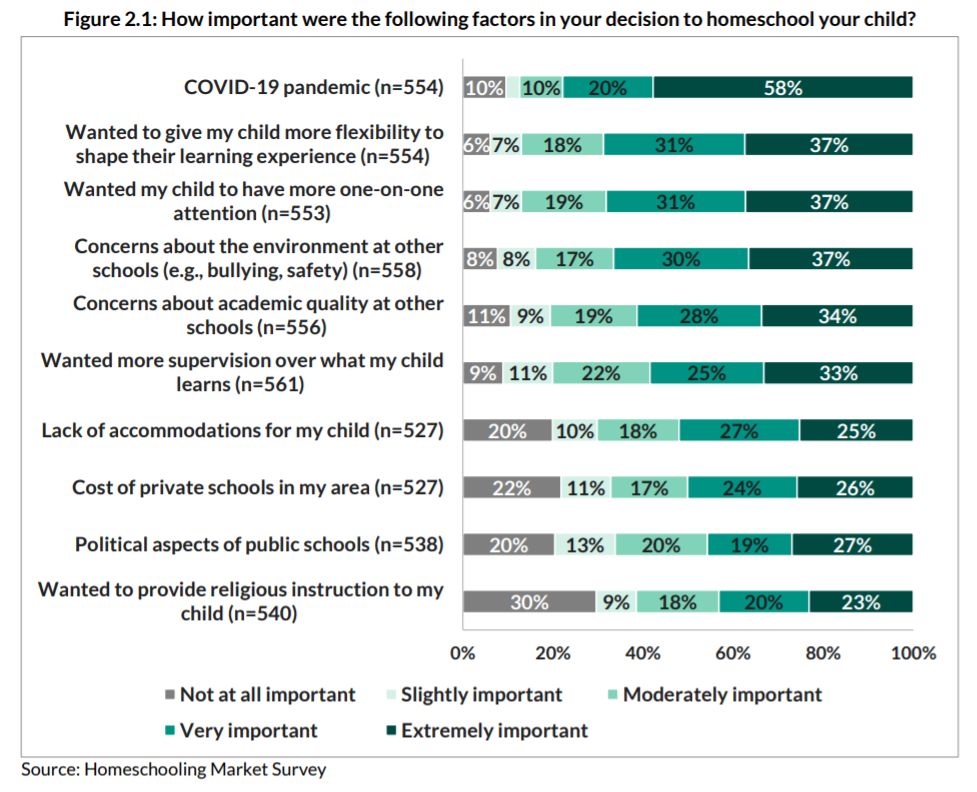
Homeschooling Data (Source) All this data led to the way of edtech startups which stepped up to fill in the gap between the educators and the educatees. One of the best examples of these startups is Prisma– that grew leaps and bounds in the last year. Prisma offers a combination of in-person and live tutoring online learning experience, aside from other features.
Another interesting example of the same could be Outschool, which matches students and teachers in small coordinated groups for live teaching. Yet another brilliant example is Primer which works in a slightly different fashion- it helps parents homeschool their kids by providing the essential tools, content and curated educational resources.
-
Massive Transition to E-Learning
This brings us to the biggest and the hottest edtech trend of 2021, which is E-Learning. While elearning trend started in 2020, it’s full potential was unleashed in 2021 when a plethora of advantages and benefits started surfacing over time-
- E-learning is extremely scalable as it allows the best educators to reach more students at the same time at a comparatively lesser cost than traditional classroom teaching.
- According to the Research Institute of America, eLearning increases retention rates by 25 to 60 percent.
As a result of this, several tools came into being to facilitate e-learning which include Zoom, Google Meet, Microsoft Teams and more. Additionally, many institutions and universities came up with different and newer online courses which students could partake in. Not just this, elearning startups like Coursera and Udemy stepped in which partnered with esteemed universities to make a host of courses available to students worldwide. Now that this practice has been received with open arms and has been adopted efficiently globally, researchers predict that most of these institutions will stick to online methods of teaching post pandemic as well.

Coursera’s search volume has increased by nearly 35% over the last 5 years.
Coursera’s search volume has increased by nearly 35% over the last 5 years. (Source)According to a survey of IT leaders in the U.S. educational system, only 7% expect their school districts to return to pre-pandemic onsite teaching this fall. Having stated that, it wouldn’t come as a surprise when we tell you that this industry is expected to exceed $1 trillion by 2027.
Other leading players in this space are CourseHero, Chegg, Thinkific, Teachable, Lessonly etc.
Transformation in EdTech Funding- How is It Paving Way for Remodelling the Industry?
Edtech Venture Capitals which stood at $500M at the beginning of 2010 experienced a massive growth which was 14x times higher and reached $7B in 2019. With that rate of accelerated investments, it was further predicted that the industry is going to reach $87B over the next 10 year beginning 2020. However, that forecast seems easily defyable when $26B of Venture Capital was already deployed before the end of 2021. With momentum that intense, it will be safe to say that we will exhaust the remaining VC predictions and could easily cross over $150B this decade. Here are a few stats-

To infer, we would only like to point out that with an acceleration that high, there is no looking back. The rise in the EdTech funding will eventually lead to an upsurge and boom of the corporate e-learning companies, homeschools and will also demand a modification in the learning strategies of traditional school and institutions. Not just this, under the light of this revelation, it will be safe to say that there will be a monstrous rise in academic content requirements- at all levels.
Are You Ready for the Next Steps?
Taken together, these are not just a few trends from the e-learning space but also a leeway into the new year 2022 and an introductory picture on what can be expected and what is incoming. What these also show is the way education and technology are coming together faster than expected with the pandemic accelerating the process. Whether you are a school institution or a university, corporate e-learning company or an edtech startup, we will all need to upend and constantly modify our ways of teaching and learning in order to stay ahead of the curve.
To sum up, you can see that the impact of technology on education is massive, and is only likely to grow even further. Knowing the market edtech trends and adopting new technologies and methodologies is a must, especially at the brink of a new year. If you’re ready to get the ball rolling, Evelyn is ready to help you develop up-to-date solutions for the educational industry. You can get in touch with our content educationists today for more information.
Evelyn Learning
Create. Engage. Inspire.
The post Most Interesting edtech trends of 2021 That Are Here to Stay appeared first on Test.Evelyn.
]]>The post Math Typing Software: A Brief Rundown Of The Best Equation Writing Software appeared first on Test.Evelyn.
]]>With mathematical equation writing software, users can enter complex equations and arrange a large number of files, among other things. There is a multitude of math typing software available in the twenty-first century, all of which have effectively dominated the web market with their own techniques.
Need For Math Typing Software
Math typing software integrate with a wide range of programs and websites, allowing users to enter equations almost anywhere. They provide users with more options for creating equations. They make entering equations as simple as writing math on paper using pencil. Users can rapidly generate equations by selecting templates from the software palettes and filling in the blanks. While typing, a few software automatically use mathematical spacing standards.
For practically every symbol, template, and action, a few software include custom keyboard shortcuts. Users who are familiar with the TeX typesetting language can directly add equations into Microsoft Word documents. Users can combine TeX and point-and-click editing to obtain the best of both worlds. One can also use math typing software to paste equations from existing TeX pages. One can use color to highlight specific parts of an equation and direct the audience’s attention to those parts. Users can also demonstrate what changed in each step of a multi-step method, bringing mathematics to life. Users can utilize the thousands of math symbols in fonts already on their computer. They can also use other math fonts by downloading them from the Internet, in addition to the proprietary math fonts available on different math typing software.
Top Math Typing Software
There are various open-source and free mathematics software programs available online for one’s Windows computer. These programs are great in typing mathematics, despite the fact that some are free. So, take a look at our list of the finest math typing software that will help you start with your math homeschooling right away.
• MathType
MathType steps in when one needs a companion tool to write equations where word processors are limited to, and insert the equations in their writings. It is a strong equation editor that can be used in conjunction with Office or on its own to write mathematical equations. Many symbols are accessible immediately from one’s keyboard. It is also compatible with a variety of operating systems for importing and exporting formulas, such as TeX or MathML.
This math typing software has nine tabs that give users access to the most commonly used tools. They can change or move any part of the mathematical equation. Users may also totally configure the software, including fonts, keyboard shortcuts, and much more. It is professional, offers a variety of auto format writing styles, keyboard shortcuts for the most commonly used formulas, and is simple to export results. Nevertheless, users can add only a limited number of shortcuts.
• MathJax
The American Mathematical Society and the Society for Industrial and Applied Mathematics (SIAM) have teamed up to enhance mathematical and scientific information on the web through the MathJax consortium. This math typing software is a JavaScript math display engine. It works with all browsers and does not require any reader setup.
Equations scale with surrounding text at all zoom levels. This is because it employs CSS with web fonts or SVG instead of bitmap graphics or Flash, resulting in high-quality typography. It is also highly modular in terms of input and output. MathJax allows one to use MathML, TeX, and ASCIImath as input and output HTML+CSS, SVG, and MathML. It is also accessible and reusable because it works with screen readers and has zooming capabilities. Users can copy equations into Office, LaTex, Wikis, and other tools. Anyone can integrate MathJax, be it a casual user, a serious author, or even a professional developer. It features a robust API for creating interactive content, as well as advanced authoring tools and math-enabled web and mobile apps.
• MathMagic

This math typing software provides an easy-to-use interface with WYSIWYG editing, adjustable features, and productivity. It also provides users the ability to print high-quality equations. MathMagic Lite, Personal Edition, Pro Edition, and Prime Edition are the four basic versions available for usage with different operating systems and Office applications. Whether one is adept at math or not, MathMagic allows everyone to create beautiful equations and symbols quickly and effortlessly. Additionally, the quality is tailored to match the needs of DTP experts. It is also compatible with word processors, DTP layout tools, presentation software, and graphic software. The Pro Editions, on the other hand, come with their own plugins or extensions, allowing one to write or edit equations directly in InDesign or QuarkXPress documents rather than having to export or import them.
Since its introduction in 1998, many scholars, university presses, publishers, professors and teachers, students, online content providers, and government research centers in over 80 countries have recognized MathMagic’s superior quality and productivity. The tool, however, is not designed to solve equations. Instead, it is designed to typeset equations for technical publications, regardless of whether they are written in meaningful or proper notation. It allows users to enter any equations they can create with the editing tools, so they do not need to have a lot of prior knowledge about math.
• LyX

This is an open-source document processor based on the LaTex typesetting system with a WYSIWYM approach. This means that what one sees on their computer is a rough representation of what will be rendered on the page. LyX is a well-known name among technical authors and researchers due to its avant-garde mathematical modes. However, non-mathematically oriented scholars are also increasingly using this math typing software. Its beneficial features, such as file management and bibliographic database integration, contribute to this.
Mathematical formula editor, copy/paste tool to and from LaTex source code, support for customizable math macros and rudimentary support for several computer algebra systems are all available. One can enter equations using a point-and-click interface or the keyboard using LaTex commands. It also includes a structured document creation process, advanced features for labels, references, indexes, and bibliographies. Additionally, standard word processor functions like cut/paste, undo/redo, spellchecker, numbered section headings and table of contents are also available for easy document navigation. The graphical user interface provides menu and mouse access to all features, as well as substantial documentation that includes a beginners’ lesson in many languages, text completion capabilities, and background typesetting.
• MathCast

This math typing software allows users to type mathematical equations into documents, emails, and websites. They can graphically show the equations on the computer screen, as well as picture files and MathML. It has a potent and amiable graphical interface for rapid development of mathematical equations. It is free and open-source, and it was first released in 2004. The Rapid Mathline is an appealing and efficient feature of the MathCast interface that supports numerous mathematical symbols, operators, and functions.
This software also includes an Equation List Manager that allows you to organize dozens of equations into a single list. This enables users to manage, alter, edit, read, and re-edit all mathematics in your project, whether it is a web page or a paper, all in the same session. This tool exposes equation lists as a restful HTTP service that can be seen by browsers and different instances on a network. Hence, users may collaborate and study together.
The tools listed above are some of the best for writing mathematical equations that one can use with Office or on their own. Almost everyone can use these math typing tools to create a variety of mathematical equations.
There are several math-equation templates in all of these software. These programs are also useful for creating assignments and assessments. One can utilize these equation-editing software to write chemical equations as well.
Also Read: Top 5 Interactive E-Learning Tools
For more information on math typing software, visit our blog.
Create. Engage. Inspire.
The post Math Typing Software: A Brief Rundown Of The Best Equation Writing Software appeared first on Test.Evelyn.
]]>The post Pedagogical Practices To Suit Various Learning Styles appeared first on Test.Evelyn.
]]>To Begin, what exactly are Learning Styles?
Almost all educators would be familiar with the concept that everyone has a preferred method of absorbing knowledge. Students will learn more easily if an educator teaches them in their chosen style. This concept has been around since the 1970s and well-intentioned teachers and dedicated students who want to learn effectively still carry it forward. It is no wonder that everyone wants to learn faster and more efficiently.
Unfortunately, there is no convincing proof that there are different learning styles.
In truth, the best evidence points in the opposite direction. The notion that people perform best when trained in a way that corresponds to their unique “learning style” — Auditory, Kinesthetic, Visual, or a combination of the three — is generally dismissed. According to multiple studies, learners do not profit from their own learning style. Teachers and students have different ideas about what learning styles work best for them, and we have no insight into how much we learn from various approaches.
The Myth of Learning Styles
Every student will differ in terms of skill, interest, and prior experience, but not in terms of learning styles. According to research, when people have a favorite style of presentation, it is typically for a task or topic in which they have a high level of talent and already feel good.
One may think they are an Auditory learner if they are good at music, or a Visual learner if they are creative. While one can prefer a certain method of learning, there is no proof that it can help them learn more effectively.
The myth of learning styles appears to be as widespread as ever. The learning styles paradigm can also be harmful to education in a variety of ways, according to various previous studies. Even though all students will profit from learning by multiple methods, educators expend time and money tailoring lessons to specific learning styles for different students. Even if it will not help them excel, students study in ways that correspond to their perceived learning style.
However, it is not obvious why educators want to believe in them. It is possible that the theory is heavily reinforced during teacher training; it is also possible that teachers are dealing with their students in the same way that their teachers interacted with them. Alternatively, it is possible that efforts to dispel the theory have become close to zero, struggling to reach educators.
Best Teaching Practices to Suit Various Learning Styles
Educators are well aware that no two students are alike, and that there is a wide range of learning styles. As a result, an educator’s teaching style may have a significant effect on a student’s ability to understand and comprehend. This is why teachers must be familiar with a variety of learning styles.
Is Shawn’s preferred method of learning pictures and graphics? It is possible that he is a Visual learner.
Is it true that Kevin learns best by attending seminars, asking questions, and engaging in group discussions? He may be an Auditory learner.
Is it more convenient for Jack and Katie to collect knowledge by reading, taking notes, and writing reports or essays? They may be Reading/Writing learners.
What about Joel, for instance? She is very hands-on and seems to love disassembling and reassembling items in order to learn by doing. It is possible she is a Kinesthetic learner.
That is one common breakdown of the learning styles continuum, but it is by no means the only one. Most teaching types fall into one of two categories: Teacher-Centered or Student-Centered. Here is a breakdown of the differences between teacher-centered and student-centered instruction:
• Teacher-Centered Approach:
The Teacher-Centered approach to education is a teaching style that views the teacher as the authority in charge of imparting information to students through lectures or direct instruction. Students are passive actors or “empty vessels” in this approach (also known as “sage on the stage”). They listen and absorb information.
This Teacher-Centered approach to teaching is the most common, but it is not always the strongest. And, as educators learn more about how to involve students of all learning styles, the teacher-centered approach is becoming less common.

• Student-Centered Approach:
The Student-Centered approach is a teaching style that fosters greater harmony between the instructor and the student by allowing both to participate in the learning process. The instructor is often referred to as the “guide on the side” in this strategy.
While the teacher retains authority, he or she is more likely to serve as a facilitator, coaching and assisting students in their studies. This method promotes student autonomy while also allowing students to engage with one another. Under the student-centered approach to teaching, there are a few styles to consider:
• Approach Based on Inquisitiveness
Students lead the way and receive instruction from their teachers in this Student-Centered learning style. Moreover, this approach promotes flexibility, autonomy, and hands-on learning.
• Approach Based on Co-operation
Cooperative learning is a Student-Centered method of instruction that emphasizes group work and social development. The cooperative model, like the inquiry-based style, promotes individuality and hands-on learning, but places a premium on peer-to-peer collaboration and culture.
Many teaching resources categorize the best teaching styles into the five key categories mentioned below:
1) Authoritative or Lecturer Style
The Authoritative teaching style is based on the conventional Teacher-Centered approach. This includes lecture sessions and one-way presentations. Students are expected to pay attention, process information, take down notes, and ask questions in this approach (also known as the “chalk and chat” style).
2) Coach or Demonstrator Style
The Demonstrator style, which is common in math, science, and music, emphasizes “showing” rather than “telling,” with teachers more likely to back up their points with examples, tests, demos, or multimedia presentations.
3) Activity Style or Facilitator
The facilitator/teacher is focused on encouraging students to learn for themselves and assisting them in developing critical thinking and learning skills. It is a Student-Centered approach that entails designing learning plans. It includes classes that enable students to explore and discover course material in unique and innovative ways.

4) Group or Delegator Style
The Delegator style of teaching is well-suited for curricula that include or emphasize group activities, as it places much of the responsibility for learning on the students, who are motivated to collaborate on projects related to the lesson themes (think science labs, debates, etc.). The instructor is an involved spectator in this style, guiding students in the right direction.
5) Blended or Hybrid Style
The Hybrid approach combines elements of the above-mentioned models, often blending the teacher’s personality and interests with the students’. While this method is considered inclusive because it allows teachers to adapt their teaching styles to the needs of their students within the subject matter, some educators claim it risks diluting the learning process by putting less emphasis on in-depth research than a single, concentrated approach.
Final Thoughts
The aim of the discourse above is not to categorize the organic practice of classroom teaching into tidy categories. We do not wish to label educators as one “type” of teacher or another, but rather to investigate various methodologies in order to improve our collective understanding of the teaching experience.
It all comes down to getting to know the students and using the respective skills and intuition to figure out the best ways to involve individual students and whole classes with the curriculum. What works for one student or community may or may not work for another.
That is why, in order to be the most successful instructor possible, educators must have a clear understanding of the various student learning styles. They must have a solid grasp of the various teaching styles and strategies available.
Image Sources: Shutterstock and Unsplash
For more information on different teaching practices, visit our blog.
Create. Engage. Inspire.
The post Pedagogical Practices To Suit Various Learning Styles appeared first on Test.Evelyn.
]]>The post Ways To Boost Your E-Learning Course appeared first on Test.Evelyn.
]]>Technology used to be flat and one-sided, and it could not efficiently communicate subjects. New innovations now make it possible to reach and engage learners. However, these latest developments have also revealed new challenges.
Courseware is frequently overly complicated, with confusing text, pictures, links, and graphics, a lack of continuity and clarity in the learning message, and navigation that is much more complicated than appropriate. All of this makes it difficult for students to concentrate, understand, and learn what they want. Students become disengaged, unmotivated, and uninterested in their online learning as a result.
When careful attention is paid to the seemingly minor details that are too easy to overlook, the standard of online learning courses has boundless potential for development and evolution. Educators can follow these basic and effective rules to quickly boost their e-Learning courses and build the best e-Learning courseware.
1) One idea, one screen
Since the course designer incorrectly assumes that fancy design contributes to more successful e-Learning, some e-Learning course screens seem to be a jumble of ideas and concepts. In reality, it is the polar opposite. A course’s screens can only express one concept at a time. This Rule of One keeps the student centered on the most critical concepts one at a time and helps boost the e-Learning Course.
2) Keep it simple (visually)
One must remove any unnecessary graphics, photographs, and text from their online learning materials, restricting them to just a few pieces that are well-structured, appropriate, high-quality, and neatly organized. When classes become difficult, visual aids such as graphs and charts provide the opportunity to choose more over less. Otherwise, choosing white space over needless and distracting clutter is a reasonable rule of thumb to boost ab e-Learning course. One may use headings, bullet points, and short paragraphs for a clean visual structure that allows online learners to easily locate important things within the document.
3) Make it easy to navigate
Learners should be able to work through a course independently. Arrows, icons, and buttons are examples of navigational aids that must be thoughtful, practical, and easily recognizable. Navigating a course should be similar to navigating a road: it should be straightforward and easy to follow so that one can concentrate on the task at hand.
4) E-Learning video teasers
Consider how much a trailer for a film excites us. A teaser attracts the viewer by showing clips from the film’s most entertaining or noteworthy scenes. This straightforward approach can also be used to promote e-Learning and boost one’s e-Learning course. Educators can create a video teaser that focuses on what the e-Learning course will be like and how it will help learners boost their results.
5) Include self-assessment.
Teachers must enable students to self-assess their learning by providing opportunities for them to do so. Allowing students to score their own discussion posts or contribute to their own grade for course participation can be rewarding since it encourages students to take ownership of their learning and hence helps educators boost their e-Learning course.
6) Providing incentives and rewards
Who does not want to be rewarded? Here is an example of how one can use incentives to boost their e-Learning course: instructors can build a fast learning game or prepare a quiz based on the e-Learning course. They can inform the workers that the first fifteen employees who sign up and play the game will earn prizes, discounts, or vouchers. This method of rewarding students also promotes word-of-mouth publicity.
7) Setting time constraints rather than slide constraints.
Or, to put it another way, quality over quantity. The total number of slides in a course does not imply usefulness if the content on those slides is poor. Instead of a slide quota, one can build a course with a time limit. Learners can become disengaged if educators use slides that have no meaning. Setting a time limit will help one to boost their e-Learning course as it allows people to get down to the point and stay on task.

8) Importance of social interaction
E-Learning allows students to communicate on a variety of social media channels. To involve the students and boost their e-Learning Course, educators can use social media. To help create a sense of classroom community, one can add a Twitter badge to their course homepage. They can also use a hashtag to push tweets with course-relevant content to their students.
In order to socially engage users, educators can consider using embedded audio and video, chat rooms, instant messaging, broadcast text messaging, and homepage announcements. Furthermore, creating explanatory screencast videos has become increasingly simple and inexpensive, providing yet another communication platform.
9) Rather than text, use visuals
Teachers can transform a long, complicated text into a visual representation of the data. Could one, for instance, use a flow chart, video, or infographic to illustrate a process that is described in the text? Visuals promote thought and assist in the solidification of ideas that might be lost in vast blocks of text.
10) Corporate Newsletters
A newsletter is a good way to boost an e-Learning course and raise awareness about the training one is providing. The good news is that no matter what, every employee has access to the weekly/monthly/bi-monthly/quarterly/annual newsletter, which makes it a good place to advertize. One may provide information on the upcoming training in a given location in the newsletter. The promotional material for the e-Learning course in the newsletter, including posters and infographics, should walk a fine line between text and visuals so that workers can scan it easily.
Concluding Remarks
We have designed these online learning tips to increase online learners’ participation and inspire them to get the most out of their courses. Although some of them can seem obvious, they are often the overlooked—but crucial—’small’ or ‘simple’ specifics that make or break a course’s performance. Focusing on increasing interaction rather than only providing content transactionally would improve the consistency of a course’s message. This will ensure engagement and, eventually, retention.
We cannot overstate the importance of marketing and spreading the word about the advantages of online learning to students. Well-designed promotional campaigns attract more students to enroll in the course, ensuring long-term sustainability and profitability for the company. So, one must keep these ten simple e-Learning promotion strategies in mind in order to boost their e-Learning course. Educators can tell learners what they are getting into and how online learning will help them perform better, and their e-Learning enrollment rates will skyrocket.
Image Sources: Shutterstock and Unsplash
For more information on boosting and marketing an e-Learning course, visit our blog.
Create. Engage. Inspire.
The post Ways To Boost Your E-Learning Course appeared first on Test.Evelyn.
]]>The post Technology in Education: An overview appeared first on Test.Evelyn.
]]>With the evolution of technology, new technologies for teaching started developing. From abacus to handheld calculators, from slide projectors to virtual reality tools, artificial intelligence, from books to kindle. Most of all, the effective use of these digital learning tools in eLearning has helped to facilitate personalized learning experiences which couldn’t have been possible in the past in a traditional classroom setting. This has extended learning beyond the classroom and a person can virtually reach anywhere just with the click of a button.
There are various aspects to incorporating technology in the education sector .This article will further evaluate the role and benefits of using the right technology in classrooms.
Role of technology in education
Just a couple of decades ago, finding technology in classrooms was not a very common sight. Today, technology is a fundamental part of the learning process.
According to a recent study, evidence has shown about 70% of all primary and secondary schools in the UK use tablet computers to deliver learning content.
Although technology is essential, it may not be enough to integrate technology alone in online classrooms. Undoubtedly, with lack of good teaching practices, individual tools are destined to fail in providing effective learning experiences.

Why is the use of technology in education essential?
1. Automating everyday tasks
If technology is incorporated effectively into the learning process, it can become a teacher’s best friend and a trusted teaching assistant.
For instance, a number of apps are designed to help teachers take attendance so their time is utilized in other important tasks. Students can mark their attendance through a tablet, even if the teacher is busy preparing for class. And voice assistant tools such as Alexa, Siri, Cortana can help teachers to multitask, find information to share with students, set up appointments, make phone calls, etc.
Meanwhile, as students browse information and access everything online, it eliminates the need to perform basic everyday tasks such as making notes, photocopying or stapling.
2. Greater accessibility
In the past, students and teachers had to be physically present to conduct lectures or exams. Similarly with the use of technology in eLearning, this process can be shifted online avoiding any distance barriers.
Educational technology opened doors to exciting possibilities such as distance learning, virtual field trips, gamification and many more. Established traditional schools now provide online courses, while other schools have shifted their operations online completely. This proves incredibly useful for students who like being flexible and learn at their own pace.
3. Increased collaboration
Educational technology provides endless possibilities for immersive learning practices. Not only are teachers involved with students during lectures, but, students also communicate with each other. Through online lessons and activities, students can interact among themselves to share ideas and work in a team. For example, teachers could hold extra doubt solving classes, by being available via instant messaging or video calls to help students as they go about with the day’s homework.
4. Real time feedback
Using technology for providing real-time feedback can take a great many forms. But, overall, technology can enhance assessment by providing the means to gauge a wide range of student competencies. For instance, schools may opt for an LMS software to assess the leaner’s progress and provide immediate feedback. This can help in healthy engagement of the students. In short, providing real time feedback can foster communication within the classroom.
5. Personalized learning
Technology provides 24/7 access to learning tools and resources. This, in turn, helps the learners utilize their time in a much better way. Through online videos, learners can easily comprehend difficult concepts as it is laid out in bite-sized chunks . Adopting methods such as blended learning in eLearning can also be a great tool to personalize lessons for students with different learning needs. An added benefit is students can complete a course at their own pace and time. Similarly, teachers offer their support by monitoring and assessing the students at every stage.
Technology is here to stay
It is impossible to deny that technology has become an inseparable part of our lives. Today, digital technologies make it easy to find and share information. As well as, people can reach any part of the world through just a screen. Similarly, most classrooms depend on technology to provide personalized learning experiences that results in collaboration. Tech tools give the ability to make teaching easier and eliminate challenges otherwise faced in a non-tech traditional classroom setting.
Above all, it helps to eliminate any geographical barriers, making learning more accessible. Whether you’re a student or an educator, it’s crucial to integrate the right technology by assessing the benefits it will bring in the classroom.
Image credits: Freepik
For more such content on technology and e-learning, visit our blog.
Create. Engage. Inspire
The post Technology in Education: An overview appeared first on Test.Evelyn.
]]>The post What is a Learning Management System (LMS) appeared first on Test.Evelyn.
]]>- Admin app- A trainer or instructor can construct, manage, and integrate all training programs through the admin app. The admin app typically involves adjustments and features which allow them to fully customize the training programs.
- An user interface- In the user interface, participants can take an active part and experience what the admin has compiled for them. Participants learn and access the training programs created for them through a mobile screen or a web browser.
Today, more learners are turning flexible and need their learning on-the-go. Therefore, LMSs need to adapt to the learner’s preferences and create a system where they can access courses according to their pace. Most importantly, accessibility plays a huge role in influencing the purchasing decision. The sign-on process should be simple and user-friendly. Also. the learner should be able to get all the information he needs through the homepage. Therefore, a robust LMS system should have various elements such as user access, calendars, communication, assessments, etc.
Features of Learning Management System
The definition of good LMS varies from individual to individual, but every LMS needs to have a certain set of features.
- Mobile accessibility – Any good LMS system should be compatible with mobile (tablets, smartphones). This is especially helpful for courses that require learning outside work hours or for distributed teams where learning can occur between meetings or calls.
- Advanced Security – Generally, corporate LMS solutions include advanced encryption protocols and backup options to guarantee data security
- Gamification – According to a 2018 study, almost 70 percent of students felt “gamified courses” were better than a traditional course. Additional features such as leaderboards, points, badges can be an extra motivating factor for students. Similarly, most LMS platforms are adopting this trend and including gamification elements in their software to stand out from the market.
- Calendar Catalog – Assigning dates for course-related project deadlines or upcoming tests and publishing it online.
- Collaborative Learning – A great system will help to bring everyone together to share their learning experiences. Also, engaging in group discussions, working together, sharing pictures, and so on, are just a few examples of inducing collaboration in eLearning.
- Coursework Grading – Tracking performance over time and assigning grades to students for continuous improvement.
- Ecommerce – LMS with an Ecommerce functionality will be useful for those organizations looking to sell courses. Here, it allows users to set prices for course material, as well as track revenue and manage expenses without feeling the need to integrate an e-commerce back-end.

Role and functionalities in LMS
a. Schools, universities, eLearning providers
Traditional education institutions and schools selling eLearning will be beneficiaries of an online Learning management system. Also, the system is a crucial tool to design and manage online schools and classrooms by adopting effective teaching styles in an ever-connected world.
b. Administrators
The administrator’s role is at the top of the hierarchy with the most power in relation to the entire platform. But this type of admin is different from the administrator who focuses on handling the technical issues of the server instead. On the contrary, this role is an important one which has a vision of the whole LMS.
c. Instructors
Instructors and teachers’ carries out the whole training process, from the creation of the training course, to strategy building and content delivery. In addition, the teacher will have access to everyone student’s progress and reports to provide assessment and keep track of the activities.
d. Students
It proves to be a highly effective approach for students who prefer a flexible environment of learning, unlike the traditional method. Also, it is suitable for professionals with tight work schedules that cannot choose a traditional or face-to-face program.
Types of Learning Management System
1. Open Source vs Commercial
Free, open source software is all about combining user control with affordability. This can turn out to be quite customizable for any organization. However, organizations must have a technical team and necessary infrastructure in place to support an open-source LMS.
Unlike the open source, free LMS, the commercial version comes with easy execution, promising customer service and extra features. The difference is that it is not free. Ultimately, the necessary features and capabilities required decide the cost you incur.
2. SaaS vs Licensed
This is known as one of the user-friendly models, the SaaS LMS comes with a subscription model. Here, the vendor looks after all the operations and necessary upgrades. And the cost is charged on a monthly or annual basis.
The Licensed model is considered a much safer alternative because it provides customization, customer support and reliability.
3. On-premise or Cloud-based
On-premise offers users the ability to customize and take control. This is useful when the organization has a reliable IT team in place to handle and administer the system. Whereas one disadvantage is that it tends to be more difficult to scale than a cloud-based LMS and may be more expensive.
On the other hand, a cloud-based LMS is hosted on the vendor’s server and users can access it through a web server. As a result, this requires much less maintenance because the cloud service provider carries out all the necessary upgrades or changes.
4. Integration
As the need for LMS solutions keeps increasing, one of the most exciting developments is the ability to integrate with other softwares like HRM, Talent Management System, Payroll, etc. Depending on your organization’s need, you can look for an LMS software which offers this sort of app integration.
Final Thoughts
To sum up, evaluating an LMS requires an extensive analysis of all the functions and advantages that each one offers.
There is an increase in the demand for LMS every year as more companies are adopting eLearning. LMSs are confidently, a modern generation of training systems that outperform conventional classroom training in terms of outcome. Evaluating an LMS becomes a necessity in such factors, requiring a thorough analysis of the features each one offers.
Reference: Learn Upon
Image credits: Freepik
For more such content on technology and e-learning, visit our blog.
Create. Engage. Inspire
The post What is a Learning Management System (LMS) appeared first on Test.Evelyn.
]]>The post Virtual Reality Widening the Scope of Education appeared first on Test.Evelyn.
]]>VR as a Game-changer in Education
A study conducted by National Survey showed that 90% of teachers believed that VR in education was an effective tool to provide immersive learning for students.
Tablets and lightweight computers emerged first in classrooms, but as you might guess, there was still a lack of room for interaction. This is how virtual reality is differentiated from every learning practice.
By combining advanced technology with knowledge, it has been possible to create a learning environment by projecting different versions of reality.

Application of VR in Education
-
Distance Learning
One of the best things is that virtual reality in school education helps students and teachers overcome geographical boundaries and produces natural interactions in classrooms. Similarly, one can attend any interesting event on Earth with just a press of a button. For instance, the London School of Business and Finance is a great example of combining VR with distance learning in the courses they offer to postgraduate students.
-
Virtual Field trips
The capability of VR to offer deeply immersive experiences can be useful for teaching subjects such as history, geography, and art with the help of a virtual field trip. This technology promotes students with the freedom to explore and learn at their own pace. Some of the biggest universities are already offering these trips to students, and the best part about virtual field trips is that they can be distributed on a massive scale.
What Makes VR in Education Beneficial?
1. Engaging
A great deal of time and resources are spent by teachers to engage students through interactive projects, public speaking, and a variety of other ways. Oftentimes, their efforts go in vain.
On the other hand, virtual reality makes it easier to create immersive experiences which bring lessons to life. By gaining hands-on skills, students also become prepared for the future.
2. Technology
It’s incredible how digital technology has changed the way classrooms are taught. The move from passive learners to active learners has changed the game. Especially today in the 21st century, students need to be proficient in technological skills to adapt to the world.
3. Language Roadblock
International education can be a problem for the learner, considering the differences in culture and languages. With virtual reality, every possible language can be included within the software. Therefore, language will no longer be a barrier.
4. Safe Learning Environment
Sometimes, making mistakes during learning can make the students scared of the possible outcome. Gaining skills without the fear of failure makes virtual reality a preferable tool for training to build the student’s confidence. Therefore, students can try different approaches and choose what’s best for them.
5. Practicality
Regarding the practicality of education, students often need special tools and the application of theory in real-life scenarios for learning. Difficult concepts in subjects can be hard to comprehend due to the lack of practical application. And that is how just by using VR in education, students get a chance to learn by doing rather than simply reading. By visualizing complex topics or mechanisms, the cognitive load to process the information is highly reduced.
Final Thoughts
Undoubtedly, we can say that VR is the best fit for modern education. It creates an immersive learning experience and offers a favorable environment for every student out there. Therefore, VR keeps reshaping the way we view the world. It can be said that the young learners of tomorrow are truly in good hands with technology. They will employ it to its full potential.
Reference: Immersion VR
Image credits: Freepik
For more such content on technology and e-learning, visit our blog.
Create. Engage. Inspire
The post Virtual Reality Widening the Scope of Education appeared first on Test.Evelyn.
]]>