The post Formative Assessment Tools For Classroom Learning appeared first on Test.Evelyn.
]]>Features Of Good Formative Assessment Tools
The following features should be present in a good formative assessment tool:
- It should be goal-oriented and based on what we do daily. A good formative assessment is precise, tangible, and measurable since it is intended to assist students in performing well.
- Formative assessment tools need to concentrate on higher-order thinking abilities. We are not just concerned about the nuts and bolts but also need to know if the students are using the higher levels of resources to submit, analyze, evaluate, and develop.
- It should keep students responsible for their results. In and of itself, group evaluation is beneficial. Furthermore, pinpointing the specific needs of the person will provide you with direction in which to guide your teaching, ensuring that the students are successful.
- Good formative assessment tools should be smooth, and you should not have to alter your daily routine to accommodate the exam. Some formative assessment tools have a steep learning curve, while others are simple to understand even though you have no prior experience. You may need to incorporate formative evaluation into your lesson. Some of it can be done on the fly, but others will need planning.
Top Formative Assessment Tools For Classroom

Students can be motivated to pursue learning goals as a regular and continuous part of their everyday routine using digital formative assessment tools. Here are five free formative assessment tools to assist you in integrating technology into your classroom. The list includes a wide range of features and alternatives to aid in the development of your formative assessment strategy.
1) Socrative:
Socrative offers real-time scoring on quizzes and questions. According to various online reviews from teachers and qualified reviewers alike, Socrative is one of the top-rated formative assessment tools for teachers. It is an immersive digital platform that allows you to quiz, score, and test on the fly; “learning at the speed of light.” Fast queries for immediate input, class counts to see who is logging in, and complete quizzes for deeper comprehension are all available to teachers.
Build surveys, activities, and shuffle questions with or without student names using this powerful method. Quizzes are graded in real-time and can be saved for later use for different classes. It operates on MS Windows, Android and iOS phones, tablets, laptops, and other computers. It is completely free for students, apart from being straightforward, adaptable, and aligned with Common Core.
2) Padlet:
Padlet is a virtual wall where students can share their thoughts on a given subject. You may embed audio and video in addition to written speech and have students answer in the form of a structured discussion. It is also possible to create separate Padlet for different classes or groups of students using password protection. For instance, using Padlet, you might have students identify keywords and address areas of agreement and disagreement with what their classmates have written.
3) Google Forms:
Google Forms is an easy-to-use, COPPA/FERPA-compliant tool. What is the best reason to use Google Forms as an educational formative assessment tool? The ease with which it can be used. Even if it is your first time using Google Forms, it is a favorite among teachers because it is fast and easy to build and automatically grade quizzes.
Make multiple-choice or short-answer quizzes with a simple answer key that includes point assignments for each problem. Students can quickly respond to questions by selecting an option from a drop-down menu, typing a quick text response, or uploading a short YouTube video to Google. For a fast bird’s-eye view of the class as a whole, teachers can view graphs and summaries of often missed responses.
4) Mentimeter:
Among evaluation instruments used in the classroom, professional reviewers and teachers give Mentimeter a high rating. It includes a listening skills assessment, icebreakers, formative tests, post-lecture surveys, and polls, as well as other educational models for the classroom. Create quizzes and assessments, monitor academic standards, engage students, and even lead a teacher training session.
Mentimeter not only gives everyone a voice but also has a handy feature that allows you to silence extra-loud students. It is completely free to use and allows you to build and host live quizzes using templates or from scratch. For a few dollars a month, schools and universities can get a Pro edition that includes unlimited question slides per presentation, exports, unlimited quizzes, and help. The user interface is easy on a 101 basis, with tech support available to smooth out the kinks.
5) Kahoot:
Kahoot‘s game-based approach to learning and evaluation is a hit with students. Teachers can select from over 40 million ready-to-use learning games or quickly build their own. Organize games in real-time or as tasks.
Students may also make their own “kahoots” to share with their peers, making the activity more social. In minutes, you can create a quiz game, import questions from spreadsheets, and check their 500-million question bank. Want to incorporate sketches from your iOS device or merge multiple mini-kahoots into a single assessment? That is something Kahoot can do, besides incorporating YouTube videos into your questions.
Teachers can apply multiple choice or true/false questions to the evaluation games, which students can schedule individually or in groups. The games are paced and graded, with the instructor establishing point scales. You can also download basic spreadsheet reports.
Concluding Remarks
In the physical classroom, it is simple to measure student success. We take for granted that paper assessments, quizzes, and spot questions are among the instruments used in the evaluation. For personalized virtual learning, the best online evaluation tools for teachers provide the same degree of input.
Formative assessment has the advantage of being completed when students are still learning. Formative evaluation methods that are fast and enjoyable are ideal for checking in on certain learning journeys. One final piece of advice is to choose one formative appraisal and personalize it. Do not attempt too many at once. Use one before the students have figured out how to do it and you have figured out how to interpret the data.
Read more about assessments on other blogs.
Image Sources: Shutterstock and Unsplash
For more information on formative assessment tools, visit our blog.

Create. Engage. Inspire.
The post Formative Assessment Tools For Classroom Learning appeared first on Test.Evelyn.
]]>The post Effective E-learning Tools: Determinants and Options appeared first on Test.Evelyn.
]]>What are Authoring Tools?
Authoring tools are applications that help design eLearning courses. Authoring tools contain crucial instructional tools, templates, and audio-visual aids to take forward the process of online learning. Popular examples of authoring tools are WordPress, Adobe Captivate, Active Presenter, and others. Currently, there are two primary authoring tools in the eLearning industry:
- Desktop apps: These are available as applications on the web that can be directly installed on a computer, and most of them work offline. PowerPoint add-ins are unique desktop authoring tools that enhance the functionality of PowerPoint and are available exclusively within that software.
- Cloud-based apps: Most new authoring tools are cloud-based. Instead of occupying space on a computer, these apps operate over the cloud and are dependent on a fast internet connection. Another advantage of cloud-based authoring tools is certainly that the course-makers can design content remotely.
If we design courses on interactive platforms and incorporate media, assessments, and animation, they will engage learners. This article, therefore, aims to guide course-makers through the vast array of authoring software based on their features and usability.
Determinants of Choosing an Authoring Tool
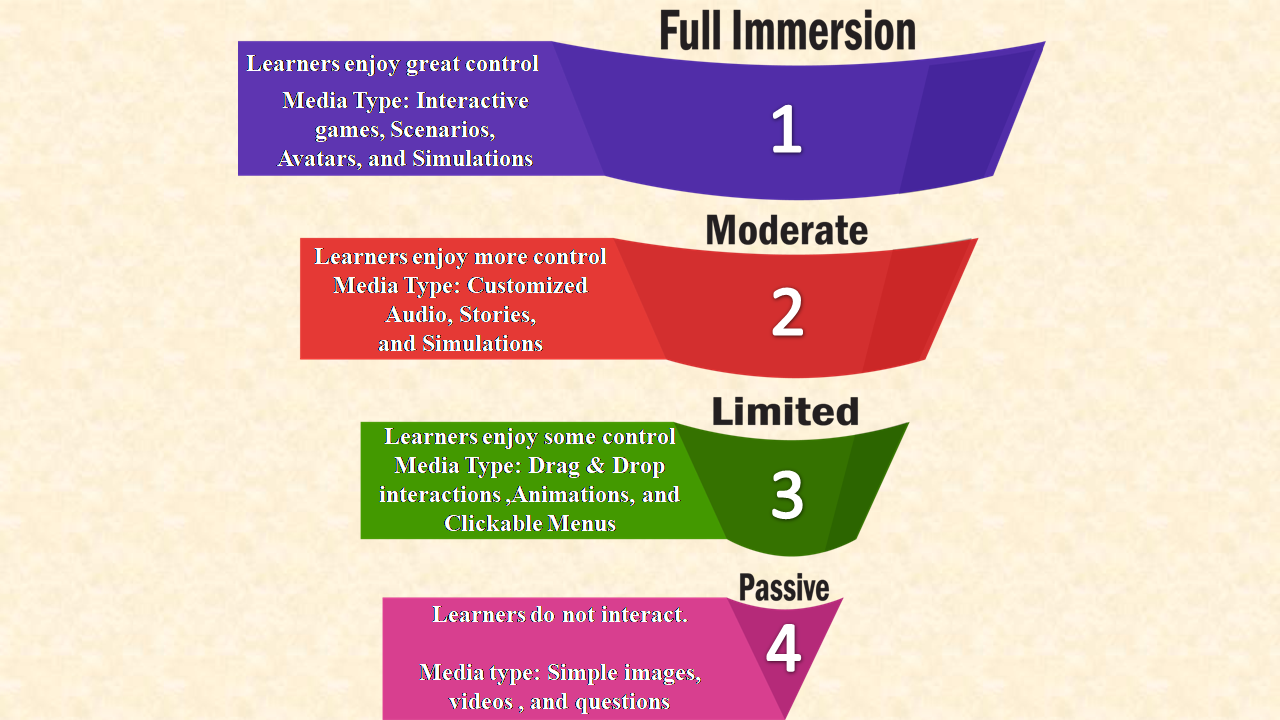
- Level of Interactivity: Online education should essentially be dialogic learning, that is, there must be an exchange of ideas between the instructor and the learners. This enables learners to form original ideas, track progress, and provide feedback. Learner interactions take the shape of quizzes, simulations, and videos; all of which assess knowledge. Course-makers typically decide on the level of interactivity that an eLearning module should incorporate. Ranging from passive engagement to maximum interaction, there are four levels of interactivity. The diagram below summarizes them:
2. Budget and Ease of Usage: It is crucial to consider how much money is going to be spent while purchasing a specific authoring tool. Therefore, to avoid incurring losses with the purchase, one must weigh in the following points:
- Which features are on offer?
- Does the software have built-in templates and audio-visual aids?
- Is technical support readily available?
- Does the company offer tutorials and other resources to enable ease of usage?
A recent review report of costs and pricing run by PcMag showed that among the most expensive eLearning tools are Elucidat and Shift eLearning, whereas software like Camtasia and Active Presenter are comparatively inexpensive, with a host of free features.
The usability of software is additionally determined by the availability of resources, readymade templates, and video tutorials. All of these certainly allow technologically inept users to design courses with ease. For starters, choosing software that have a convenient user interface (UI) is recommended. However, other tech-savvy course-makers may want more creative control. In that case, they may opt for software that offers a complex and customizable user interface, where the user controls every aspect of the product.
3. Publishing Format: A novel feature of online learning that tells it apart from traditional learning is the option to upload content over an LMS (learning management system). To clarify, the obvious advantage of LMS is that remote learners can access assets and also keep a track of their learning without geographic barriers. While selecting the right authoring tool for an online course, we must consider whether we will be uploading the course to an LMS or make them available personally to clients. Finally, to publish the course to an LMS, a software that permits publishing to SCORM, TinCan API, or AICC is necessary.
Some eLearning Authoring Tools Suited for Different Purposes
A curated list of authoring tools according to a variety of media requirements, for instance, graphics, assessments, audio, and so on, is available below.
Free Software for Graphics:
Graphics cover charts, infographics, or visual aids. The use of informative graphics can effectively make a course come alive. Some of the best free graphics tools ordered according to the ease of usage are:
- Canva: Create collages, charts, marketing promotions, or infographics with their easy-to-use software.
- Easel.ly: Design and share visual infographics online.
- Gliffy: Create up to five public diagrams, flowcharts, or charts a month for free.
- Google Charts: Turn the data into powerful charts and graphs.
- Pixlr: Edit any photos or graphics for free.
Free software for audio:
Audio tools allow users to record, mix, edit, and also to download audio clips. We can add them to eLearning courses to enhance the power of text-heavy courses. Some free tools, for instance, are:
- Ardour: To record, edit, and mix audio files on all platforms
- Audacity: This software has been in the market for years due to its resilient build. In the same vein, it is an open-source recording, editing, and sharing tool.
- Voki: Incorporating speaking characters into teaching courses is made easy with customizable avatars on offer at Voki.
- vozMe: An immensely useful text-to-speech tool
Free eLearning tools for animation:
To make eLearning courses come alive, animation is the key. Incorporating video clips is also a great idea to elucidate complex ideas. Some popular choices in this domain include:
- Camtasia: Videos are created using their drag-and-drop video editing tools. Moreover, special effects and graphics can be added to them.
- Screencast-O-Matic: It allows the recording of voice-overs of up to 15 minutes for on-screen activities or short tutorial videos.
- Snagit: It enables the creation and editing of videos or converting them into GIFs.
Free eLearning authoring software:
Some exceptional authoring tools allow the creation of customized eLearning courses. A few of these software provide all the necessary tools. For instance, screen casting, adding videos/images, including interactive features, publishing options, and others.
- iSpring: It links PowerPoint presentations to learning management systems or content management systems to publish them.
- Easygenerator: If users do not wish to buy a paid subscription for this software, the free option allows users to create up to ten online courses that come with pre-installed packages and the option to publish over cloud.
- Udutu: It offers a host of options, such as ready templates, assessment tools, interactive features, and the option to convert courses to the SCORM format. Moreover, this eLearning tool is absolutely free.
- LCDS by Microsoft: It offers users Microsoft Silverlight Learning Snacks, which is a free browser plug-in that offers interactive media experience, business, and mobile applications.
Our previous blog “steps of creating e-learning courses” in the eLearning archives sets out precise objectives that every online course should be able to fulfil.
To explore more about e-learning, visit our blog.
Create. Engage. Inspire.
The post Effective E-learning Tools: Determinants and Options appeared first on Test.Evelyn.
]]>The post Best 07 Assessment Tools for Teachers appeared first on Test.Evelyn.
]]>Effective conduct of formative assessment thus becomes a precondition for evaluation. For this purpose, a variety of assessment tools for teachers are available on the Internet. These tools contain pre-designed formats and are easy to operate.
This blog incorporates the top 7 assessment tools for teachers that can help design effective assessments.
(Refer to our article on Formative vs Summative Assessment for more information on both the types of assessment.)
Socrative
Socrative is an online assessment tool available for free. It is useful for conducting in-class quizzes, viewing student responses in real-time, and generating results. Also, it facilitates pre-class testing to help the teacher discern the prior knowledge that the students possess about a topic.
Moreover, Socrative allows the teachers to create customized quizzes and to add images and explanations along with the answers. After the students complete the quiz, the results can be downloaded in a variety of formats for sharing with the students, as well as for the teacher’s personal record. Additionally, the results work as feedback for the teachers who use it to modify teaching techniques for better learning outcomes.
Kahoot
Kahoot is a game-based learning and assessment approach with more than 100 million games for every subject. It is available in multiple languages and is also used for corporate training. Kahoot has an easy to use interface for young students. It facilitates the creation of quick quiz games along with the ease of importing questions from spreadsheets, or from the Kahoot question bank that contains millions of questions.
Moreover, there is an option to add drawings to the quizzes using an iOS device along with YouTube videos. So, a combination of mini Kahoots can be converted into a larger Kahoot to create a larger assessment.
Additionally, the user-friendly interface allows students to plan assessment games by themselves or as a team. Teachers can later add multiple choice questions or true/false statements to the games. Also, the games are timed and points are awarded according to the parameters set by the teacher.
Kahoot is available for free and contains additional paid features.
ProProfs
ProProfs online assessment software is one of the best tools for creating online quizzes with automated scoring. It allows quick creation of online assessment tests with more than 100,000 ready-to-use questions available in the question bank in a variety of forms. Also, it has more than 100k customizable assessments that are easy to edit. As a result, there are no chances of unauthorized access or cheating during the test.
Moreover, this software allows teachers to automate grades and scores along with instant feedback for better learner engagement. This feature helps track the performance of individual learners.
Along with this, ProProfs also provides customizable certificates as rewards that help increase learner participation.
Easy LMS
Easy LMS is a paid software that caters to all the educational and corporate training needs. This tool is available in 24 different languages, with a dashboard available in 11 languages. This feature makes for a handy tool to create customized online assessments. Moreover, it has an easy to use interface that does not require technical skills to operate.
Furthermore, it gives a customized feel to the training by allowing the user to change logos, colors, and fonts.
ExamSoft
ExamSoft is a professional approach to online assessment. Unlike other assessment tools, it is a complex software that demands professional skills for operation. ExamSoft is a considerably powerful software that delivers fully customizable assessments.
Moreover, the availability of numerous randomized questions eliminates the chances of cheating during the assessment.
ExamSoft has an easy accreditation process that guides improvement in curriculum and exams. The powerful data insights guide the student and provide feedback in the areas of strength and weaknesses in the understanding of the concepts.
GLIDER.ai
GLIDER.ai uses advanced machine learning and AI technology to create assessments. It is a revolutionary tool that gives meaningful insights into the performance of the learners. Although it might seem complicated due to the use of AI machine learning, the actual user experience is relatively hassle-free.
Moreover, its easy-to-use interface and effective functioning makes it a perfect solution for creating assessments for students as well as employees.
This assessment tool is fully automated with advanced features that allow teachers to create effective assessments in no time. Also, it has several question types to choose from, making it one of the best tools to create interactive assessments.
iSpring Suite
iSpring Suite is a powerful toolkit to create complete and complex interactive assessments. The vast potential of this toolkit allows teachers to create courses within minutes with a drag and drop facility.
Additionally, iSpring Suite gives critical insights into student behavior and performance. This helps the teachers to modify strategies to improve results.
The options to add video narration, polls, quizzes, and screencasting are also available. All these features make it an ideal tool for teachers to create effective online assessments.
Creating interactive assessments within the lowest time possible is of utmost importance to teachers. The top 7 assessment tools for teachers mentioned above can help them ace the assessment game.
Furthermore, online assessments give the same level of results and feedback as physical assessments. Thus, they act as a comparatively easier and more effective alternative to in-class assessments that are easy to develop using these software recommendations.
Referred Articles: Careermetis, Shakeup Learning
Images: Shutterstock
For more informative content, visit our blog.

Create. Engage. Inspire.
The post Best 07 Assessment Tools for Teachers appeared first on Test.Evelyn.
]]>The post Tips for Creating Effective Assessments appeared first on Test.Evelyn.
]]>There are a variety of formal and informal methods available to assess student progress. These methods include observation, discussions, group interactions, projects, questionnaires, assignments, and so on. Moreover, Project-Based Learning is one of the most effective instructional techniques and an accurate method of assessment.
Although teachers are free to make use of any technique they find suitable for the assessment of their learners, there are certain things of note while designing these assessments.
Some Tips for Creating Effective Assessments
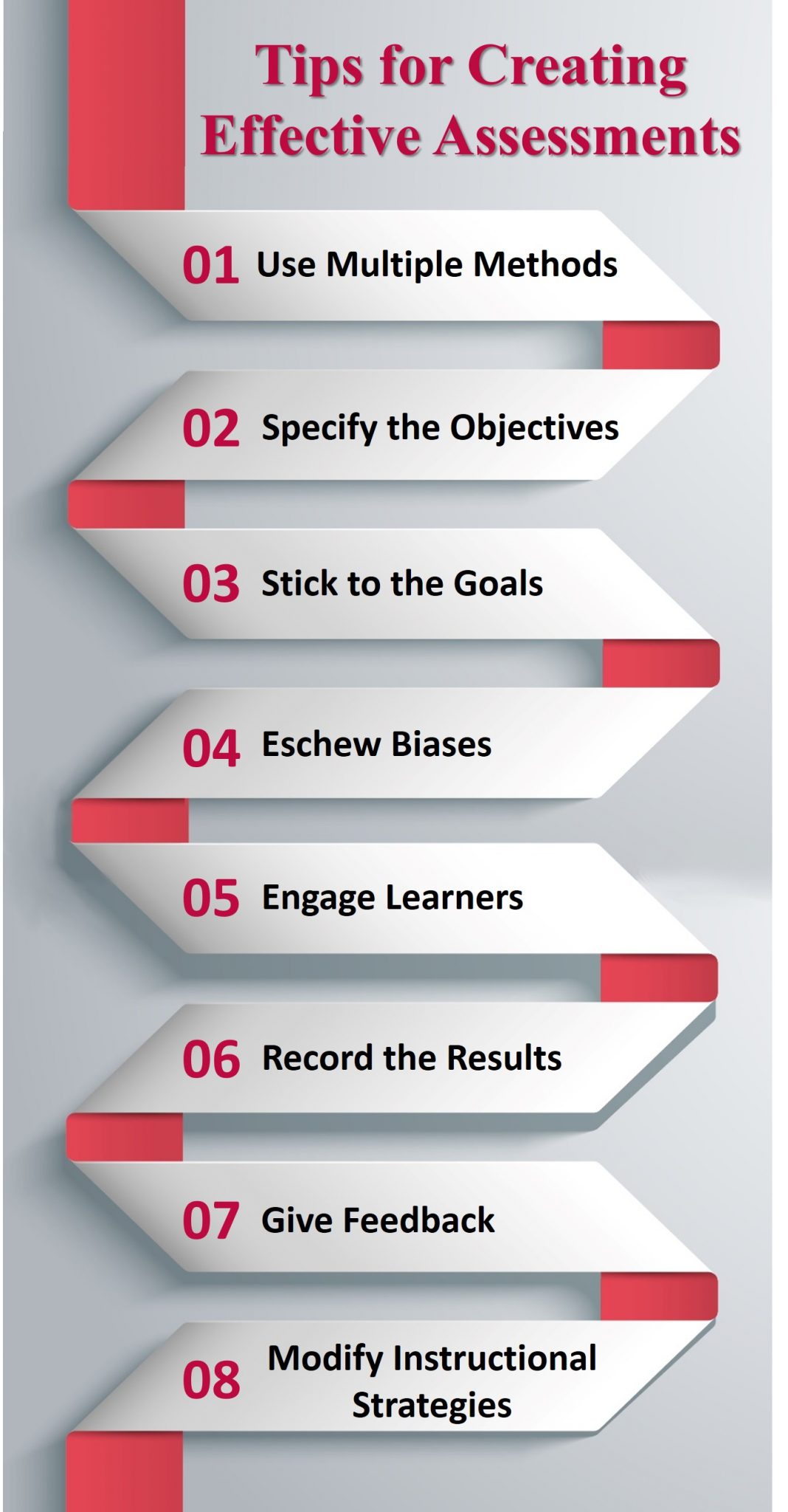
1. Use Multiple Methods
A single method is not enough to provide a complete picture of the knowledge and skills acquired by the students. Thus, a teacher must use multiple methods to assess the students for their capabilities in different fields.
Various activities such as projects, questionnaires, surveys, and others help in the assessment of different skills. These activities are conducted in the form of either formative or summative assessment.
(Refer to our blog on Formative vs Summative Assessments for more information.)
2. Specify the Objectives
Learning aims to inculcate a certain type of skill. Any form of learning has some necessary objectives for acquiring the required skills and knowledge. Moreover, these objectives determine the efforts of the learners and their contribution to the learning process as they participate in various activities. Therefore, specifying the objectives at the beginning of an assessment test helps students identify the skills they must demonstrate. Also, it motivates them to perform better as they are aware of what they are doing.
3. Stick to the Goals
An assessment is nothing without a goal. Effective assessment activities are completely goal-oriented. Thus, teacher as well as students should be aware of the goals and objectives of learning and should stick to them.
Additionally, teachers must ensure that the activities that do not fulfill the goal requirements are avoided to avoid the sheer waste of time.
4. Eschew Biases
Biases create hindrances in the process of development. They develop a sense of insecurity among the learners that often affects their performance. Therefore, teachers should work on creating a free and healthy environment where the students can display their abilities without the fear of judgment.
As a result, the students develop a sense of self-awareness and become progressive as they express themselves better. Moreover, unbiased assessments contribute to the development of their overall personality.
Additionally, the assessments that are not related to the skills/knowledge of the target group of students must be avoided.
5. Engage Learners
Learner engagement is a fundamental requirement for learning. The assessment of learning produces more accurate results when the learners actively participate in the classroom. Also, participation inculcates self-confidence in students as they learn to take initiative.
Moreover, the students learn many social skills as they collaborate with peers in group activities. Therefore, assessment activities involving more learner interaction and participation must be prioritized.
6. Record the Results
Keeping a record of the assessment results is important. It helps to assess the levels of improvement in the learners and also gives a clear picture of their potential.
Also, it helps the teachers identify areas where the learner requires assistance and practice. Accordingly, teachers can then design lessons and choose a teaching methodology that serves the purpose.
Moreover, students get to know where they stand, and a sense of healthy competition develops among them. This motivates the students to compete for better results.
7. Give Feedback
Feedback is what helps students to move further in learning. It gives them insights into their current performance and the areas they need to improve upon. Also, it helps teachers identify potential threats to learning and encourage the students to overcome their fears.
Moreover, feedback initiates an interaction between students and teachers. This creates a healthy classroom environment that leads to the development of communication skills. Also, the overall development of the students’ personality takes place within the classroom.
8. Modify Instructional Strategies
Choosing the right instructional strategy determines the effectiveness of the assessment and the overall course. Thus, the teacher must give clear instructions and should not refrain from modifying the instructional strategy.
Incorporating Gamification in assessments is a strategy that works to engage students while they have fun developing their skills. Apart from this, Blended Learning and Flipped Classroom are two other effective instructional strategies to use.
Furthermore, experimenting with instructional strategies helps to cater to the individual learning needs of the students and renders better performance results in assessments.
Creating effective assessments can be challenging sometimes. The above-mentioned tips for creating effective assessments can help the teachers to fulfill the requirements of learning and assessment to give the students an enriching learning experience.
Research Articles: Getting Smart and Brave in the Attempt
Images: Shutterstock
For more information, visit Evelyn Learning blog.

Create. Engage. Inspire
The post Tips for Creating Effective Assessments appeared first on Test.Evelyn.
]]>