The post Universal Design for Learning: A Practical Guide appeared first on Test.Evelyn.
]]>Universal Design for Learning is based on three principles:
- Engagement (taking advantage of learners’ interests and motivations);
- Representation (giving content in a variety of formats);
- Action and expression (offering learners with a variety of ways to express themselves)
Universal Design for Learning is a paradigm for reducing physical and emotional barriers to learning and ensuring that all students have an equal opportunity to succeed. Educators provide information in a variety of ways with UDL. This includes lectures, dialogues, demonstrations, resources, and more. Automatic doors and closed captioning are two instances of how Universal Design for Learning has influenced daily living outside of the classroom.
What is Universal Design for Learning?
Universal Design for Learning is a style of thinking about teaching and learning that aims to provide all students with an equal chance at success. This method allows students to access, engage with, and demonstrate their knowledge in a variety of ways. This method of creating lesson plans benefits all children, but it may be particularly beneficial to children with learning and thinking disabilities.
The purpose of Universal Design for Learning is to eliminate any obstacles to education and provide all students with equal opportunities to succeed. It’s all about incorporating flexibility that may be tailored to each student’s unique skills and needs. That is why this approach is beneficial to all children.

This kind of instruction does not specifically cater to students who learn and think in different ways. However, it can be especially beneficial for the 1 in 5 children who suffer from these problems, even those who have not yet been formally identified. It can also be extremely beneficial to English language students.
Even if one has never heard of the term “Universal Design,” they’ve almost certainly seen examples of it in their daily life. Closed captioning on televisions, for instance, allows those with hearing problems to read the text of what is being said on screen. In the classroom, Universal Design for Learning offers the same level of adaptability. Teachers can effectively teach a diverse set of students by implementing UDL principles. They do so by allowing learners to acquire material in a variety of ways and allowing them to demonstrate their understanding in a range of methods.
Methodology of Universal Design for Learning
Rather than laying out a common approach for teaching everyone, Universal Design for Learning provides an adaptive framework for connecting each student to the learning process. All of this may seem intimidating, and the UDL hypothesis is undoubtedly ambitious. Thankfully, it has broken down its standards into three simple categories that instructors may work with. These are the following:
-
Representation:
Students must first be able to access the resources in order to participate in the learning process. The Universal Design for Learning suggests that information be made available in multiple formats. Textbooks, for one, rely heavily on images. Providing text, audio, video, and hands-on learning, on the other hand, allows all children to access the content in the manner that best suits their learning abilities.
Everyone would have a choice for whatever format they want to study in. Others may prefer a combination of formats to properly cement the concept.
-
Action and Expression:
According to Universal Design for Learning, children should be given multiple opportunities to interact with the material and demonstrate what they’ve learnt. Students can have the option of taking a pencil-and-paper examination, giving an oral presentation, or working on a group project, for instance.
-
Engagement:
UDL urges teachers to explore a variety of approaches to motivate their pupils. Teachers can maintain students’ interest by allowing them to make choices and offering them assignments that are relevant to their life.

Educators accomplish this mostly through connecting themes and activities to the interests of students and allowing them to infuse their excitement into projects. Gamification and clearly defined levels of achievement and challenges are also effective ways to engage pupils in their study. Making skill improvement feel like a game and providing opportunities for pupils to get up and walk around the classroom are two other typical tactics.
Effectiveness of Universal Design for Learning
Moving on, what are the main advantages of implementing Universal Design for Learning in a class, institution, or town?
-
Making Learning more Pertinent:
Universal Design for Learning actively targets students’ desire and drive to learn. It does this by making knowledge more relevant to students’ interests and daily activities. This can assist learners become more engaged in the learning process. At the same time, this also reinforces their knowledge and inspires them to continue studying throughout their lives.
-
Accessibility:
The flexibility and variety of UDL are its most major advantages. It is possible to alter activities and materials to account for everyone’s strengths and weaknesses. As a result, learning becomes more accessible and pleasant for everyone.
-
UDL Supports Various other Research-based Learning Methodologies:
Universal Design for Learning is not incompatible with other methodologies and practices. It incorporates and supports many modern research-based techniques to teaching and learning. This includes collaborative learning, blended learning, multisensory teaching, and student-centered learning, to mention a few.
-
Low Cost:
A UDL curriculum is designed from the start to match the needs of the entire class. This eliminates the need for costly, time-consuming, and after-the-fact curriculum changes.
-
Empowerment:
Universal Design for Learning empowers both teachers and students. It provides a framework for teachers to adapt material to the learner rather than forcing the learner to adapt to the material. This is a significant result since it allows the entire classroom to take control of the instructional format and, as a result, be more effective.
-
Taking Control over your Education:
UDL gives students the expertise and technologies they need to select the best learning options for themselves. There is little spoon feeding, and educators encourage pupils to take care of their own learning. This also allows children to evaluate their individual learning needs and figure out how they absorb information most effectively. This is critical for academic and professional success.
Concluding Remarks
Educators know that their learners have a diverse range of interests, backgrounds, and talents in any class. They can approach the subject in a variety of ways if they plan with this range in mind. Information is frequently delivered in multiple media with Universal Design for Learning, including text, audio, and hands-on activities.
Universal Design for Learning is a viable approach as it helps you foresee and plan for all the students from the beginning of the class. It can assist an educator in ensuring that all students, not just a select few, have access to and participate in learning. To acquire a more accurate picture of what students know, it urges teachers to give a variety of examination forms, such as oral presentations and group projects. It also seeks for new ways to keep students engaged.
Image Sources: Shutterstock and Unsplash
For more information on Universal Design for Learning, visit our blog.
Create. Engage. Inspire.
The post Universal Design for Learning: A Practical Guide appeared first on Test.Evelyn.
]]>The post Using Math Tools in Online Teaching appeared first on Test.Evelyn.
]]>In high school, the emphasis in math classes shifts to college and career preparation through advanced algebra, calculus, test preparation, and plenty of real-world problem solving.
In this article, we’ll show you a few of the most intriguing math apps that every educator can use in the online classroom. These applications and tools meet or exceed static math exercise by providing the personalization, monitoring, and variation that can equip kids for learning beyond high school, whether teachers require a math tool for students to flip the classroom or involve learners in a discussion.
1) GeoGebra
GeoGebra is a computer tool that allows students to solve problems in a dynamic way. It is appropriate for students at all levels of study, from beginners to experts. Geometry, algebra, spreadsheets, graphing, statistics and analysis, and calculus are all included in this user-friendly software. GeoGebra’s community is rapidly growing, with millions of users throughout the world. They are the leading provider of dynamic mathematical software throughout the world. If an educator is interested in using math tools in online teaching, they should give this one a try.
2) Stepping Stones 2.0: Comprehensive Mathematics
Stepping Stones 2.0 combines print and digital resources to provide instructors more options when it comes to teaching K-6 math. Additional practice, effective tactics, visual examples, and instructor support are all included in SS 2.0. For using math tools in online teaching and stressing or reteaching a concept, the instructor can use SlateCast to broadcast a resource onto the class whiteboard.
3) Geometry Pad
Geometry Pad is a fun method to study and practice geometry and fundamental constructions. It’s like having a personal tutor when it comes to learning mathematics. Students can show their geometric constructs, take measurements, utilize the compass, and explore a variety of geometric shapes with relative ease.
Students can alter the attributes of forms, zoom in, save their progress, and make side notes. Geometry Pad is a fantastic tool for teaching math online to students of all ages and in a variety of mathematical subjects.
4) FluidMath
FluidMath is the first “pen-centric” iPad and dynamic whiteboard math platform. While solving difficulties and engaging with tough subjects, students and teachers can write in their own handwriting. FluidMath has received numerous accolades, and its numerous features make it an excellent resource for instructors and students in any math school.
Instructors may design engaging educational materials for schools, and students can grasp mathematical topics. FluidMath is an excellent choice when it comes to using math tools in online teaching and may be thought of as a brilliant piece of math paper.
5) Shapes 3D
Shapes 3D is an Augmented Reality app that teaches geometry. Prisms, pyramids, revolution solids, and Platonic solids are all possible. Start with a simple figure and work your way up until you reach the most complex ones. This tool aims to enhance the teacher’s abilities and provide opportunities to demonstrate things that aren’t possible to demonstrate with physical tools or in the classroom. Shapes 3D is another excellent alternative for educators who wish to use math tools in online teaching.
6) Math is Fun
Math is Fun strives to make math pleasurable and amusing, as the name suggests. To assist students in their study, the site includes puzzles, games, quizzes, worksheets, and a forum. The challenges and solutions are all given in simple language, allowing kids to study on their own without the need for an adult or teacher to “translate.”
7) Virtual Nerd
Virtual Nerd is a program that may be used in any math class. The only thing you’ll need is an internet-connected device. The creators of Virtual Nerd have kept students of all ages in mind. You may discover a variety of movies on their website that explain a variety of mathematical difficulties. They show you how to address these challenges step by step in these videos. This is, in fact, a virtual instructor.
This is a simple tool that teachers can use to help students solve mathematical problems. If pupils don’t comprehend their teacher’s explanation, they might be able to understand it by watching a Virtual Nerd video.
8) Desmos
Students can use Desmos, a free online graphing calculator, to graph functions, plot data, and assess equations. To help pupils get the most out of the calculator, the site also provides arithmetic examples and even artistic art. The website and app are incredibly user-friendly, with a comprehensive help center; and families don’t have to worry about spending a lot of money on a graphing calculator using Desmos.
Desmos also allows students to build their own math concepts. The students can discuss the with one another. The activity builder allows not only students but also teachers to create their own activities and ideas. Teachers can then provide the appropriate material to meet the needs of their students.
9) CueThink
CueThink is a cutting-edge app for students in grades 2 through 12. On the one hand, it aims to engage children who are currently performing well, while also assisting kids who are struggling with math. With a growing perspective, they want pupils to see problems as possibilities.
Teachers might assign kids math problems from a so-called “problem bank.” Each student’s responsibilities are tied to a specific level, ensuring that they are appropriate for them. Students build and present their solutions using a specified method. CueThink is a virtual community where students can collaborate in groups. They can learn from one other, both from their successes and their mistakes, thanks to these groups.
10) Prodigy Math Game
Prodigy Math Game is an online arithmetic game based on Pokémon, designed for kids in grades 1 through 8. Students must design their own avatar, which they can change as they move through the game. Students will play this game at home because it is an enjoyable game, doubling their math practice time.
11) ByteLearn
ByteLearn is a digital teaching assistant for math that helps students step-by-step in solving math problems, providing help and feedback the way that a teacher would. Teachers create practice assignments for their students and get targeted insights into their students’ knowledge gaps and misconceptions.
Teachers can see the skills students have been working on, how much time they spent playing the game, and what they found challenging, due to reports. The most significant advantage of this math software is that students may use it anywhere if they have an internet connection, making it ideal for all educators interested in using math tools into online teaching.
To sum up, these are the top math apps for math tutors who wish to use math tools in online teaching. These are the tools to use if you want to teach your students something new or if you want them to study anything at their own pace.
Impact of Using Math Tools in Online Teaching
In math classrooms, technology offers exciting new ways to teach. Through engaging and interactive media, we can improve the learning process and bring concepts to life. Additional assistance may be provided to meet the requirements of all learners and to provide customized learning experiences.

With better access to technology for math, students can have a more personalized learning experience. Because no two students are the same, technology can assist individual students find content and resources that are tailored to their specific requirements. Lessons, tutorials, screencasts, and other instructional resources can be seen by children on their own devices and at their own pace. So, if one student is still stumped on a topic while another is ready for a new challenge, using math tools in online teaching can help each of them take the next logical step.
Teachers should consider using math tools in online teaching to assist students see how concepts learned in the classroom may be used in real-life situations. Students can communicate with people outside of the classroom to help widen their understandings and viewpoints about what they are studying by incorporating technology into the math classroom.
Concluding Remarks
With good cause, some of the top educators we know are relocating their entire work online. Tutoring kids online minimizes the waste of time spent driving between visits, which can eat into crucial tutoring time.
Using math tools in online teaching will encourage students to engage in self-exploration and show them how arithmetic is woven into the fabric of their lives. Students can also take control of their academic performance and build a favorable relationship with a subject that they previously felt indifferent about by using these tools and applications.
Image Sources: Shutterstock and Unsplash
For more information on using math tools in online teaching, visit our blog.
Create. Engage. Inspire.
The post Using Math Tools in Online Teaching appeared first on Test.Evelyn.
]]>The post Video Hosting Platforms for Online Courses appeared first on Test.Evelyn.
]]>Why Use Video Hosting Platforms?
Videos take up a lot of storage space. This hinders the speed of servers and has an impact on the video quality. Also, not all platforms can provide an appropriate audience for a video-based course. Consequently, it is important to choose a video hosting platform with a relevant audience.
Moreover, the demand for high-definition videos is on a constant rise. These high-quality videos take up more hardware storage. As a result, they require a dedicated server capable of handling a significant amount of traffic. Uploading videos on a website can be taxing for a server, which affects the entire functionality of a platform. Hence, using a video hosting platform is more convenient.
Top 7 Video Hosting Platforms
There are many video hosting platforms offering a plethora of hosting options. Many of these are free to use with a paid upgrade option to avail advanced features.
The top 7 video hosting platforms have been described below.
1. YouTube
YouTube is the largest video-sharing platform with over 2 billion users worldwide. Also, it is the second-largest search engine after Google. It contains numerous video lessons uploaded by its various users. This platform provides several convenient features, including automatic transcription for more accessibility. Most YouTube videos are easily downloadable, which means a course can easily be copied and distributed. Consequently, there are more privacy breaches. However, the paid version of YouTube offers security options with ad-free services and other premium features.
Another feature is the search engine visibility of YouTube videos. This signifies that users can discover videos simply with a Google search. It makes YouTube one of the best video hosting platforms for online courses.
2. Vimeo
Vimeo is a professional interface for video sharing. Although it offers comparatively less upload space and customization, more privacy controls are available to the users. It provides powerful video analytics and high-quality videos without ads. Also, the video download option is only available if the creator enables it. This protects the videos and content from unwanted distribution. This platform is beneficial for creative professionals, including educators who wish to share their work with a large audience.
Although there are fewer customizations available in the free version, Vimeo offers four types of upgrade plans based on a user’s requirements. Upgrading to a paid version offers more customization and comes with more cloud storage space.
3. Wistia
Wistia is a professional digital marketing platform. It offers a wide range of marketing tools, including a built-in call to action button. Users can upload videos and embed links to their website in between. It offers a completely customizable embedded player that highlights videos from the same user. However, there are no video recommendations from other channels. It is also useful for CRM integration and custom branding because it helps create a custom audience for different social media platforms.
4. Facebook
Facebook is a ubiquitous social media platform and one of the most prominently used platforms for video hosting. It offers the biggest audience with a large number of visitors each day. Users can showcase their creativity by creating and uploading videos on Facebook. Moreover, it supports different aspect ratios and provides unlimited file storage. Although there are fewer options available to embed videos, Facebook is still useful for creating brand awareness.
5. WordPress Video Hosting
WordPress offers video hosting options in its premium and professional plans. Users must install the Jetpack plugin to access unlimited video hosting options. WordPress accepts videos in different formats, namely, .MOV, .MPEG4, MP4, .AVI, and others. Also, it offers a customizable embedded video player with video stats available on the WordPress dashboard.
A drawback of WordPress video hosting is that it does not have the premium features that other video hosting platforms offer. Also, it does not have an established audience. As a result, WordPress video hosting might not seem a good idea for someone targeting a large audience in less time.
6. Brightcove
Brightcove is a paid video hosting platform that has a fast server and powerful live-streaming options. It is a scalable solution used by many Fortune 500 companies because it does not have any resolution limit and supports all aspect ratios. It also supports all upload sizes without any issues. However, the storage depends on the plan selected.
In conclusion, Brightcove is a complete enterprise solution that supports advanced integrations for large-scale marketing and communications.
7. Dailymotion
Dailymotion is somewhat similar to YouTube. It is a platform with over 300 million unique users. This platform provides free unlimited video hosting with advanced security options. The host can protect their videos with passwords or make them private. Also, users enjoy unlimited file storage and can upload videos in the desired formats.
However, the maximum upload limit is restricted to 2GB with a maximum video length of one hour. There is less competition so building an audience becomes easy. However, there are frequent ads and issues with embedding videos on the websites.
Final Note
There are a variety of video-hosting platforms available for various unique users for free or at a low cost. Choosing the right platform requires a thorough analysis of the needs and requirements of the user. They can then compare and choose a suitable platform that serves their purpose.
Read more about Video Learning here.
Research articles: Wondershare Filmora and Kinsta
Images:
For more information on Video-Based Learning, visit our blog.
Create. Engage. Inspire.
The post Video Hosting Platforms for Online Courses appeared first on Test.Evelyn.
]]>The post Video Learning Styles: An Introduction appeared first on Test.Evelyn.
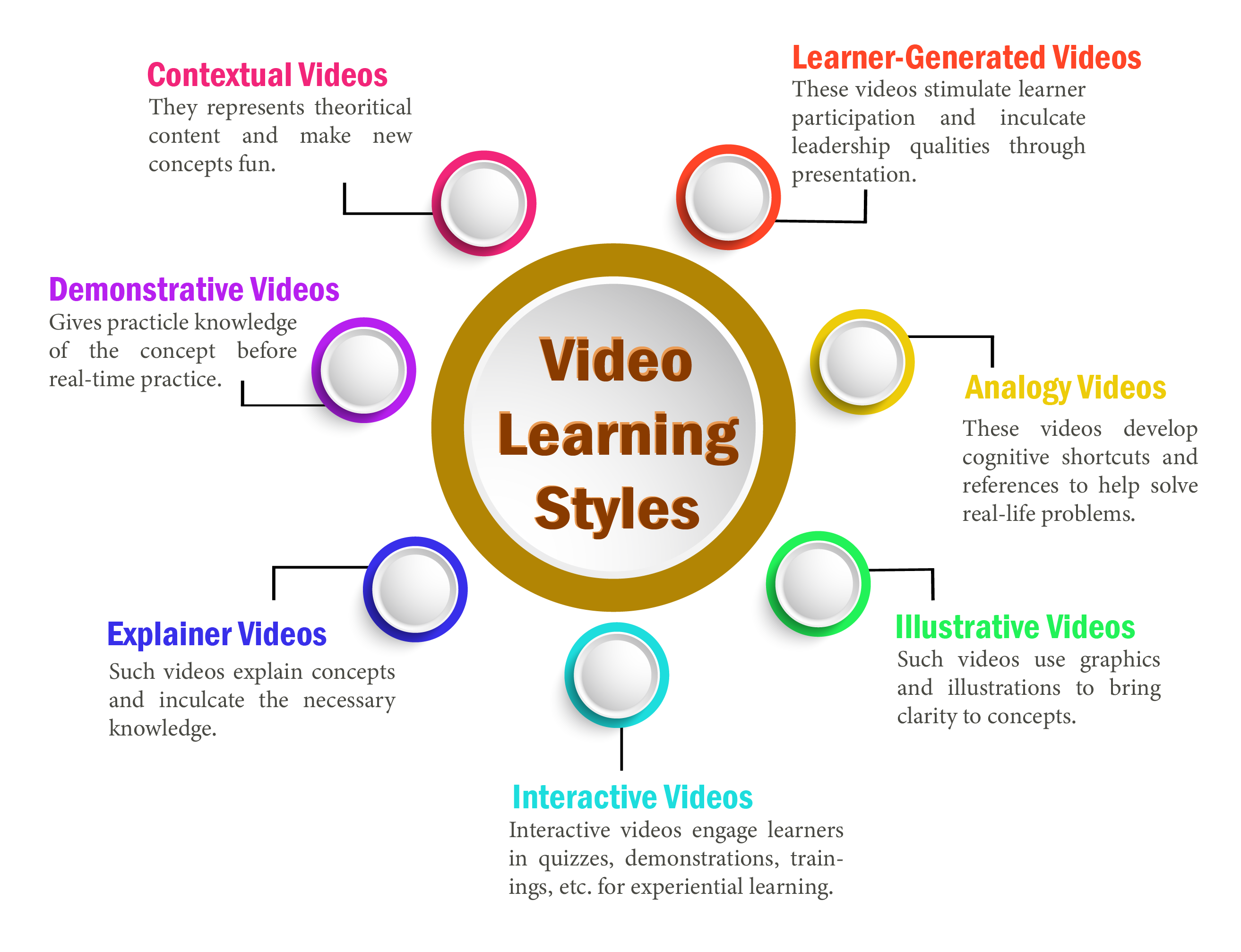
]]>The reason video-based learning outshines any other method of teaching-learning is that it allows better learner engagement. It also stimulates faster and better understanding. To achieve these outcomes, educators must possess a sound knowledge of the various video learning styles. Here are some video learning styles that satisfy the learning needs of discrete learners.
Different Video Learning Styles
i) Contextual Videos
Contextual video learning style is a powerful way of introducing e-learning. It helps create a tech-friendly environment for learning that promotes learner participation. Also, learners gain autonomy to proceed further in learning at will with the help of videos.
Moreover, such videos are perfect for theoretical content. They help students learn faster and better by reducing text rigidity and making the information easier to consume. They make the introduction of new concepts easy and fun.
ii) Demonstrative Videos
Demonstrative video learning style follows the learning by doing approach. Such videos are useful for providing practical knowledge of a subject before learners try it on their own. This signifies that demonstrative videos help share a skill before learners acquire the relevant experience. The virtual environment brings forth the steps and risks of the activity. Consequently, learners get a virtual experience of performing an exercise in real-time.
Moreover, it prepares learners to practice precaution measures while performing the actual practical experiment.
iii) Explainer Videos
Explainer video learning style uses animation, slides, live videos, and other ways to explain concepts. Such videos explain complex concepts and inculcate in learners the necessary knowledge regarding those concepts. Moreover, this video learning style influences learning to a great extent with its usability and effectiveness in teaching and learning.
iv) Interactive Videos
The concept of interactive videos is comparatively new in video-based learning. Interactive videos are not only useful for learning but also for corporate training. They help address the multiple learning needs of various learners. Additionally, as the name suggests, interactive videos interact with learners in different ways to engage them. This interaction can be in the form of quizzes, demonstrations, or skill training.
Furthermore, the most fundamental benefit of this video learning style is that it enhances learner participation and promotes longer retention. In turn, it helps produce better learning results.
v) Illustrative Videos
Illustrative videos employ illustrations and graphics to bring clarity to concepts. In addition to this, illustrative examples help define topics and concepts, leading to a better understanding so that learners retain more. Educators can create such videos with simple illustrations, images, and graphics. As a result, they are extremely cost-effective. Additionally, illustrative videos are compatible with different devices and are lightweight. Their function is not limited by restricted internet bandwidth on a multitude of devices.
vi) Analogy Videos
Analogy video learning style helps develop cognitive shortcuts and references to solve real-life problems. Learners get to learn multiple concepts within the course without switching between topics. This makes it easier to relate one concept with another in a multidisciplinary environment. Also, learners can conclude learning with a cumulative analysis of the concepts. This learning style promotes holistic learning and longer retention.
vii) Learner-Generated Videos
Learner-Generated videos provide a stimulus for learner participation. Learners share videos through the Internet to showcase their knowledge. These videos work as a medium to transfer knowledge to other learners as well. Moreover, it promotes social learning and helps inculcate leadership qualities in learners.
Furthermore, such videos also ignite the interest of peer learners, cutting down the monotony of learning.
Video-based learning is a fun way to promote learning and enhance retention. It reduces cognitive stress and engages learners. There are a variety of areas where video learning proves to be the go-to method. And these areas extend to the workplace as well. However, educators must be familiar with various video learning styles to create effective video lessons/courses.
Research article: EdTechReview
Images: Shuterstock and Freepik
To explore more e-learning options, visit our blog.
Create. Engage. Inspire.
The post Video Learning Styles: An Introduction appeared first on Test.Evelyn.
]]>The post Benefits of Video Based Learning appeared first on Test.Evelyn.
]]>What are the Benefits of Video-Based Learning?
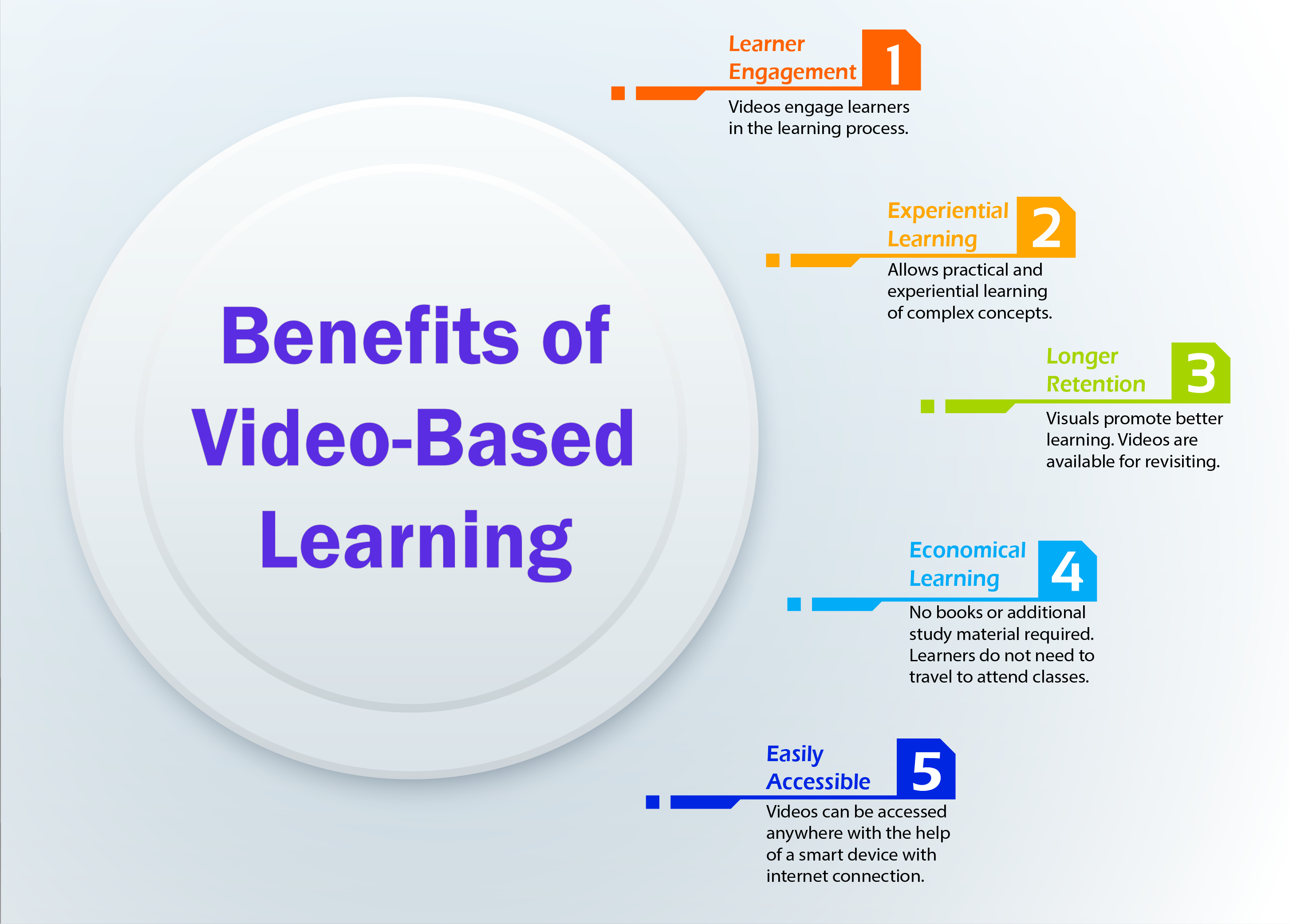
a) Learner Engagement
Videos are an interactive way of learning. Learners are likely to engage more with videos in contrast to text-only content. This is because videos include visuals that paint a clear picture of concepts. Also, educators can use non-verbal cues to their benefit in such type of courses. Non-verbal communication such as intonation when combined with questioning skills promotes engagement. This strategy is not only effective for in-class teaching but also works for video-based learning.
Moreover, videos grasp learner attention with the help of colorful and interactive visuals. As a result, learners remain constantly engaged with the visuals while learning.
b) Experiential Learning
Learning by doing is the key to achieve the best learning outcomes. The practical knowledge of a concept is necessary along with theoretical knowledge, but this practical knowledge is limited to certain subjects. For instance, learners cannot dissect a human body by themselves to study human anatomy. However, videos provide a solution for such situations that limit learning. Learners can learn about anatomy through videos that show the human body through virtual reality. In this way, the actual practical learning takes place with the help of videos.
c) Longer Retention
Videos are an amalgamation of text, visuals, and sounds. All these form the basis of learning. Studies suggest that the average adult retains 10% of what they hear, 20% of what they read, and 80% of what they see. This is because the human brain processes visual information better than verbal or written information. Consequently, when the brain receives information in a combination of text, visuals, and sounds, it becomes easier to retain.
Furthermore, videos are much more engaging than mundane classroom lectures. Learners interact with the content on the screen and are free to revisit the lessons/courses at their will. This means that they are free to practice the concepts based on their convenience. This eventually leads to better learning and retention.
d) Economical Learning
Video-based learning is an economical learning solution. Learners have access to various educational videos available on the Internet. Most of these videos are available for free or at minimum charges. Also, video-based learning does not require traveling or attending classes physically. This helps learners save time and money that would otherwise be utilized.
Moreover, there is no requirement for books and other study material. Only a good Internet connection and a smart device can serve as the tools for receiving knowledge.
e) Easily Accessible
Videos are one of the most easily accessible resources in the current era. This is thanks to technology and the Internet, which provide easy access to all online services. Learners can access any videos on the concepts they wish to learn without having to spend much time finding a teacher. Moreover, videos are always available for reviewing to recapitulate a lesson/concept.
Additionally, technology enables educators to create learning videos on their own. There are various tools available on the Internet that help create an e-learning course.
(Read our blog on Creating a Video-Based Learning Course for more information.)
Future of Video-Based Learning
Auditory learning is gradually becoming a thing of the past. The Internet presents various new learning possibilities. Consequently, eLearning is gradually becoming a go-to learning method. It serves learners with different e-learning styles with an amalgamation of various teaching/learning methods. Video-Based Learning is a great way of administering knowledge. This is because videos immediately grasp the learners’ attention.
Although videos are a part of eLearning, they also supplement in-class learning. Various forms of blended learning (including the flipped classroom) use eLearning to supplement in-class learning. This yields better learning outcomes and also promotes better retention.
Video-based learning will have more consumers in the future, which is due to its ease of usability and application in a wide gamut of industries. It is not only useful for learning but also serves various corporate training and learning needs. Additionally, with technology and resources gradually becoming available to all, creating educational videos will be much easier in the future. As a result, it has great potential to play a prominent part in the future of eLearning.
Research Website: ELearning Industry
Images: Shutterstock and Freepik
To explore more e-learning options, visit our blog.
Create. Engage. Inspire.
The post Benefits of Video Based Learning appeared first on Test.Evelyn.
]]>