The post Using Math Tools in Online Teaching appeared first on Test.Evelyn.
]]>In high school, the emphasis in math classes shifts to college and career preparation through advanced algebra, calculus, test preparation, and plenty of real-world problem solving.
In this article, we’ll show you a few of the most intriguing math apps that every educator can use in the online classroom. These applications and tools meet or exceed static math exercise by providing the personalization, monitoring, and variation that can equip kids for learning beyond high school, whether teachers require a math tool for students to flip the classroom or involve learners in a discussion.
1) GeoGebra
GeoGebra is a computer tool that allows students to solve problems in a dynamic way. It is appropriate for students at all levels of study, from beginners to experts. Geometry, algebra, spreadsheets, graphing, statistics and analysis, and calculus are all included in this user-friendly software. GeoGebra’s community is rapidly growing, with millions of users throughout the world. They are the leading provider of dynamic mathematical software throughout the world. If an educator is interested in using math tools in online teaching, they should give this one a try.
2) Stepping Stones 2.0: Comprehensive Mathematics
Stepping Stones 2.0 combines print and digital resources to provide instructors more options when it comes to teaching K-6 math. Additional practice, effective tactics, visual examples, and instructor support are all included in SS 2.0. For using math tools in online teaching and stressing or reteaching a concept, the instructor can use SlateCast to broadcast a resource onto the class whiteboard.
3) Geometry Pad
Geometry Pad is a fun method to study and practice geometry and fundamental constructions. It’s like having a personal tutor when it comes to learning mathematics. Students can show their geometric constructs, take measurements, utilize the compass, and explore a variety of geometric shapes with relative ease.
Students can alter the attributes of forms, zoom in, save their progress, and make side notes. Geometry Pad is a fantastic tool for teaching math online to students of all ages and in a variety of mathematical subjects.
4) FluidMath
FluidMath is the first “pen-centric” iPad and dynamic whiteboard math platform. While solving difficulties and engaging with tough subjects, students and teachers can write in their own handwriting. FluidMath has received numerous accolades, and its numerous features make it an excellent resource for instructors and students in any math school.
Instructors may design engaging educational materials for schools, and students can grasp mathematical topics. FluidMath is an excellent choice when it comes to using math tools in online teaching and may be thought of as a brilliant piece of math paper.
5) Shapes 3D
Shapes 3D is an Augmented Reality app that teaches geometry. Prisms, pyramids, revolution solids, and Platonic solids are all possible. Start with a simple figure and work your way up until you reach the most complex ones. This tool aims to enhance the teacher’s abilities and provide opportunities to demonstrate things that aren’t possible to demonstrate with physical tools or in the classroom. Shapes 3D is another excellent alternative for educators who wish to use math tools in online teaching.
6) Math is Fun
Math is Fun strives to make math pleasurable and amusing, as the name suggests. To assist students in their study, the site includes puzzles, games, quizzes, worksheets, and a forum. The challenges and solutions are all given in simple language, allowing kids to study on their own without the need for an adult or teacher to “translate.”
7) Virtual Nerd
Virtual Nerd is a program that may be used in any math class. The only thing you’ll need is an internet-connected device. The creators of Virtual Nerd have kept students of all ages in mind. You may discover a variety of movies on their website that explain a variety of mathematical difficulties. They show you how to address these challenges step by step in these videos. This is, in fact, a virtual instructor.
This is a simple tool that teachers can use to help students solve mathematical problems. If pupils don’t comprehend their teacher’s explanation, they might be able to understand it by watching a Virtual Nerd video.
8) Desmos
Students can use Desmos, a free online graphing calculator, to graph functions, plot data, and assess equations. To help pupils get the most out of the calculator, the site also provides arithmetic examples and even artistic art. The website and app are incredibly user-friendly, with a comprehensive help center; and families don’t have to worry about spending a lot of money on a graphing calculator using Desmos.
Desmos also allows students to build their own math concepts. The students can discuss the with one another. The activity builder allows not only students but also teachers to create their own activities and ideas. Teachers can then provide the appropriate material to meet the needs of their students.
9) CueThink
CueThink is a cutting-edge app for students in grades 2 through 12. On the one hand, it aims to engage children who are currently performing well, while also assisting kids who are struggling with math. With a growing perspective, they want pupils to see problems as possibilities.
Teachers might assign kids math problems from a so-called “problem bank.” Each student’s responsibilities are tied to a specific level, ensuring that they are appropriate for them. Students build and present their solutions using a specified method. CueThink is a virtual community where students can collaborate in groups. They can learn from one other, both from their successes and their mistakes, thanks to these groups.
10) Prodigy Math Game
Prodigy Math Game is an online arithmetic game based on Pokémon, designed for kids in grades 1 through 8. Students must design their own avatar, which they can change as they move through the game. Students will play this game at home because it is an enjoyable game, doubling their math practice time.
11) ByteLearn
ByteLearn is a digital teaching assistant for math that helps students step-by-step in solving math problems, providing help and feedback the way that a teacher would. Teachers create practice assignments for their students and get targeted insights into their students’ knowledge gaps and misconceptions.
Teachers can see the skills students have been working on, how much time they spent playing the game, and what they found challenging, due to reports. The most significant advantage of this math software is that students may use it anywhere if they have an internet connection, making it ideal for all educators interested in using math tools into online teaching.
To sum up, these are the top math apps for math tutors who wish to use math tools in online teaching. These are the tools to use if you want to teach your students something new or if you want them to study anything at their own pace.
Impact of Using Math Tools in Online Teaching
In math classrooms, technology offers exciting new ways to teach. Through engaging and interactive media, we can improve the learning process and bring concepts to life. Additional assistance may be provided to meet the requirements of all learners and to provide customized learning experiences.

With better access to technology for math, students can have a more personalized learning experience. Because no two students are the same, technology can assist individual students find content and resources that are tailored to their specific requirements. Lessons, tutorials, screencasts, and other instructional resources can be seen by children on their own devices and at their own pace. So, if one student is still stumped on a topic while another is ready for a new challenge, using math tools in online teaching can help each of them take the next logical step.
Teachers should consider using math tools in online teaching to assist students see how concepts learned in the classroom may be used in real-life situations. Students can communicate with people outside of the classroom to help widen their understandings and viewpoints about what they are studying by incorporating technology into the math classroom.
Concluding Remarks
With good cause, some of the top educators we know are relocating their entire work online. Tutoring kids online minimizes the waste of time spent driving between visits, which can eat into crucial tutoring time.
Using math tools in online teaching will encourage students to engage in self-exploration and show them how arithmetic is woven into the fabric of their lives. Students can also take control of their academic performance and build a favorable relationship with a subject that they previously felt indifferent about by using these tools and applications.
Image Sources: Shutterstock and Unsplash
For more information on using math tools in online teaching, visit our blog.
Create. Engage. Inspire.
The post Using Math Tools in Online Teaching appeared first on Test.Evelyn.
]]>The post Online Learning appeared first on Test.Evelyn.
]]>Online Learning is a broad umbrella term that we apply to any kind of education that happens over the Internet. Online courses may follow synchronous or asynchronous modes of instruction. E-Learning is a popular trend in learning, and it involves complex information and communication technologies such as Moodle, MOOCs, Virtual Reality, and others. Above all, Online learning is significantly more beneficial than traditional learning because students can learn in their chosen time, proceed at a comfortable pace, and learn from anywhere in the world. Learners may choose to take an online course for a variety of reasons:
- as enrichment courses to acquire skills such as marketing & PR, writing or public speaking courses
- in the form of full-fledged graduate/post-graduate courses under popular universities to earn degrees via distance learning
- as training courses for honing the skills required at the workplace such as pedagogy for teachers, customer service, lead generation, and others
Top Platforms Today
Currently, a plethora of online learning platforms exist. They boast of robust Learning Management Systems (LMS) that help learners track their progress, provide progress reports, and allow institutions to upload study material for remote access. Moreover, these platforms also offer several free courses while other advanced courses are paid and certified.
According to a Forbes survey dated April 2020, the top three online learning platforms today are Udemy, Skillshare, and Coursera. These platforms and others (LinkedIn Learning, Edx, Teachable, LearnWorlds) offer thousands of online courses pertaining to areas of business, writing, photography, history, mythology, literature, and music to name a few. Users can learn in their native languages and download study materials offline from most of these platforms.
Implications in the Education Scenario
With the advent of web-based learning, the role of a teacher has undergone a change. Rather than posing as the “sage on the stage”, they are becoming a participant along with the students in a dynamic learning atmosphere. A teacher in an online setup is more like a “guide on the side”. What is happening in effect is that the top-down approach is being replaced by collegial pedagogy. The philosophy of online education can be categorized under three broad headings:
Constructivism
Just because online learning takes place on mobile devices, it does not mean that group projects are not involved. Learning over the Internet is essentially a group effort. In this respect, constructivism dictates that the students share ideas and construct knowledge together1. Unlike traditional teaching where students are involved in passive learning, online education permits them to take control of their learning and become active learners who co-create their knowledge.
Constructionism
It emphasizes on the importance of constructing something for others to critique or experience. In an online course, learners are frequently asked to create something of meaning, such as an original essay/slideshow/photograph, which is then analyzed by their classmates to invite discussion, criticism, and also to foster deeper understanding.
Collaboration
Instead of notes being handed out in a class, online learning operates in a two-way mode. Learners interact with the learning systems via simulations, quizzes, polls, and storyboards. These are individual as well as group activities. In this way, online learning ensures that the knowledge is a fruit of collaborative effort and that each student enrolled in the class gains mastery equitably.
Types of Online Learning
Based upon mode of instruction, Online Learning can be categorized under three broad headings:
Synchronous online learning
In this mode, instructors conduct real-time classes that students from all over the world attend. Synchronous classes are conducted in the form of webinars/videoconferencing. This technique emphasizes student-teacher interaction; they communicate via audio and video and through online chats. This is the most popular form of online education as it strengthens the teacher-student relationships. Therefore, it comes closest to the look and feel of a traditional classroom.
Asynchronous online learning
In this mode, there is no real-time interaction between the instructor and the learners. Students can learn at their chosen time at a comfortable pace. The entire coursework is uploaded to a cloud-based platform (for instance, Google Classroom, MOODLE, and others). Schedules, assignments, and tests are available for learners to take at any time and pass the course. In this regard, asynchronous learning is more student-centered as it provides them more control over their learning.
Blended online learning
This mode features a combination of online lectures several times throughout the course and the availability of course material. Consequently, this is a hybrid mode that allows for real-time classes and also asynchronous learning. The instructor ideally reserves the online classes for the explanation of concepts and the clarification of the learners’ queries. And the assignments and tests are uploaded in a course management system (CMS) for students to access whenever they wish to.
With regards to various types of Online Learning, a quasi-experimental study2 revealed the following:
- In a contrasted study between blended learning and synchronous learning, learning outcomes are usually comparable across both.
- Educators can enhance Online Learning by giving learners some control over their interactions with embedded media in the courses.
- When groups of students learn together (collaborative learning), tools such as guiding questions, quizzes, and polls generally influence how they learn, but have no overall effect on the amount of learning.
The Present State of Online Learning – a Case Study
Organization: US Department of Education
Methodology: 1) Contrasting between online and traditional education.
2) Measuring the learning outcomes.
3) Using a rigorous research design.
4) Providing adequate information to track an effect size.
Key Findings:
-
- Students who took an online course performed better than those taking the same course offline.
- Effect sizes were greater for online courses where there was collaborative effort or teacher-intervention than in the ones where students worked independently.
- Variations in the modus operandi of Online Learning did not affect learning outcomes significantly.
- The effectiveness of Online Learning is evident across learning styles and content types.
So the takeaway from the above case study is simple: Online learning trumps traditional methodology in terms of wide reach, flexibility, and popularity. However, teacher intervention remains crucial in online education despite teaching roles having undergone a radical change in this mode. Owing to several benefits, its growth has been substantial and rapid. To clarify, let us refer to this set of statistics about the growth of Online Learning.
- 63 percent of institutions surveyed said that online learning was certainly an essential part of their future strategy.
- Almost 30 percent of all enrollments now are in online courses.
- Nearly three-quarters of institutions report that the economic downturn has increased the demand for online courses and programs.
- More than three-quarters of academic leaders at public institutions report that online instruction is as good as or better than face-to-face instruction.
- The reported year-to-year enrollment changes for fully online programs by discipline show maximum growth, but with a sizable portion seeking steady enrollments.
References
https://learn-u.com/lesson/piagets-constructivism/
https://www2.ed.gov/rschstat/eval/tech/evidence-based-practices/finalreport.pdf
Allen, E., & Seaman, J. (2010). Class Difference$: Online Education in the United States. (From http://sloanconsortium.org/publications/survey/class_differences.)
For more ideas on Online education, refer to our blog.

Create. Engage. Inspire.
The post Online Learning appeared first on Test.Evelyn.
]]>The post Creating an E-Learning Course as per Learner-Needs appeared first on Test.Evelyn.
]]>What is eLearning?
eLearning is any form of learning that one undertakes on a digital device. Be it an educational video of half an hour or a month-long course on digital marketing, all of it comes under the wide umbrella of eLearning. In other words, one of the reasons why students, professionals, and companies are switching to eLearning courses is their convenience. In the past decade, the online education industry has witnessed a sweeping reorganization in terms of service, user-friendly interface, and availability of downloadable study material. Therefore, considering the demand for online courses, steps for creating eLearning courses count as implicit knowledge.
The Popularity of Online Courses
Today, premier institutions like Harvard University, Penn State University, and the University of Michigan have aligned themselves with the online education sector. Numerous courses offered by these esteemed universities, both paid and free, can be found on EdX, Coursera, and other such platforms. Private corporations such as LinkedIn Learning have enhanced the employability of interns and professionals through their flexible courses on SEO, language courses, Python, C++, animation, and numerous others.
The popularity of online courses is only expected to increase soon as reported by the research conducted by Ambient Insight, which indicates that the global eLearning market is expected to multiply by 5% yearly.
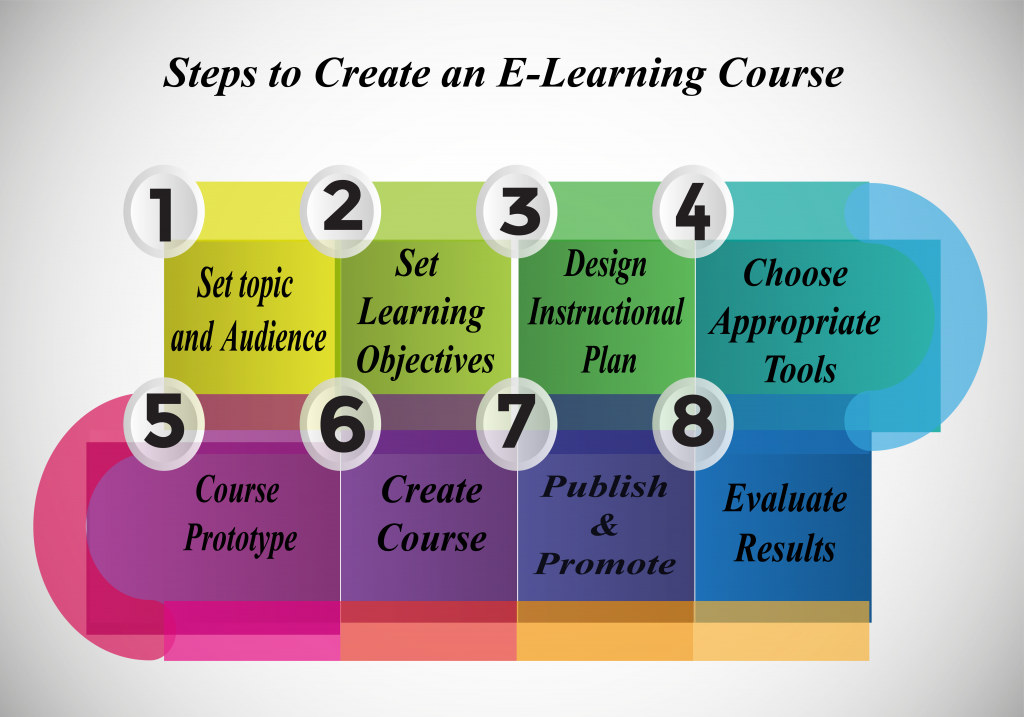
Considering the vast reach of online learning courses, one can independently design modules – a daunting task ultimately made easy in this explanatory blog. Consequently, a step-by-step analysis of the process of creating eLearning courses is summarized below:
Points to Remember while Creating eLearning Courses
1. Analyze the Topic and Set the Audience:
We must note that eLearning typically addresses the gaps in knowledge and helps employees acquire valuable skills. However, it ranks rather low on the scale when a job design plan or a requirement of practical experience is concerned. Companies with dynamic work atmospheres adopt eLearning, and the courses undertaken pertain to product description, code of conduct, software usage, customer satisfaction, and so on. Likewise, retail, banking, and pharmaceutical industries frequently conduct eLearning courses to bring employees up to date with newer requirements on the job.
Knowing the audience allows online course makers to design courses that are relevant, precise, and well-rounded. Surveys, polls, and focus groups within the office or the class generate individual responses about learner expectations from the course, availability, and technical know-how. As a result, this prevents course makers from designing “one-fits-all” modules that leave important gaps in knowledge.
There are several determinants to consider about the target audience before creating eLearning courses:
- Demographics: This involves parameters such as age, educational background, languages spoken, and country of residence.
- Prior Knowledge: An online course may be taken by a small group of learners. Each learner may have varying degrees of prior knowledge. Consequently, an assessment at the beginning of the course is a helpful idea. It informs the designers of specific skills that learners already have. As a result, any and all knowledge gaps are bridged.
- Context: Several psychological and professional factors contextualize a course. Additionally, contextualizing generates maximum learner satisfaction and wide outreach among audiences. Driving questions that help one to decide the context are:
- How much time beyond office/school hours can the learners devote to online learning?
- What are some of the frequent challenges/frustrations in the workplace?
- What are the causes of low productivity, disinterest, or procrastination?
Other factors that help decide the target audiences for creating eLearning courses are learning preferences, group behavior, technical skills, and accessibility.
2. Set the Learning Objectives for the eLearning courses:
To design relevant online courses, it is best to have a comprehensive understanding of learning objectives. Learning deliverables are supposed to fulfill a set of goals by the end of a course. For instance, a statement on the learning objectives of a poetry appreciation course can be –
“By the end of this course, the learner shall be able to critically analyze poetry, measure feet, syllable, and scan for prosodic rhyme. The learner will be able to pinpoint the said text to the specific school of poetry it belongs to.”
This statement at once clarifies the goal(s) of the course for learners to decide whether taking it will benefit them. In the same vein, this set of objectives helps the course maker not stray from the path while designing it.
The SMART mnemonic code helps us to decide on some objectives:
- Specific – specificity of target audience and course outcomes
- Measurable – a variety of means to measure learner progress (tests, quizzes, and peer review)
- Achievable – to ensure that the learning goals are realistic and achievable
- Relevant – the target audience must find the course relevant to their needs.
- Time-bound – can the learners realistically achieve all the teaching goals by the end of the course? The answer decides the necessity of the course.
3. Choose the Appropriate Tools:
The right authoring tools can make or break an online course. The technological know-how of the target audience helps the course maker decide on the tools. For instance, learners with basic technical skills may select an authoring tool with a user-friendly interface and ready templates. On the other hand, a tech-savvy group of learners can adjust to a complex UI, interactive platform, and dynamic simulations. Company budget, software and hardware support, and server maintenance are important factors to consider before selecting the tools.
4. Design an Instructional Plan:
A crucial part of designing an online course is to devise an instructional plan. Most importantly, learners typically do not express interest in a tedious course without audience interaction/participation. At this step, the course maker should consider how to strike a balance between audience engagement and knowledge delivery. Even then we have more to do. The Instructional Plan contains the most effective, engaging, and fruitful method of knowledge dissemination.
If the course deliverable is more fact-based, teachers can represent such knowledge through graphs, charts, and printable study material. However, if the course is about explaining a concept, consider audio-visual content and frequent quizzes to ensure understanding, and encourage e-discussion panels. Instructors may design homework and practice tests in such a manner that they are goal-oriented and evenly spread throughout the course. Above all, coursework should ideally not pile up at the end.
5. Course Prototype:
A task in fine-tuning an online course is prototyping it. Making a prototype entails designing a small-scale version of the course to check its look and feel before launching it formally. This step is a basic simulation task. It checks whether the technical functions are running smoothly, whether the course sequence is correct, and all in all, how promising it looks. Course makers may take the help of other subject matter experts by taking feedback on the prototype before launching it for learners.
6. Create the eLearning Course:
After running a successful prototype that is duly approved, course-makers may take up the task of actually creating the eLearning course. Moreover, one must keep in mind whether the course aligns with the original objectives and take care to design it in a model that enhances learner engagement.
7. Publish and Promote:
After creating an engaging course, contact the marketing team of the said organization to duly promote it. In addition, course makers may promote their work externally through a PR team or adopt an internal promotion plan.
8. Evaluate the Results:
A conscious educator knows that their responsibility extends beyond completing a course; they take learner feedback and measure its effectiveness. In addition, from an end-of-course survey, one may gather valuable tips on how to improve or discern whether the course has delivered on all its objectives.
[Evelyn Learning can help create an eLearning course for you. For more information, click here.]
Creating eLearning Courses: Final Thoughts
To sum up, we have attempted to provide a theoretic guide to creating eLearning courses that are both interactive and engaging. Subsequently, in our next articles on the topic, we shall look into the vast array of eLearning authoring tools on offer today and attempt to draw up a checklist of what makes an effective eLearning course.
References
*Sam S. Adkins. The Worldwide Market for Self-paced eLearning Products and Services: 2010-2015 Forecast and Analysis. July 2011.
Will Erstad. Online By Design. November 2020. Accessed at https://www.rasmussen.edu/student-experience/college-life/quality-online-education-experience/s
For more cues on creating E-Learning courses, visit our blog.
Create. Engage. Inspire
The post Creating an E-Learning Course as per Learner-Needs appeared first on Test.Evelyn.
]]>The post Why and How of Online Tutoring? appeared first on Test.Evelyn.
]]>More learners are opting for online classes and an equal number of people are willing to work as online tutors. However, one needs to consider all the aspects of online tutoring before indulging in it. Refer to this step-by-step guide for getting started with online tutoring, along with some tools/software to effectively manage your online tutoring classes.
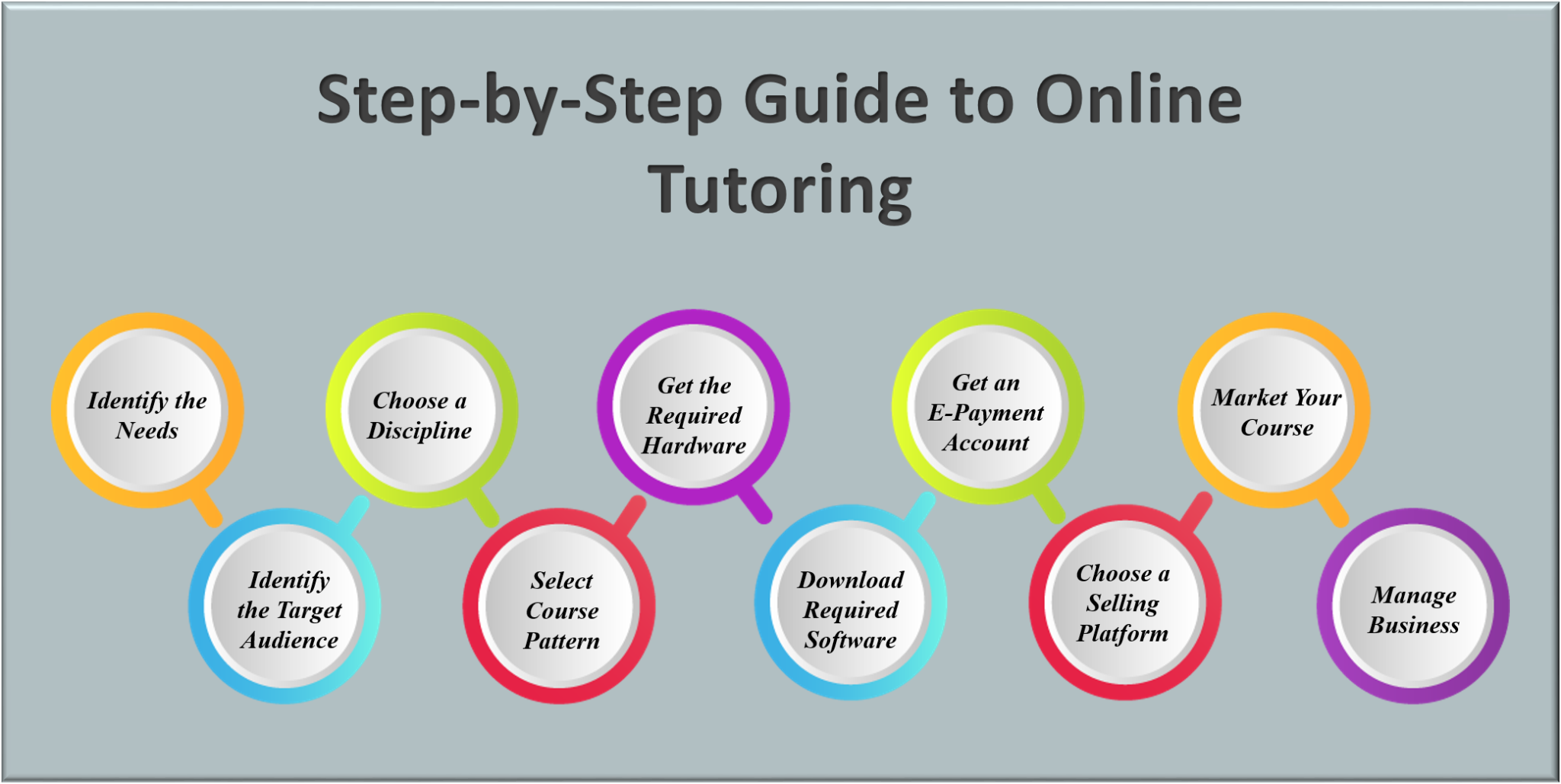
Step-by-Step Guide to Online Tutoring
Online tutoring can be a beneficial part-time job and a lucrative business for the ones willing to devote themselves to it. Here is a step-by-step guide to start with online tutoring.
1. Determine your Requirements
Identify the niche, target audience, skills, and experience needed to begin with a class.
2. Identify the Audience
Perform market research to identify the audience based on various characteristics for designing a program that caters to varied learning requirements.
3. Choose a Discipline
Choose a topic of your interest or an area of expertise in which you can provide classes. Furthermore, you can turn a hobby into a profession with online tutoring.
4. Select a Course Pattern/Model
Determine whether you want to offer video courses or written format courses. Also, choose the format of the course as per your convenience and the time you wish to devote to online tutoring.
5. Get the Required Hardware
A computer, fast internet connection, webcam, and microphone comprise the basic hardware requirements. High-quality equipment with excellent working conditions is best for conducting online classes.
6. Download the Required Software
There are a lot of free softwares available on the Internet that offer video conferencing and screen sharing options. Apart from this, you may also require other software such as on-screen whiteboards for conducting tests, assessments, and other activities to engage learners.
7. Get an E-Payment Account
An e-payment gateway is a must to receive payment from the remote learners in your class. This provides the freedom to collect earnings from learners living far away.
8. Choose a Suitable Platform to Present
After you are done with the initial steps, it’s time to choose a platform to present the course. Here, two options can be considered. Either sign up as a tutor on websites like Udemy and Skillshare or create a personalized eLearning platform by purchasing a domain name for your website.
9. Market your Course
The next step is to market the course. Various social media platforms are the best stages for creating an online presence and promoting a business.
10. Manage
The final step is the management of online tutoring classes. Good management of the course and timing along with proper conduct of assessments can fetch more learners and provide an excellent experience in the field.
Essential Tools for Online Tutoring
The execution of the above-mentioned steps requires certain tools to allow online operations for conducting classes. These tools furnish the tutor’s requirements of video conferencing by providing a real-time virtual class, creating and sharing content & resources, conducting assessment tests, keeping assessment records, and also maintaining contact with the parents/guardians of the learners.
Some software/websites offer an all-in-one solution for online tutors, eliminating the need to download separate software for various online tutoring needs. These tools are available on the Internet with either free access or a minimum paid subscription. Here are two of the best tutoring software providers:
Moodle
This allows tutors to build a personalized tutoring website, create & share resources, design assessment tasks & feedback surveys, and store content for further use.
Newrow smart
This is a cloud-based learning platform for conducting a real-time virtual class using YouTube videos as resources. It also offers screen sharing and recording along with a whiteboard facility.
Some other relevant tools that can be used to facilitate online tutoring are:
- Videoscribe – An alternative to a whiteboard that explains concept through videos
- Storybird – A tool for teaching creative writing
- Artsy – For online art classes
- Kahoot – For game-like learning experiences through highly engaging images and videos
- Otter-ai – For lecture transcription and notes taking
Other popular tools include Camtasia Recorder, Smooth Draw3, and Wacom Bamboo Tablet. These softwares are also used by Khan Academy, one of the most widely used teaching and learning platforms.
Recommendations
The tools and resources mentioned in this blog help set the foundation for an online tutoring business. However, it is recommended to look for alternatives before tirelessly doing everything personally. Some companies hire online tutors and also provide all the resources on a single platform by levying a sizable commission. Such platforms serve as better alternatives for boosting career plans by saving time and energy as this puts a lower strain on tutors while setting the foundation of a course.
Read more about online tutoring here.
Images: Shutterstock. and Freepik
Visit our blog for further reading on Online Tutoring.

Create. Engage. Inspire.
The post Why and How of Online Tutoring? appeared first on Test.Evelyn.
]]>The post A Glimpse into the World of Online Tutoring appeared first on Test.Evelyn.
]]>Benefits of Online Tutoring
- This approach to teaching does not pose any geographic limitations and enables the same knowledgeable tutors who conduct face-to-face classes to administer learning but via new means. Thus, this frees the tutors from having to travel to the tutee’s location, and the sessions can be arranged as per the convenience of the tutee. Also, impromptu sessions in case of doubts or for understanding specific topics can also be easily arranged.
- Online learning is becoming fast prevalent in universities and the job sector. Students opting for online tutoring become familiar with the commonly used online learning tools early.
- With the presence of personal computers and the internet in the majority of households, online tutoring has quickly established itself as a legitimate medium of knowledge transfer. Moreover, various government-officiated tests and exams are now being conducted online. This is a testament to the fact that the internet is now an essential tool for education and learning.
Its Potential Downfalls
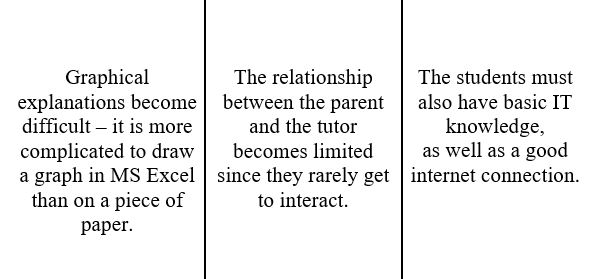
Synchronous v/s Asynchronous Online Tutoring
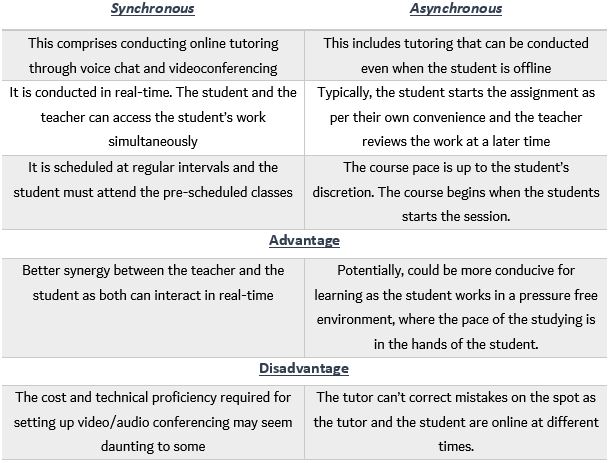
One-on-One v/s One-to-Many Teaching
According to various surveys and studies, most students prefer one-to-one learning as opposed to being taught as a group. However, this comes with its own challenges.
The training that most tutors receive prepares them on how to attend a class. Thus, a one-on-one situation may prove to be uncomfortable. Another problem arises when the relationship between them becomes blurred. This situation occurs when the teacher-tutor interaction becomes familiar since the entire focus of the tutor is on a single tutee.
Conversely, this undivided focus on the strengths and weaknesses of a single student can be conducive to the student’s growth. As a consequence of this focused attention, the teacher is able to tailor the study structure based on a single person’s need, and not to those of a group of unique proficiencies.
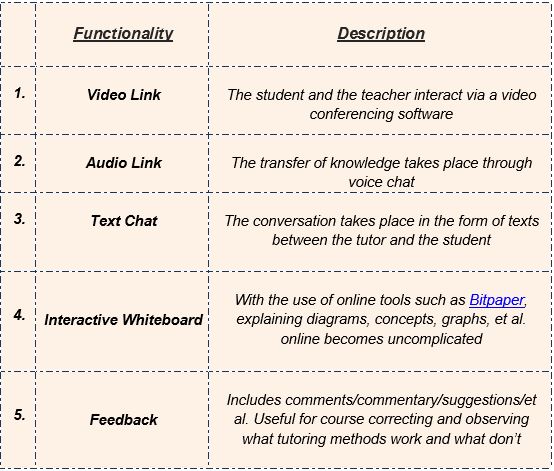
- The relatively recent and reliable presence of certain key technology has added another crucial facet to the ecosystem of online teaching. That facet is Live Online Tutoring.
- Live Online Tutoring entails the student and the teacher interacting in real-time. This ensures that clear communication takes place between them.
- This form of tutoring closely resembles traditional face-to-face tutoring, although it is not a complete education per se.
For further reading, refer this Emerging EdTech webpage for a fascinating insight into the benefits and drawbacks of Online Teaching. You can also read about One-to-One teaching in-depth at this TEFL & TESOL Training webpage.
You can also read our article about the best practices associated with effective online tutoring here.
For further reading related to education methodologies, visit our blog page.
Create.Engage.Inspire
The post A Glimpse into the World of Online Tutoring appeared first on Test.Evelyn.
]]>The post Effective Practices for Online Tutoring appeared first on Test.Evelyn.
]]>The moniker Instructional Designer has to be understood before we enter an in-depth article about Best Practices for Effective Online Tutoring. (You can skip the following section if you’re already familiar with the term.)
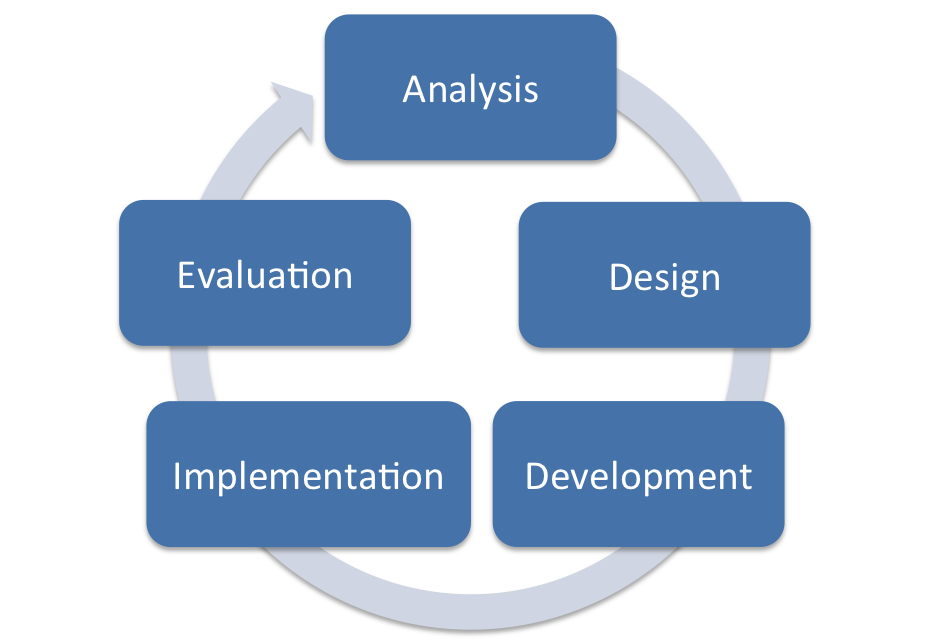
Instructional Designer
An Instructional Design or Instructional System Design is known as a systemized organization of learning material and resources to achieve the desired learning objective and acquisition of knowledge. It is a multistep procedure that involves identifying the objective, to begin with, followed by devising a strategic plan to achieve the same, developing suitable learning material and resources, and assessing its efficacy. An Instructional Design is created by an Instructional Designer.
The key responsibilities of Instructional Designers include:
- Identify the student’s needs and help the faculty set teaching goals.
- Keeping in mind the student’s proficiency and factors associated with effective online tutoring and learning (schedule, study environment, comfort level), they strive to create a fluid course content to keep the learners constantly engaged.
- Work with the respective Subject Matter Experts (SMEs) to help create coursework and assessment tools (quizzes, tests, et al.) that are suited to the needs of the student.
- In coordination with SMEs, design- and tech teams, they ensure that the interactive/multimedia tools used in the online course do not inundate the learners.
- It can be said that instructional designers are the glue that holds an online course together. They must have a cordial relationship with the faculty, the learner, and the support teams as well to ensure that the course is as learner-friendly as possible.
What Makes a Good Online Tutor?
A good teacher, be it online or offline, always has to go the extra mile to make their students grasp every bit of the concept being taught. It is always a little more difficult for the online tutors as they miss the physical presence of the students and cannot monitor their activities in real-time.
- A good online tutor must ensure that an engaging instructional design is created for the students.
- Holding the students’ attention until the end of the session is extremely significant for achieving the best results.
- Employing most, if not all, of the best practices in the lesson plan has proven to be effective in making promising online sessions.
- Among the few listed earlier, the most important, almost indispensable best practice is creating a discussion forum. It enables the students to interact with the tutor and their fellow students through online mediums and get a better understanding of the concept being taught.
Online tutoring is deemed to be the most widely used technique of imparting education in the future. So, the teachers must explore the medium and come up with notable contributions for the betterment of the same.

Best Practices for Effective Online Tutoring
1. Coordinate with an Instructional Designer
Instructional Designers help make the course more attuned to the student’s needs, and they bring the latest teaching methodologies and creative ideas to the table. This helps in incorporating engaging and effective web tools and technologies in the online course. Instructional Designers also play a vital role in connecting all the course content and activities with the learning objectives and goals.
2. Be Student Friendly
It could be the first online course for a lot of students. So, an open and welcoming introduction goes a long way to make them feel welcomed and to maximize learning.
3. Establish Clear Schedule and Learning Objectives
Distinctly specifying the schedule, due dates, and course content helps students create a reliable timetable and allocate time for the online program, and it also promotes regularity. Also, ensure that the course content is aligned with the course goals and assessments. Supplementary exercises and content are good for students who learn at a high pace, but adding additional content may overwhelm certain students.
4. Consistent Online Presence
A crucial expectation from an online tutor is frequent online presence. Ideally, tutors should be present online multiple times a week, the daily online presence being the best. Unless they are told otherwise, students expect the faculty to be online whenever they are, regardless of the time.
5. Employ Synchronous and Asynchronous Activities
Synchronous Learning: Real-time activities (video chat, audio ink, et al.)
Asynchronous Learning: Interaction or activities that do not require the participants to be online at the same time (text chat, recorded audio/video messages, et al.)
Synchronous tools like virtual live classrooms, real-time collaboration tools, and a multitude of web tools and smartphones that support synchronous chat, video calls, etc. have made the online learning experience very similar to the classroom learning experience.
You can read about Synchronous and Asynchronous tutoring in detail in our post: Online Tutoring.
6. Regular Feedback from Students
Regular and early feedback from students helps discern what is working and what isn’t. Moreover, it reinforces important information, skills, concepts, et al. Selecting the most effective method of feedback will make students feel that their say in the course is also heard. This could be done through an online one-on-one video call session, a text forum, a Q&A session, etc.
7. Create a Discussion Forum
There should be an online community where learners can come together and raise their doubts. Additionally, a learning community is great for the growth of students as they interact with each other in real-time and get a chance to develop friendships outside the course. If the students see the faculty put time and effort into the forum, they too will. Most websites recommended checking these discussion boards twice a day. Also, not every comment requires a response, just those which seem well-thought-out and those which may spark further discussions.
8. Pull Content from Varied Digital Sources
Carrying around textbooks feels like a thing of the past for online learners in the present age. They also respond more enthusiastically to readily available digital tools and resources. Thus, this practice motivates students to make the best use of internet resources. For reference, the content in digital format can refer to e-books, simulations, tutorials, et al. Tutorials related to complex engineering, physics, business, and chemistry keep increasing in quality and quantity and are easily available on the internet.
9. Core curriculum + Individualized Focus Learning
Any course worth the salt will have a good mix of core concepts and a progressive set of complex and customized learning activities to help understand and learn those concepts. Additionally, an ideal process of learning concepts requires the use of patterns and relationships.
Tip: Designing personal goals/exercises that are closely linked to the course goals is extremely beneficial for each student individually and as a group.
10. Have a Good Wrap-Up Activity
As the end of the course approaches, students might feel inundated with the amount of work remaining. Thus, a proper schedule and making a list of remaining tasks are great ways to combat this. The course-end sessions should ideally include analyses, summaries, student presentations, and a concise revision of the concepts included in the course. These concluding sessions also serve as a great medium for reinforcing concepts and skills already taught.
And last of all, you should have fun teaching!
Articles from Arizona State University, Stanford University and Brown University were referred while researching this post.
To read other interesting posts relating to technology, education, and research, visit our blog page.
Create. Engage. Inspire
The post Effective Practices for Online Tutoring appeared first on Test.Evelyn.
]]>