The post Universal Design for Learning: A Practical Guide appeared first on Test.Evelyn.
]]>Universal Design for Learning is based on three principles:
- Engagement (taking advantage of learners’ interests and motivations);
- Representation (giving content in a variety of formats);
- Action and expression (offering learners with a variety of ways to express themselves)
Universal Design for Learning is a paradigm for reducing physical and emotional barriers to learning and ensuring that all students have an equal opportunity to succeed. Educators provide information in a variety of ways with UDL. This includes lectures, dialogues, demonstrations, resources, and more. Automatic doors and closed captioning are two instances of how Universal Design for Learning has influenced daily living outside of the classroom.
What is Universal Design for Learning?
Universal Design for Learning is a style of thinking about teaching and learning that aims to provide all students with an equal chance at success. This method allows students to access, engage with, and demonstrate their knowledge in a variety of ways. This method of creating lesson plans benefits all children, but it may be particularly beneficial to children with learning and thinking disabilities.
The purpose of Universal Design for Learning is to eliminate any obstacles to education and provide all students with equal opportunities to succeed. It’s all about incorporating flexibility that may be tailored to each student’s unique skills and needs. That is why this approach is beneficial to all children.

This kind of instruction does not specifically cater to students who learn and think in different ways. However, it can be especially beneficial for the 1 in 5 children who suffer from these problems, even those who have not yet been formally identified. It can also be extremely beneficial to English language students.
Even if one has never heard of the term “Universal Design,” they’ve almost certainly seen examples of it in their daily life. Closed captioning on televisions, for instance, allows those with hearing problems to read the text of what is being said on screen. In the classroom, Universal Design for Learning offers the same level of adaptability. Teachers can effectively teach a diverse set of students by implementing UDL principles. They do so by allowing learners to acquire material in a variety of ways and allowing them to demonstrate their understanding in a range of methods.
Methodology of Universal Design for Learning
Rather than laying out a common approach for teaching everyone, Universal Design for Learning provides an adaptive framework for connecting each student to the learning process. All of this may seem intimidating, and the UDL hypothesis is undoubtedly ambitious. Thankfully, it has broken down its standards into three simple categories that instructors may work with. These are the following:
-
Representation:
Students must first be able to access the resources in order to participate in the learning process. The Universal Design for Learning suggests that information be made available in multiple formats. Textbooks, for one, rely heavily on images. Providing text, audio, video, and hands-on learning, on the other hand, allows all children to access the content in the manner that best suits their learning abilities.
Everyone would have a choice for whatever format they want to study in. Others may prefer a combination of formats to properly cement the concept.
-
Action and Expression:
According to Universal Design for Learning, children should be given multiple opportunities to interact with the material and demonstrate what they’ve learnt. Students can have the option of taking a pencil-and-paper examination, giving an oral presentation, or working on a group project, for instance.
-
Engagement:
UDL urges teachers to explore a variety of approaches to motivate their pupils. Teachers can maintain students’ interest by allowing them to make choices and offering them assignments that are relevant to their life.

Educators accomplish this mostly through connecting themes and activities to the interests of students and allowing them to infuse their excitement into projects. Gamification and clearly defined levels of achievement and challenges are also effective ways to engage pupils in their study. Making skill improvement feel like a game and providing opportunities for pupils to get up and walk around the classroom are two other typical tactics.
Effectiveness of Universal Design for Learning
Moving on, what are the main advantages of implementing Universal Design for Learning in a class, institution, or town?
-
Making Learning more Pertinent:
Universal Design for Learning actively targets students’ desire and drive to learn. It does this by making knowledge more relevant to students’ interests and daily activities. This can assist learners become more engaged in the learning process. At the same time, this also reinforces their knowledge and inspires them to continue studying throughout their lives.
-
Accessibility:
The flexibility and variety of UDL are its most major advantages. It is possible to alter activities and materials to account for everyone’s strengths and weaknesses. As a result, learning becomes more accessible and pleasant for everyone.
-
UDL Supports Various other Research-based Learning Methodologies:
Universal Design for Learning is not incompatible with other methodologies and practices. It incorporates and supports many modern research-based techniques to teaching and learning. This includes collaborative learning, blended learning, multisensory teaching, and student-centered learning, to mention a few.
-
Low Cost:
A UDL curriculum is designed from the start to match the needs of the entire class. This eliminates the need for costly, time-consuming, and after-the-fact curriculum changes.
-
Empowerment:
Universal Design for Learning empowers both teachers and students. It provides a framework for teachers to adapt material to the learner rather than forcing the learner to adapt to the material. This is a significant result since it allows the entire classroom to take control of the instructional format and, as a result, be more effective.
-
Taking Control over your Education:
UDL gives students the expertise and technologies they need to select the best learning options for themselves. There is little spoon feeding, and educators encourage pupils to take care of their own learning. This also allows children to evaluate their individual learning needs and figure out how they absorb information most effectively. This is critical for academic and professional success.
Concluding Remarks
Educators know that their learners have a diverse range of interests, backgrounds, and talents in any class. They can approach the subject in a variety of ways if they plan with this range in mind. Information is frequently delivered in multiple media with Universal Design for Learning, including text, audio, and hands-on activities.
Universal Design for Learning is a viable approach as it helps you foresee and plan for all the students from the beginning of the class. It can assist an educator in ensuring that all students, not just a select few, have access to and participate in learning. To acquire a more accurate picture of what students know, it urges teachers to give a variety of examination forms, such as oral presentations and group projects. It also seeks for new ways to keep students engaged.
Image Sources: Shutterstock and Unsplash
For more information on Universal Design for Learning, visit our blog.
Create. Engage. Inspire.
The post Universal Design for Learning: A Practical Guide appeared first on Test.Evelyn.
]]>The post Adaptive Learning in The Classroom appeared first on Test.Evelyn.
]]>As mentioned in our previous article, Adaptive Learning systems provide personalized learning experience for students by first adjusting to their learning styles and paces. Following this, instructional designers perform unique course sequencing and evaluation methods. In this way, educators can secure equitable learning on a scale of 100-200 pupils per class. This article explains how to start implementing Adaptive Learning in the course curriculum.
-
Designed Adaptivity
Using this method a teacher designs the course, sequences its components, and includes assessments to guide learners through the learning process. The system operates based on the instructor’s design and accordingly offers feedback to students based on a variety of parameters called the Adaptivity Factors. To clarify, these factors have been described in-detail here.
This method tells the technology what alternative course content to offer in unique situations following the “if-this-then-that” approach. For instance, if a student is facing difficulty grasping the concept of Bubble sorting technique in Java, then the system directs them to more quizzes on coding bubble sort rather than pushing them towards the next content (i.e., selection sort).
Consequently, this method rejects linear course sequencing, provides remediation to struggling students, and brings up advanced materials for educating learners. It gives the teacher much needed agency and control over the learning process so as to ensure equity in teaching.
-
Algorithmic Adaptivity
A method in which one or more algorithms answer the following two questions:
- What previous knowledge does the learner have?
- What should they learn next?
Based on these answers, the algorithm can adjust the path and pace so that students learn the right thing at the right time. One benefit reaped from adaptive learning as emphasized on our previous blog is that it respects and utilizes learners’ prior knowledge.
One such algorithm, for instance, is Bayesian Knowledge Tracing (BKT) which measures such parameters as the probability of students demonstrating a skill correctly or incorrectly, and other such parameters.
Adaptivity Factors
In order to personalize the syllabi, adaptive learning systems take a variety of inputs about the learners. These factors help the system/educator adapt to learners’ styles and needs and these are called Adaptivity factors. Some common adaptivity factors are:
-
Performance
Measuring a learner’s accuracy over a series of tasks, sequenced in an increasing order of difficulty.
-
Content preferences
Discerning whether the student learns better with audio-visual content or prefers printed material.
-
Demographics
Collecting a learner’s background information: where the learner has grown up, their cultural background, and other such data points contribute to their prior knowledge. For instance, a learner based in the US is expected to excel in a module on US polity while a student hailing from another country might need added course material.
-
Level of knowledge
Checking the level of mastery/skill demonstrated by learners in various topics.
-
Misconceptions
Evaluating the learning prejudices or misconceptions that might be embedded in learners.
-
Behaviour
Discerning how long learners take to complete a test or what their feedback was of the same.
Education technology uses a combination of any of these adaptivity factors to readjust course sequences. For instance, a combination of Misconceptions and Demographics is chosen, and the system then tests a learner’s gaps in learning due to misconceptions, and aims to fill them by offering alternative reading lists and/or tutorials.
Since Adaptivity factors generate unique responses from each learner, they enable educators to re-route the learning experience by taking into account the learners’ experiences, instead of blindly moving forward with a set course structure.
Overall Method in which Adaptive Learning Works
The overall learning algorithm involved in Adaptive Learning has been shown below:
Adaptive Content
[Students answer questions along with feedback as to why they chose that option]
Course Sequencing
[Continuous analysis of student feedback and skills to reorder what the student learns next]
Adaptive Assessment
[Changing questions based on the student’s responses to the previous ones. The difficulty will increase if the students have been answering with ease. If they have been struggling, the questions will get easier]
Research Report
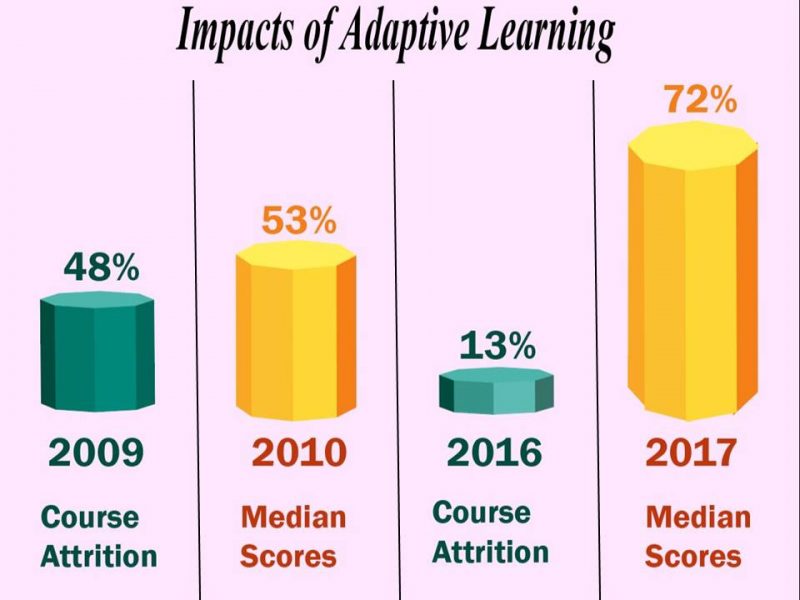
A five-year study conducted at the University of California, Los Angeles revealed the real-life benefits of Adaptive Learning. Scholars incorporated an interactive interface called Courselets as a resource where instructors collaborated to design courses. The algorithm measured Misconceptions and Course attrition when compared between traditional lectures and Adaptive Learning. To clarify, course attrition refers to the pressure experienced by learners that compels them to lose potential and interest in learning.
The results of the study were:
- Median score measured at 53% increased to 72% over a 5-year stretch
- The course attrition decreased four-fold, from 48% to a staggering 13%.
The following chart illustrates how Adaptive Learning systems dramatically improve academic performances:
Final Thoughts
Just as the said statistics suggest, numerous advantages are attached to the adoption of an adaptive learning technique in an institution. Implementing Adaptive learning opens up opportunities for individualized learning experiences, where students stay on focused pathways and work at their chosen pace.
The post Adaptive Learning in The Classroom appeared first on Test.Evelyn.
]]>The post Best 07 Assessment Tools for Teachers appeared first on Test.Evelyn.
]]>Effective conduct of formative assessment thus becomes a precondition for evaluation. For this purpose, a variety of assessment tools for teachers are available on the Internet. These tools contain pre-designed formats and are easy to operate.
This blog incorporates the top 7 assessment tools for teachers that can help design effective assessments.
(Refer to our article on Formative vs Summative Assessment for more information on both the types of assessment.)
Socrative
Socrative is an online assessment tool available for free. It is useful for conducting in-class quizzes, viewing student responses in real-time, and generating results. Also, it facilitates pre-class testing to help the teacher discern the prior knowledge that the students possess about a topic.
Moreover, Socrative allows the teachers to create customized quizzes and to add images and explanations along with the answers. After the students complete the quiz, the results can be downloaded in a variety of formats for sharing with the students, as well as for the teacher’s personal record. Additionally, the results work as feedback for the teachers who use it to modify teaching techniques for better learning outcomes.
Kahoot
Kahoot is a game-based learning and assessment approach with more than 100 million games for every subject. It is available in multiple languages and is also used for corporate training. Kahoot has an easy to use interface for young students. It facilitates the creation of quick quiz games along with the ease of importing questions from spreadsheets, or from the Kahoot question bank that contains millions of questions.
Moreover, there is an option to add drawings to the quizzes using an iOS device along with YouTube videos. So, a combination of mini Kahoots can be converted into a larger Kahoot to create a larger assessment.
Additionally, the user-friendly interface allows students to plan assessment games by themselves or as a team. Teachers can later add multiple choice questions or true/false statements to the games. Also, the games are timed and points are awarded according to the parameters set by the teacher.
Kahoot is available for free and contains additional paid features.
ProProfs
ProProfs online assessment software is one of the best tools for creating online quizzes with automated scoring. It allows quick creation of online assessment tests with more than 100,000 ready-to-use questions available in the question bank in a variety of forms. Also, it has more than 100k customizable assessments that are easy to edit. As a result, there are no chances of unauthorized access or cheating during the test.
Moreover, this software allows teachers to automate grades and scores along with instant feedback for better learner engagement. This feature helps track the performance of individual learners.
Along with this, ProProfs also provides customizable certificates as rewards that help increase learner participation.
Easy LMS
Easy LMS is a paid software that caters to all the educational and corporate training needs. This tool is available in 24 different languages, with a dashboard available in 11 languages. This feature makes for a handy tool to create customized online assessments. Moreover, it has an easy to use interface that does not require technical skills to operate.
Furthermore, it gives a customized feel to the training by allowing the user to change logos, colors, and fonts.
ExamSoft
ExamSoft is a professional approach to online assessment. Unlike other assessment tools, it is a complex software that demands professional skills for operation. ExamSoft is a considerably powerful software that delivers fully customizable assessments.
Moreover, the availability of numerous randomized questions eliminates the chances of cheating during the assessment.
ExamSoft has an easy accreditation process that guides improvement in curriculum and exams. The powerful data insights guide the student and provide feedback in the areas of strength and weaknesses in the understanding of the concepts.
GLIDER.ai
GLIDER.ai uses advanced machine learning and AI technology to create assessments. It is a revolutionary tool that gives meaningful insights into the performance of the learners. Although it might seem complicated due to the use of AI machine learning, the actual user experience is relatively hassle-free.
Moreover, its easy-to-use interface and effective functioning makes it a perfect solution for creating assessments for students as well as employees.
This assessment tool is fully automated with advanced features that allow teachers to create effective assessments in no time. Also, it has several question types to choose from, making it one of the best tools to create interactive assessments.
iSpring Suite
iSpring Suite is a powerful toolkit to create complete and complex interactive assessments. The vast potential of this toolkit allows teachers to create courses within minutes with a drag and drop facility.
Additionally, iSpring Suite gives critical insights into student behavior and performance. This helps the teachers to modify strategies to improve results.
The options to add video narration, polls, quizzes, and screencasting are also available. All these features make it an ideal tool for teachers to create effective online assessments.
Creating interactive assessments within the lowest time possible is of utmost importance to teachers. The top 7 assessment tools for teachers mentioned above can help them ace the assessment game.
Furthermore, online assessments give the same level of results and feedback as physical assessments. Thus, they act as a comparatively easier and more effective alternative to in-class assessments that are easy to develop using these software recommendations.
Referred Articles: Careermetis, Shakeup Learning
Images: Shutterstock
For more informative content, visit our blog.

Create. Engage. Inspire.
The post Best 07 Assessment Tools for Teachers appeared first on Test.Evelyn.
]]>