The post Emerging Technology is an Intersection of Humanity and Technology: Brad Waid on AR/VR appeared first on Test.Evelyn.
]]>This is how Brad Waid is encouraging everyone to utilize digital technology to its best advantage.
In recent years, virtual and augmented reality have gained popularity in education. Students have shown interest in learning because of AR/VR.
A report conducted by ResearchGate and drafted by E. Demirtas, “Reality Technologies and Use in Education” mentioned some exciting facts about virtual reality.
According to this report, the market for VR reached $5.5 billion in the year 2019. However, it is expected that, by the end of 2026, the VR market will reach approximately $18.6 billion.
Students and teachers are inclining more towards online learning than traditional ones, as tech-based learning provides students with an opportunity to understand difficult concepts in a fun and interactive way.
Since the pandemic, there has been an immense increase in the usage of technology in education. This fact has been highlighted by another research report published by Research Gate in the year 2022.
The report features a graph representing the AR/VR users in the United States. There were nearly 60 million users of AR and 35 million users of VR in the year 2018. But, during and after the pandemic hit the entire world, there was a drastic increase in the number of AR/VR users. By the end of the year 2022, AR users had crossed the mark of 95 million, while virtual reality users were more than 60 million.

Graph Representation of AR/VR Users in the United States 2018-2022
We had the pleasure of speaking with Brad Waid in our series “Ed-Insights by Evelyn.” He discussed the changes in student learning that have occurred in recent years due to the inclusion of technology in education.
Brad is an award-winning emerging technology leader, international keynote speaker, educator, and author. He is a visionary who specializes in AR/VR/XR, machine learning, and artificial intelligence.
Brad is recognized as one of the top 20 global futurists and keynote speakers by TAFFD. Furthermore, he is also recognized as the #14 influencer in augmented reality (AR) by Onalytica worldwide.

Brad Waid appeared on our 4th episode of Ed-Insights By Evelyn. Watch the Full Interview here.
The blend of technology and education has increased in recent years. Can you give us some examples of the fundamental changes in student learning due to the inclusion of AR/VR in education?
I’ve seen two radical changes in student learning. One of the changes came around 2011-12 when the iPad was introduced. The introduction of the iPad threw a wrinkle in education. We got access to tools, which have now completely changed what we are doing. The second and most important change is the expectation that students will use technology in education. They are using online learning platforms such as phones, tablets, and laptops as part of their online learning sessions. Nowadays, students don’t know a world without devices. They don’t know a world without technology.
The inclusion of AR and VR in education has made students more engaged in their learning. Traditionally, teachers used to lecture to share all the information about a particular topic. Eventually, students had to memorize that information and respond.
You may like to read about: Influencing the Future of Education with AR/VR
Now, we have a lot more integration of technology in education. The method of teaching has also changed. Teachers share an idea and then students have to research and investigate it. The change that we are seeing is a jump from simple memorization to an active approach to research and coming up with unique ideas.
Do you think it is a concern that we might replace actual books sometime in the future?
I don’t believe that AR/VR is going to replace all books because nothing can replace a classic book. But at the same time, what an ordinary book is used for might change. Reading something motivational, informative, fiction, etc., would still be done with a traditional book.
What augmented reality in education can do is add a digital representation. Imagine you’re reading about a museum in a textbook. Now, with the help of AR, instead of just reading about that museum, you can look at the artifacts in the museum, check its size for scale, and also read a little history about it. augmented reality is not going to replace a book, but it can enhance the classic books we use in education.
What is your idea about what lies beyond 2022? Are we looking forward to some exciting newer trends or better technology in 2023?
AR/VR is starting to take a foothold and it’s being used all over the world. The two big things that are coming shortly are artificial intelligence and metaverse. Both AI and metaverse will come under a blanket of Industry 4.0.
Industry 4.0 will defeat the traditional way of learning and teaching. This change would inculcate curiosity among students by shifting the responsibility of learning from teachers to them.

Inclusion of Technology in Education is Inevitable and the Key to Moving Forward
AI and metaverse are starting to cause some more wrinkles in modern education, but I’m always going to look at their benefits. Students would use AI as a tutorial that will help and assist them. Moreover, metaverse is going to have an impact on students’ learning. However, it’s not going to give them an environment where they can explore. Still, it’s also going to be a new place for students where they can meet people from all over the world.
AI and metaverse are the two big things that we will see in the future. They are already here but will be further developed for better use in education.
Would you like to give a message to our audience?
I want to encourage everyone to use technology in a way that will benefit humanity. Automobiles, airplanes, computers, etc. are built for the welfare of humankind. Teachers should be open to new technology and try to understand it more with the help of their students.
“Embrace the technology and use it. Whether you’re a teacher or a student, or you’re in the industry, try to use technologies like virtual and augmented reality in a way that will benefit humanity”.
Students can play a big role in helping us understand emerging technology and also assist us in moving forward. They are the ones who took us into this new world. We are living in a great time where modern technologies like AR/VR can help all humankind.
The post Emerging Technology is an Intersection of Humanity and Technology: Brad Waid on AR/VR appeared first on Test.Evelyn.
]]>The post Gauging Student Knowledge Using Bloom’s Taxonomy and DOK appeared first on Test.Evelyn.
]]>Educators must use the most effective teaching pedagogies and types of assessments to help the students learn and succeed.
Comparison of Bloom’s Taxonomy and Depth of Knowledge.
Bloom’s Taxonomy and Depth of Knowledge are theories that guide ways to assess student learning. These are like standards that help teachers worldwide assess students on common parameters.
Bloom’s Taxonomy is a framework for categorizing educational goals and objectives based on their level of complexity and specificity. It was first introduced by Benjamin Bloom in 1956 and has since been updated and modified by other educators.
Bloom’s Taxonomy levels
There are six levels of bloom’s taxonomy
Level 1: Remember
Assessments in the remembering level are intended to check the student’s knowledge of the recently learned concepts and to know if they can recall what they have learned.
Level 2: Understand
Assessments in the second level of Bloom’s Taxonomy take recalling what was learned to the next level. It evaluates if the student can describe the learned concepts in more detail and in different ways.
Level 3: Apply
In the next level of Bloom’s Taxonomy, the teachers can gauge the students’ knowledge through their ability to practically apply it in real-life situations and solve problems using the concepts.
Level 4: Analyze
In the fourth level of Bloom’s Taxonomy, teachers can assess the student’s understanding of the various variables within the concept. The students are asked to analyze, classify and explain the relationship among the different parts of the learned concept.
Level 5: Evaluate
At the evaluation level, the assessment is based on the idea of understanding the students’ ability to make decisions and judgments based on the problems and situations of a learned concept. The student should be able to evaluate the lesson’s thoughts and uniquely critique their understanding.
Level 6: Create
In the last level of Bloom’s Taxonomy of learning , a student is assessed on the ability to create something new out of the learned concept. For example, a student can be asked to create a thesis statement or a new music composition, draw, organize, or produce a new piece of art.

Each level builds upon the previous one and represents a different level of thinking and cognitive complexity.
Levels in Depth of Knowledge
Depth of Knowledge, or DOK, is a framework that categorizes the complexity of cognitive processes that students must use to answer questions or complete tasks. DOK ranges from level 1, which requires simple recall of facts or information, to level 4, which requires students to engage in complex reasoning and analysis.
The four levels of Depth of Knowledge are:
Level 1: Recall
The first level assesses the student’s ability to recall information and lessons learned in classrooms.
Level 2: Skills and Concepts
In the second level of DOK, the teacher assesses the deeper understanding of the concept by asking them to answer various questions which use the knowledge of the learned concept. The students can be asked to do basic reasoning using the concept and compare the information.
Level 3: Strategic Thinking
In the third level of DOK, a student’s advanced skills of conceptual understanding are used to create situations, critical thinking, and problem-solving.
Level 4: Extended Thinking
In the extended thinking level, the student has the knowledge to use the concept to create a different idea, prove a situational impasse, critique the idea, and apply the concepts.

Concept: Webb, Norman L. and others. “Web Alignment Tool” 24 July 2005. Wisconsin Center of Educational Research. University of Wisconsin-Madison. 2 Feb. 2006.
Guidelines to use Bloom’s Taxonomy and Depth of Knowledge for creating Assessments
Using both Bloom’s Taxonomy and DOK together can help teachers create more effective lesson plans and assessments, as they can more accurately gauge the levels of thinking required of their students. For example, a level 1 question might ask students to recall a fact or definition, while a level 4 question might ask them to analyze, evaluate, and synthesize information from multiple sources.
Evelyn has created several assessment sheets and worksheets to help gauge student knowledge.
Evelyn developed the following worksheet, which is drafted so that teachers can check the memory of the lesson taught in the class. The questions in the worksheet are created to assess the remembering power of the students.

The Math worksheet below is an assessment that helps to gauge the student’s understanding of the concept. The stage from Bloom’s taxonomy concept is ‘understanding’; the worksheet is a level 1 question from the DOK’s concept.

Incorporating Bloom’s Taxonomy and Depth of Knowledge into Classroom Learning
One way to incorporate Bloom’s Taxonomy and DOK into classroom instruction is through learning objectives. Teachers can understand what a classroom wants and draft the learning objectives accordingly. These objectives can guide a teacher on how they want to pursue their lessons and how they would assess the students’ learning.
Learning objectives should be clear and specify the needs they are intended to meet. A well-written learning objective should be specific, measurable, achievable, relevant, and time-bound (SMART).
By incorporating Bloom’s Taxonomy and DOK into the learning objective, teachers can create goals targeting specific thinking and cognitive levels of complexity.
Assessment is another area where Bloom’s Taxonomy and DOK can be helpful. Teachers can use both frameworks to create assessments that measure students’ knowledge and understanding at different levels. This helps teachers identify areas where students may need additional instruction or support.
Another way to use Bloom’s Taxonomy and DOK in the classroom is through open-ended questions and tasks. Open-ended questions allow students to engage in higher-level thinking and can help them develop critical thinking skills. Similarly, open-ended tasks require students to use various cognitive processes to complete them successfully.
Conclusion
Incorporating Bloom’s Taxonomy and DOK into classroom instruction can help teachers create effective lesson plans and assessments and gauge student knowledge and understanding at different levels. Using both frameworks, teachers can ensure they provide their students with opportunities to engage in higher-level thinking and develop critical thinking skills. Ultimately, this can lead to better student academic outcomes and a more effective and rewarding teaching experience for educators.
The post Gauging Student Knowledge Using Bloom’s Taxonomy and DOK appeared first on Test.Evelyn.
]]>The post What is Homeschooling and other FAQs appeared first on Test.Evelyn.
]]>Kirk Cameron is an actor, filmmaker, and the maker of the documentary. He says, ‘this movie is a deep dive into the normal lives of American homeschool families who are on the mission of putting faith, family, and freedom back into learning.’
Now that sounds serious and like an upcoming movement!
Homeschooling gained traction during the pandemic for obvious reasons. But what intrigues us is that it has still not gone back to the pre-pandemic levels. This means that parents are not backing out of homeschooling. They are still unsure about sending their children back to school. They actually like it this way!
It has been this way for quite some time, except that the reasons may differ now. For example, parents in earlier cases may have homeschooled their children for religious or pecuniary reasons. However, they prefer Homeschooling now, even when they can afford to send their children to these schools.
What is Homeschooling?
Homeschooling is not a new concept, but it is demanding the limelight now. To homeschool children is to educate them at home with tutors or parents, without sending them to public or private schools. It is an exciting notion to keep your children away from school. Parents can teach them whatever they feel is good and important for their children.
The idea of Homeschooling was put forth approximately in the 1970s by John Holt, an educational theorist. He had an ideology of teaching children at home for the first few years of their academic life. This ideology came from the traditional school system fatigue, a system where memory and stressful learning were common. He urged the parents to ditch the regular school system and homeschool their children. His ideology spelled that the automobile of education can be chosen, but the paths of schooling can be different.

Homeschooling for children can be self-paced and stress-free.
Why do people homeschool their children?
The US Census revealed that the number of parents who homeschool their children increased by 63% in 2020-2021. Data finds that some of the parents who had homeschooled their children during the pandemic are considering continuing it even after the reopening of schools.
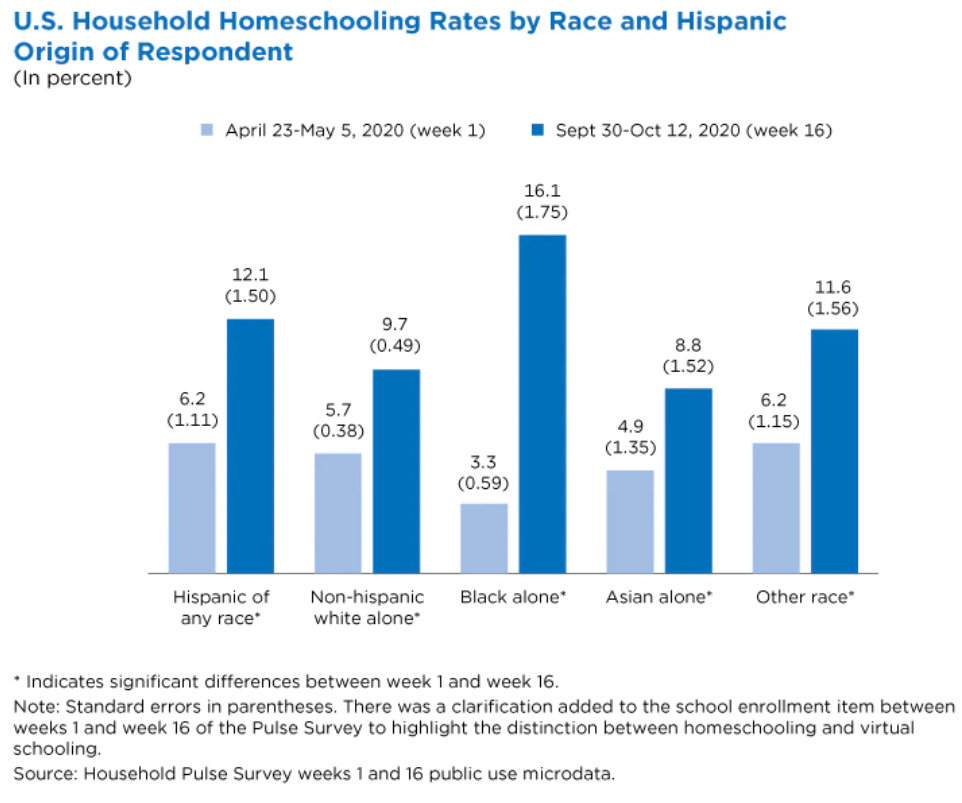
Source: US Census
The trend shows that not all parents are happy with their children’s schooling. Be it sex education, SEL education, or any other part of the general curriculum, parents want to take control of what their children learn in their lives, including knowledge about their faith and history.
Homeschooling parents keep their children out of typical school life for multiple reasons, some of which are:
- Disliking the school curriculum and teaching methods
- Financial burden of expensive schools
- A desire to spend more time with kids and get travel flexibility too
- Keeping kids away from bullying or discrimination at school
- Religious reasons
What homeschool programs can parents use to teach children?
Homeschool families consider the world to be their children’s school and life to be their curriculum.

Parents can also give social values to their children effectively
Homeschooling parents need to be aware of the state laws before they can start teaching their children at home. They can consider what kind of curriculum they want for their children. For example, biblical learning like Bob Jones homeschool curriculum or a free, online one like Easy-Peasy curriculum.
Parents can find homeschool coops to interact with families with similar homeschool interests and take help from one another.
Some parents can teach their children, and others can hire dedicated homeschool educators. Families can either purchase or create a homeschool curriculum through different resources. Some agencies and online platforms act as resource pools having the courses and curriculum for grades ranging from kindergarten to high school.
Ed-tech companies also play a pivotal role in homeschooling children from remote areas. Online Ed-tech platforms like Study.com help provide tutors, online courses, and video lessons that help in distance learning.
Are Homeschooled children less social?
Kirk Cameron, through ‘Homeschool awakening,’ advocates that homeschooling is not just reasonable but also healthy for children. He believes that there is nothing a child cannot learn at home in the presence of their family.
Pro-homeschool parents feel that their children are not learning in a restricted campus environment, as it is in everyday schools, but in a real-world environment.

Homeschool co-ops are becoming popular and help students to socialize
They interact with members of their families, neighbors, friends, and other people, and the question of becoming antisocial is practically irrelevant to them.
Learning Pods
Learning pods are like micro-schools. Homeschool families create small groups of their own to share learning experiences and cross-teach or hire a facilitator to teach their students the same subjects. It relieves the parents of the burden of teaching all subjects to their children, increases their socialization time with same-age groups, and helps kids learn from subject experts.
Is Homeschooling the Best for Our child?
When it comes to children, everyone wants to have the best school, the best food, and the best life for them. This is a natural parental desire. Parents are beginning to realize what they want their children to learn and not what the government-recommended syllabus is.
On the other hand, many parents feel that what the public schools teach is suitable for their children and their guidance. They do not have the time or the influence to take the entire school education of their children into their own hands. These parents believe that if they did well after learning in school, their children would too.
Which way of schooling should be given depends on multiple factors. As we said before, there is not just one way to education!
The post What is Homeschooling and other FAQs appeared first on Test.Evelyn.
]]>The post Pedagogical Practices To Suit Various Learning Styles appeared first on Test.Evelyn.
]]>To Begin, what exactly are Learning Styles?
Almost all educators would be familiar with the concept that everyone has a preferred method of absorbing knowledge. Students will learn more easily if an educator teaches them in their chosen style. This concept has been around since the 1970s and well-intentioned teachers and dedicated students who want to learn effectively still carry it forward. It is no wonder that everyone wants to learn faster and more efficiently.
Unfortunately, there is no convincing proof that there are different learning styles.
In truth, the best evidence points in the opposite direction. The notion that people perform best when trained in a way that corresponds to their unique “learning style” — Auditory, Kinesthetic, Visual, or a combination of the three — is generally dismissed. According to multiple studies, learners do not profit from their own learning style. Teachers and students have different ideas about what learning styles work best for them, and we have no insight into how much we learn from various approaches.
The Myth of Learning Styles
Every student will differ in terms of skill, interest, and prior experience, but not in terms of learning styles. According to research, when people have a favorite style of presentation, it is typically for a task or topic in which they have a high level of talent and already feel good.
One may think they are an Auditory learner if they are good at music, or a Visual learner if they are creative. While one can prefer a certain method of learning, there is no proof that it can help them learn more effectively.
The myth of learning styles appears to be as widespread as ever. The learning styles paradigm can also be harmful to education in a variety of ways, according to various previous studies. Even though all students will profit from learning by multiple methods, educators expend time and money tailoring lessons to specific learning styles for different students. Even if it will not help them excel, students study in ways that correspond to their perceived learning style.
However, it is not obvious why educators want to believe in them. It is possible that the theory is heavily reinforced during teacher training; it is also possible that teachers are dealing with their students in the same way that their teachers interacted with them. Alternatively, it is possible that efforts to dispel the theory have become close to zero, struggling to reach educators.
Best Teaching Practices to Suit Various Learning Styles
Educators are well aware that no two students are alike, and that there is a wide range of learning styles. As a result, an educator’s teaching style may have a significant effect on a student’s ability to understand and comprehend. This is why teachers must be familiar with a variety of learning styles.
Is Shawn’s preferred method of learning pictures and graphics? It is possible that he is a Visual learner.
Is it true that Kevin learns best by attending seminars, asking questions, and engaging in group discussions? He may be an Auditory learner.
Is it more convenient for Jack and Katie to collect knowledge by reading, taking notes, and writing reports or essays? They may be Reading/Writing learners.
What about Joel, for instance? She is very hands-on and seems to love disassembling and reassembling items in order to learn by doing. It is possible she is a Kinesthetic learner.
That is one common breakdown of the learning styles continuum, but it is by no means the only one. Most teaching types fall into one of two categories: Teacher-Centered or Student-Centered. Here is a breakdown of the differences between teacher-centered and student-centered instruction:
• Teacher-Centered Approach:
The Teacher-Centered approach to education is a teaching style that views the teacher as the authority in charge of imparting information to students through lectures or direct instruction. Students are passive actors or “empty vessels” in this approach (also known as “sage on the stage”). They listen and absorb information.
This Teacher-Centered approach to teaching is the most common, but it is not always the strongest. And, as educators learn more about how to involve students of all learning styles, the teacher-centered approach is becoming less common.

• Student-Centered Approach:
The Student-Centered approach is a teaching style that fosters greater harmony between the instructor and the student by allowing both to participate in the learning process. The instructor is often referred to as the “guide on the side” in this strategy.
While the teacher retains authority, he or she is more likely to serve as a facilitator, coaching and assisting students in their studies. This method promotes student autonomy while also allowing students to engage with one another. Under the student-centered approach to teaching, there are a few styles to consider:
• Approach Based on Inquisitiveness
Students lead the way and receive instruction from their teachers in this Student-Centered learning style. Moreover, this approach promotes flexibility, autonomy, and hands-on learning.
• Approach Based on Co-operation
Cooperative learning is a Student-Centered method of instruction that emphasizes group work and social development. The cooperative model, like the inquiry-based style, promotes individuality and hands-on learning, but places a premium on peer-to-peer collaboration and culture.
Many teaching resources categorize the best teaching styles into the five key categories mentioned below:
1) Authoritative or Lecturer Style
The Authoritative teaching style is based on the conventional Teacher-Centered approach. This includes lecture sessions and one-way presentations. Students are expected to pay attention, process information, take down notes, and ask questions in this approach (also known as the “chalk and chat” style).
2) Coach or Demonstrator Style
The Demonstrator style, which is common in math, science, and music, emphasizes “showing” rather than “telling,” with teachers more likely to back up their points with examples, tests, demos, or multimedia presentations.
3) Activity Style or Facilitator
The facilitator/teacher is focused on encouraging students to learn for themselves and assisting them in developing critical thinking and learning skills. It is a Student-Centered approach that entails designing learning plans. It includes classes that enable students to explore and discover course material in unique and innovative ways.
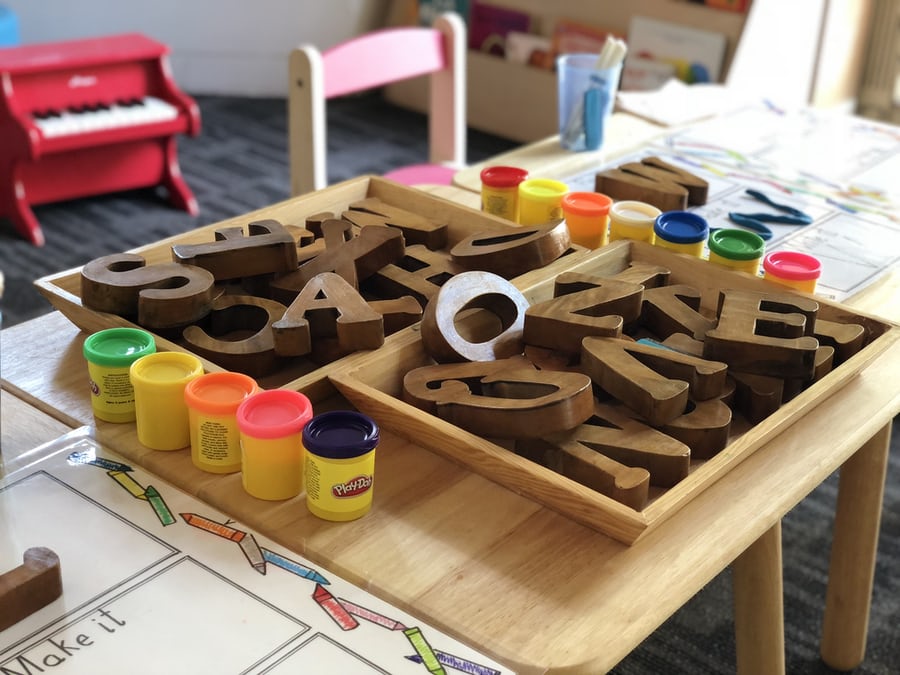
4) Group or Delegator Style
The Delegator style of teaching is well-suited for curricula that include or emphasize group activities, as it places much of the responsibility for learning on the students, who are motivated to collaborate on projects related to the lesson themes (think science labs, debates, etc.). The instructor is an involved spectator in this style, guiding students in the right direction.
5) Blended or Hybrid Style
The Hybrid approach combines elements of the above-mentioned models, often blending the teacher’s personality and interests with the students’. While this method is considered inclusive because it allows teachers to adapt their teaching styles to the needs of their students within the subject matter, some educators claim it risks diluting the learning process by putting less emphasis on in-depth research than a single, concentrated approach.
Final Thoughts
The aim of the discourse above is not to categorize the organic practice of classroom teaching into tidy categories. We do not wish to label educators as one “type” of teacher or another, but rather to investigate various methodologies in order to improve our collective understanding of the teaching experience.
It all comes down to getting to know the students and using the respective skills and intuition to figure out the best ways to involve individual students and whole classes with the curriculum. What works for one student or community may or may not work for another.
That is why, in order to be the most successful instructor possible, educators must have a clear understanding of the various student learning styles. They must have a solid grasp of the various teaching styles and strategies available.
Image Sources: Shutterstock and Unsplash
For more information on different teaching practices, visit our blog.
Create. Engage. Inspire.
The post Pedagogical Practices To Suit Various Learning Styles appeared first on Test.Evelyn.
]]>The post Ways To Boost Your E-Learning Course appeared first on Test.Evelyn.
]]>Technology used to be flat and one-sided, and it could not efficiently communicate subjects. New innovations now make it possible to reach and engage learners. However, these latest developments have also revealed new challenges.
Courseware is frequently overly complicated, with confusing text, pictures, links, and graphics, a lack of continuity and clarity in the learning message, and navigation that is much more complicated than appropriate. All of this makes it difficult for students to concentrate, understand, and learn what they want. Students become disengaged, unmotivated, and uninterested in their online learning as a result.
When careful attention is paid to the seemingly minor details that are too easy to overlook, the standard of online learning courses has boundless potential for development and evolution. Educators can follow these basic and effective rules to quickly boost their e-Learning courses and build the best e-Learning courseware.
1) One idea, one screen
Since the course designer incorrectly assumes that fancy design contributes to more successful e-Learning, some e-Learning course screens seem to be a jumble of ideas and concepts. In reality, it is the polar opposite. A course’s screens can only express one concept at a time. This Rule of One keeps the student centered on the most critical concepts one at a time and helps boost the e-Learning Course.
2) Keep it simple (visually)
One must remove any unnecessary graphics, photographs, and text from their online learning materials, restricting them to just a few pieces that are well-structured, appropriate, high-quality, and neatly organized. When classes become difficult, visual aids such as graphs and charts provide the opportunity to choose more over less. Otherwise, choosing white space over needless and distracting clutter is a reasonable rule of thumb to boost ab e-Learning course. One may use headings, bullet points, and short paragraphs for a clean visual structure that allows online learners to easily locate important things within the document.
3) Make it easy to navigate
Learners should be able to work through a course independently. Arrows, icons, and buttons are examples of navigational aids that must be thoughtful, practical, and easily recognizable. Navigating a course should be similar to navigating a road: it should be straightforward and easy to follow so that one can concentrate on the task at hand.
4) E-Learning video teasers
Consider how much a trailer for a film excites us. A teaser attracts the viewer by showing clips from the film’s most entertaining or noteworthy scenes. This straightforward approach can also be used to promote e-Learning and boost one’s e-Learning course. Educators can create a video teaser that focuses on what the e-Learning course will be like and how it will help learners boost their results.
5) Include self-assessment.
Teachers must enable students to self-assess their learning by providing opportunities for them to do so. Allowing students to score their own discussion posts or contribute to their own grade for course participation can be rewarding since it encourages students to take ownership of their learning and hence helps educators boost their e-Learning course.
6) Providing incentives and rewards
Who does not want to be rewarded? Here is an example of how one can use incentives to boost their e-Learning course: instructors can build a fast learning game or prepare a quiz based on the e-Learning course. They can inform the workers that the first fifteen employees who sign up and play the game will earn prizes, discounts, or vouchers. This method of rewarding students also promotes word-of-mouth publicity.
7) Setting time constraints rather than slide constraints.
Or, to put it another way, quality over quantity. The total number of slides in a course does not imply usefulness if the content on those slides is poor. Instead of a slide quota, one can build a course with a time limit. Learners can become disengaged if educators use slides that have no meaning. Setting a time limit will help one to boost their e-Learning course as it allows people to get down to the point and stay on task.

8) Importance of social interaction
E-Learning allows students to communicate on a variety of social media channels. To involve the students and boost their e-Learning Course, educators can use social media. To help create a sense of classroom community, one can add a Twitter badge to their course homepage. They can also use a hashtag to push tweets with course-relevant content to their students.
In order to socially engage users, educators can consider using embedded audio and video, chat rooms, instant messaging, broadcast text messaging, and homepage announcements. Furthermore, creating explanatory screencast videos has become increasingly simple and inexpensive, providing yet another communication platform.
9) Rather than text, use visuals
Teachers can transform a long, complicated text into a visual representation of the data. Could one, for instance, use a flow chart, video, or infographic to illustrate a process that is described in the text? Visuals promote thought and assist in the solidification of ideas that might be lost in vast blocks of text.
10) Corporate Newsletters
A newsletter is a good way to boost an e-Learning course and raise awareness about the training one is providing. The good news is that no matter what, every employee has access to the weekly/monthly/bi-monthly/quarterly/annual newsletter, which makes it a good place to advertize. One may provide information on the upcoming training in a given location in the newsletter. The promotional material for the e-Learning course in the newsletter, including posters and infographics, should walk a fine line between text and visuals so that workers can scan it easily.
Concluding Remarks
We have designed these online learning tips to increase online learners’ participation and inspire them to get the most out of their courses. Although some of them can seem obvious, they are often the overlooked—but crucial—’small’ or ‘simple’ specifics that make or break a course’s performance. Focusing on increasing interaction rather than only providing content transactionally would improve the consistency of a course’s message. This will ensure engagement and, eventually, retention.
We cannot overstate the importance of marketing and spreading the word about the advantages of online learning to students. Well-designed promotional campaigns attract more students to enroll in the course, ensuring long-term sustainability and profitability for the company. So, one must keep these ten simple e-Learning promotion strategies in mind in order to boost their e-Learning course. Educators can tell learners what they are getting into and how online learning will help them perform better, and their e-Learning enrollment rates will skyrocket.
Image Sources: Shutterstock and Unsplash
For more information on boosting and marketing an e-Learning course, visit our blog.
Create. Engage. Inspire.
The post Ways To Boost Your E-Learning Course appeared first on Test.Evelyn.
]]>The post Top 5 Interactive E-Learning Tools appeared first on Test.Evelyn.
]]>Mentioned below is a list of five of the best e-learning resources, namely:
- Google Drive
- Tomato Timer
- Trello
- Mural
- Elucidat
Whatever your position, you’ll find something useful here. The tools will definitely help make your training go a little more smoothly.
1. Google Drive
Our preferred method of cloud storage is Google Drive. Most importantly, Google Drive offers a stable and central location where every team member can access the files they want at any moment. Further, they can easily do this even though while operating in various locations around the world.
Why is it an excellent e-learning tool? Many members of e-learning teams work from home, work in various offices, or travel regularly. Therefore, Google Drive is essential in ensuring that team members have immediate access to the latest version of a file. This helps avoid the delay and potential for misunderstanding that email chains can cause.
In addition, account managers can need access to booklets and instructional documents stored on Google Drive. The documents and data could be from e-learning conferences or perhaps other remote areas.
2. Tomato Timer
Tomato Timer is a website and app dedicated to helping people overcome procrastination and better control their time. Moreover, the creators have used the Pomodoro Technique to create the Tomato Timer.
This method uses a timer to divide work into 25-minute cycles separated by brief breaks. This is to say that the app is straightforward to use. You can even personalize your timer.

Why is it an excellent e-learning tool? First, the stages of preparing, monitoring, and recording are crucial to the technique. As a result, Tomato Timer becomes an excellent productivity e-learning tool.
Moreover, Tomato Timer also gets bonus points for encouraging information retention. We consider going back to review after taking a break a successful method of combating the forgetting curve.
3. Trello
Trello is an incredibly simple project management app that makes getting organized a pleasure. Most importantly, the Kanban method forms the basis of Trello’s approach. It manages development processes using a simple visual order.
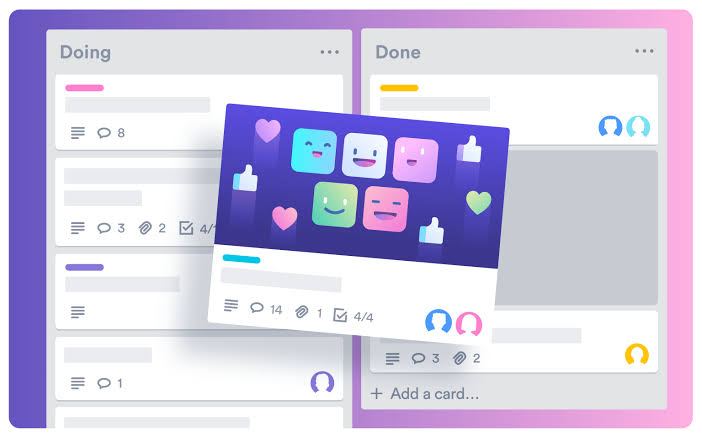
Why is it an excellent e-learning tool? They typically involve a variety of stakeholders in e-learning initiatives. To clarify, Trello makes it much easier to organize everyone’s contributions. It helps keep track of the progress of various projects.
Further, Trello has a variety of project management tools, such as cards, lists, boards, and color coding. Only those taking part in the particular project can receive updates. In addition, relevant team members can be easily attached to cards. Trello works particularly well with a variety of instructional design methods.
4. Mural
E-learning programs, such as course content curation, necessitate the participation of a diverse group of people. Above all, Mural is an excellent program for organizing, sharing, and developing ideas. Mural is a communication and brainstorming concept board. It allows teams to collaborate and exchange ideas from anywhere. Consequently, it is ideal for companies with multinational offices or remote staff.
Mural makes it easy to keep track of tasks and programs. Likewise, you can also create storyboards and other visual elements using Mural.
Why is it an excellent e-learning tool? Most importantly, Mural helps team members in visually contributing to an e-learning project. They can easily gather all details in one location. As a result, this is perfect for e-learning workers who can’t always be in the office or must travel frequently.
To sum up, Mural eliminates confusing email threads and boosts collaboration. It allows team members to communicate and exchange ideas in the same place.
5. Elucidat
Elucidat makes it simpler for ambitious teams to produce large-scale digital learning. Above all, businesses will adapt to change faster – and smarter. They will have a completely cloud-based e-learning authoring platform.
You will encourage experts to share their expertise and offer employees access to learning on any device with Elucidat. Additionally, Elucidat assists businesses in reducing costs and improving efficiency across the board. This works well for everything from product training to enforcement.
Why is it an excellent e-learning tool? Firstly, Remote e-learning team members will collaborate more easily with Elucidat’s built-in analysis and commenting features. Further, it is also ideal for instructional designers and course developers who need to create online learning content. The content thus creates loads quickly and works across a wide variety of browsers and devices.
Parting Thoughts
Many organizations are trying to do more with less resources to bring training to their teams as soon as possible. Certainly, 2021 has changed the e-learning landscape for these companies.
In conclusion, for creating entertaining, meaningful training while juggling time and money, choosing the right e-learning tools is critical. The versatility of the best e-learning tools shown here overlaps a lot. However, your needs–such as the quality and scale at which you want to deliver digital learning–will help you narrow down your options.
Finally, only your requirements can truly determine the right e-learning software for you and your team.
Image Sources: Shutterstock and Unsplash
For more information on interactive e-learning tools, visit our blog.
Create. Engage. Inspire.
The post Top 5 Interactive E-Learning Tools appeared first on Test.Evelyn.
]]>The post Tips To Use Animation In E-Learning Courses appeared first on Test.Evelyn.
]]>E-Learning is extremely beneficial because it is more immersive and allows for the presentation of knowledge in motion. It may also assist learners in easily comprehending and remembering challenging subject matters.
Animation has the ability to inspire one’s imagination and take them to fantastical realms, from favorite Disney characters to breathtaking Anime works of art. It does, however, have a much more practical use. In reality, animations can be a useful e-learning tool for creating an emotional bond with online learners and getting them excited about the e-learning process. The use of animation in e-learning is becoming increasingly common. Using a random animated video, on the other hand, does not work and will harm an online course. Spend a few minutes here before taking some action to learn how to properly use animation in e-learning.
-

Benefits of Using Animation in E-Learning
The variety of ways in which we can use animation in various situations will astound you. Let’s look at some of the advantages of using animation in an e-learning module:
1. Animation is Fun to Watch.
Engaging the learner is one of the most important objectives of any training material, module, or course. Without commitment, it’s unlikely that the learner can grasp the material or acquire the necessary new skills. As a result, it’s critical to include such content in e-learning courses that boosts interaction. This is something that animations can help one with. Rather than reading a page or two of text, most people would rather watch a cartoon.
2. Students are Often Familiar with Seeing Animations.
Animations would be familiar to the students who complete an e-learning course. They come across them on social media, the internet, when shopping, and in the content they consume, among other places. This familiarity eradicates barriers between the learner and the course material, allowing them to become more engaged in the course.
3. Encourages a Constructive Outlook on Future Preparation.
The students would be more interested and able to learn new ideas in the future if they know their training is engaging. The use of animation enhances the overall learning experience.
4. The Best Way to simplify Complicated Information
This is one of the most important advantages of animation in general, and it definitely extends to e-learning. Sounds, speech, on-screen text, static pictures, graphs, moving images, and calls to action are all easily includible in a single animation. This enables one to concisely and clearly describe even the most complex of subjects to learners.
5. It’s Useful for Quickly Explaining Information and Ideas.
Following up on the previous point, the various elements present in an animation help learners grasp details more quickly than many other types of content presentation.
6. Highly Effective at Establishing a Tone
When compared to other types of material, adding animation to your e-learning course makes it much easier to set the right tone. It is difficult, for example, to encourage learners to adopt a new idea, motivate them to improve their performance, or persuade them to change their behavior using text or an image. This is much easier with animation, especially when it comes to sounds and voice overs.
In e-learning animations can bring complicated or boring topics to life, enriching the learning experience. Most importantly, they aid in improving training course outcomes. To put it another way, animations will assist one in achieving their goals and thereby have a positive return on investment. They are a strong teaching tool, even though they aren’t appropriate for all e-learning modules.

- Tips for Including Animation in E-Learning
Tips for Using Animation in E-Learning
While animation is one of the best practices in e-learning, one must use it correctly in order for training to be successful. So, here are few pointers to keep in mind in order to have a better learning experience.
1. Select Elements that Elicit the Appropriate Emotion.
In e-learning, animations are only successful if they express the appropriate emotion or sound. A lighthearted e-learning animation won’t convey the seriousness of the situation if a writer is dealing with serious subject matter, such as bio-hazards or hazardous equipment. Instead, they should use a more intense and convincing cartoon, such as an animated e-learning character that demonstrates the cleaning process and instructs them on how to put on the proper safety equipment. It’s crucial to remember that every aspect of an e-learning animation will affect its mood, from the background music and sound effects to the e-learning script. As a result, all of these elements must be in sync with the objectives and relate to the emotional environment.
2. Use Animation in a Consistent Manner.
It’s important to use animation consistently in order to maximize training effectiveness. This aids in the creation of an easy-to-understand course while also preventing learners from becoming distracted from their learning objectives. Besides that, one should pay the same attention to their animation as they do to their online training’s complementary color scheme and fonts. This will aid in the promotion of continuity, resulting in a stronger learning experience.
3. At a Time, Concentrate on just One E-Learning Character or Subject.
Since educators don’t have any restrictions for e-learning animations, they can quickly become messy or confusing. With the right animation method, one can construct virtually any e-learning character, scenario, or environment; however, they should concentrate on one e-learning character or subject at a time. Don’t include facts or e-learning characters that aren’t important to the situation, such as giving your protagonist’s backstory or referring to secondary e-learning characters who aren’t involved. Additionally, one must limit the number of moving images or graphics in their e-learning animation. Busy screens can only confuse online students and divert their attention away from the main point.
4. Give the Students the Ability to Monitor the Animation Video.
Giving the learners the ability to monitor or pause and play an animation video at any time will help improve training effectiveness. Without a doubt, not all students will be able to sit through the animation video presentation in order to achieve the learning objectives. Some of them may be busy with their jobs and have only a small amount of time to devote to the course. As a result, allowing them to monitor the animation if a distraction occurs will help them achieve the learning objectives. Also, at the start of the online training, make sure you give them specific instructions on how to control the animation video.
5. Try to use Audio and Visuals Together.
If educators don’t use audio, such as background music or narration, even the most entrancing and convincing visuals would fall short. Audio has the ability to immerse online learners in an emotional ambiance. It also clarifies any misunderstandings regarding the e-learning animation. An audio narration, for instance, may explain why an e-learning character is responding the way they are or describe their inner thought process. Also keep in mind that some of the online students can speak English as a second language or have hearing difficulties. As a result, they’ll need text, such as captions or subtitles, to help them remember what they’ve learned.
6. Allow Students to Take a Breather.
Many of the online students would not have the time to watch the entire animated online presentation or e-learning operation. This is particularly true for on-the-job e-learning learners. As a result, educators make it simple for them to pause, rewind, or quick forward the e-learning animation at any time. If they get distracted, they may easily press the pause button and resume when they have more time. Also, at the start of the e-learning animation, they can include specific instructions about how to use the playback control buttons so that there is no misunderstanding.
Final Thoughts
There are no specific guidelines for how to use animation in e-learning. These guidelines include an overview of the benefits of video styles and how to incorporate them into your course. Furthermore, you could mix and match multiple styles to get the best of each. Animations will improve the interactivity, engagement, and emotional focus of your eLearning course. Animation in e-learning will assist you in creating an entertaining and immersive online training that matters. To maximise the efficacy of your learning, follow the tips mentioned above!
Image Sources: Shutterstock and Freepik
For more information on Animation in e-learning, visit our blog.
Create. Engage. Inspire.
The post Tips To Use Animation In E-Learning Courses appeared first on Test.Evelyn.
]]>The post Online Learning appeared first on Test.Evelyn.
]]>Online Learning is a broad umbrella term that we apply to any kind of education that happens over the Internet. Online courses may follow synchronous or asynchronous modes of instruction. E-Learning is a popular trend in learning, and it involves complex information and communication technologies such as Moodle, MOOCs, Virtual Reality, and others. Above all, Online learning is significantly more beneficial than traditional learning because students can learn in their chosen time, proceed at a comfortable pace, and learn from anywhere in the world. Learners may choose to take an online course for a variety of reasons:
- as enrichment courses to acquire skills such as marketing & PR, writing or public speaking courses
- in the form of full-fledged graduate/post-graduate courses under popular universities to earn degrees via distance learning
- as training courses for honing the skills required at the workplace such as pedagogy for teachers, customer service, lead generation, and others
Top Platforms Today
Currently, a plethora of online learning platforms exist. They boast of robust Learning Management Systems (LMS) that help learners track their progress, provide progress reports, and allow institutions to upload study material for remote access. Moreover, these platforms also offer several free courses while other advanced courses are paid and certified.
According to a Forbes survey dated April 2020, the top three online learning platforms today are Udemy, Skillshare, and Coursera. These platforms and others (LinkedIn Learning, Edx, Teachable, LearnWorlds) offer thousands of online courses pertaining to areas of business, writing, photography, history, mythology, literature, and music to name a few. Users can learn in their native languages and download study materials offline from most of these platforms.
Implications in the Education Scenario
With the advent of web-based learning, the role of a teacher has undergone a change. Rather than posing as the “sage on the stage”, they are becoming a participant along with the students in a dynamic learning atmosphere. A teacher in an online setup is more like a “guide on the side”. What is happening in effect is that the top-down approach is being replaced by collegial pedagogy. The philosophy of online education can be categorized under three broad headings:
Constructivism
Just because online learning takes place on mobile devices, it does not mean that group projects are not involved. Learning over the Internet is essentially a group effort. In this respect, constructivism dictates that the students share ideas and construct knowledge together1. Unlike traditional teaching where students are involved in passive learning, online education permits them to take control of their learning and become active learners who co-create their knowledge.
Constructionism
It emphasizes on the importance of constructing something for others to critique or experience. In an online course, learners are frequently asked to create something of meaning, such as an original essay/slideshow/photograph, which is then analyzed by their classmates to invite discussion, criticism, and also to foster deeper understanding.
Collaboration
Instead of notes being handed out in a class, online learning operates in a two-way mode. Learners interact with the learning systems via simulations, quizzes, polls, and storyboards. These are individual as well as group activities. In this way, online learning ensures that the knowledge is a fruit of collaborative effort and that each student enrolled in the class gains mastery equitably.
Types of Online Learning
Based upon mode of instruction, Online Learning can be categorized under three broad headings:
Synchronous online learning
In this mode, instructors conduct real-time classes that students from all over the world attend. Synchronous classes are conducted in the form of webinars/videoconferencing. This technique emphasizes student-teacher interaction; they communicate via audio and video and through online chats. This is the most popular form of online education as it strengthens the teacher-student relationships. Therefore, it comes closest to the look and feel of a traditional classroom.
Asynchronous online learning
In this mode, there is no real-time interaction between the instructor and the learners. Students can learn at their chosen time at a comfortable pace. The entire coursework is uploaded to a cloud-based platform (for instance, Google Classroom, MOODLE, and others). Schedules, assignments, and tests are available for learners to take at any time and pass the course. In this regard, asynchronous learning is more student-centered as it provides them more control over their learning.
Blended online learning
This mode features a combination of online lectures several times throughout the course and the availability of course material. Consequently, this is a hybrid mode that allows for real-time classes and also asynchronous learning. The instructor ideally reserves the online classes for the explanation of concepts and the clarification of the learners’ queries. And the assignments and tests are uploaded in a course management system (CMS) for students to access whenever they wish to.
With regards to various types of Online Learning, a quasi-experimental study2 revealed the following:
- In a contrasted study between blended learning and synchronous learning, learning outcomes are usually comparable across both.
- Educators can enhance Online Learning by giving learners some control over their interactions with embedded media in the courses.
- When groups of students learn together (collaborative learning), tools such as guiding questions, quizzes, and polls generally influence how they learn, but have no overall effect on the amount of learning.
The Present State of Online Learning – a Case Study
Organization: US Department of Education
Methodology: 1) Contrasting between online and traditional education.
2) Measuring the learning outcomes.
3) Using a rigorous research design.
4) Providing adequate information to track an effect size.
Key Findings:
-
- Students who took an online course performed better than those taking the same course offline.
- Effect sizes were greater for online courses where there was collaborative effort or teacher-intervention than in the ones where students worked independently.
- Variations in the modus operandi of Online Learning did not affect learning outcomes significantly.
- The effectiveness of Online Learning is evident across learning styles and content types.
So the takeaway from the above case study is simple: Online learning trumps traditional methodology in terms of wide reach, flexibility, and popularity. However, teacher intervention remains crucial in online education despite teaching roles having undergone a radical change in this mode. Owing to several benefits, its growth has been substantial and rapid. To clarify, let us refer to this set of statistics about the growth of Online Learning.
- 63 percent of institutions surveyed said that online learning was certainly an essential part of their future strategy.
- Almost 30 percent of all enrollments now are in online courses.
- Nearly three-quarters of institutions report that the economic downturn has increased the demand for online courses and programs.
- More than three-quarters of academic leaders at public institutions report that online instruction is as good as or better than face-to-face instruction.
- The reported year-to-year enrollment changes for fully online programs by discipline show maximum growth, but with a sizable portion seeking steady enrollments.
References
https://learn-u.com/lesson/piagets-constructivism/
https://www2.ed.gov/rschstat/eval/tech/evidence-based-practices/finalreport.pdf
Allen, E., & Seaman, J. (2010). Class Difference$: Online Education in the United States. (From http://sloanconsortium.org/publications/survey/class_differences.)
For more ideas on Online education, refer to our blog.

Create. Engage. Inspire.
The post Online Learning appeared first on Test.Evelyn.
]]>The post Effective E-learning Tools: Determinants and Options appeared first on Test.Evelyn.
]]>What are Authoring Tools?
Authoring tools are applications that help design eLearning courses. Authoring tools contain crucial instructional tools, templates, and audio-visual aids to take forward the process of online learning. Popular examples of authoring tools are WordPress, Adobe Captivate, Active Presenter, and others. Currently, there are two primary authoring tools in the eLearning industry:
- Desktop apps: These are available as applications on the web that can be directly installed on a computer, and most of them work offline. PowerPoint add-ins are unique desktop authoring tools that enhance the functionality of PowerPoint and are available exclusively within that software.
- Cloud-based apps: Most new authoring tools are cloud-based. Instead of occupying space on a computer, these apps operate over the cloud and are dependent on a fast internet connection. Another advantage of cloud-based authoring tools is certainly that the course-makers can design content remotely.
If we design courses on interactive platforms and incorporate media, assessments, and animation, they will engage learners. This article, therefore, aims to guide course-makers through the vast array of authoring software based on their features and usability.
Determinants of Choosing an Authoring Tool
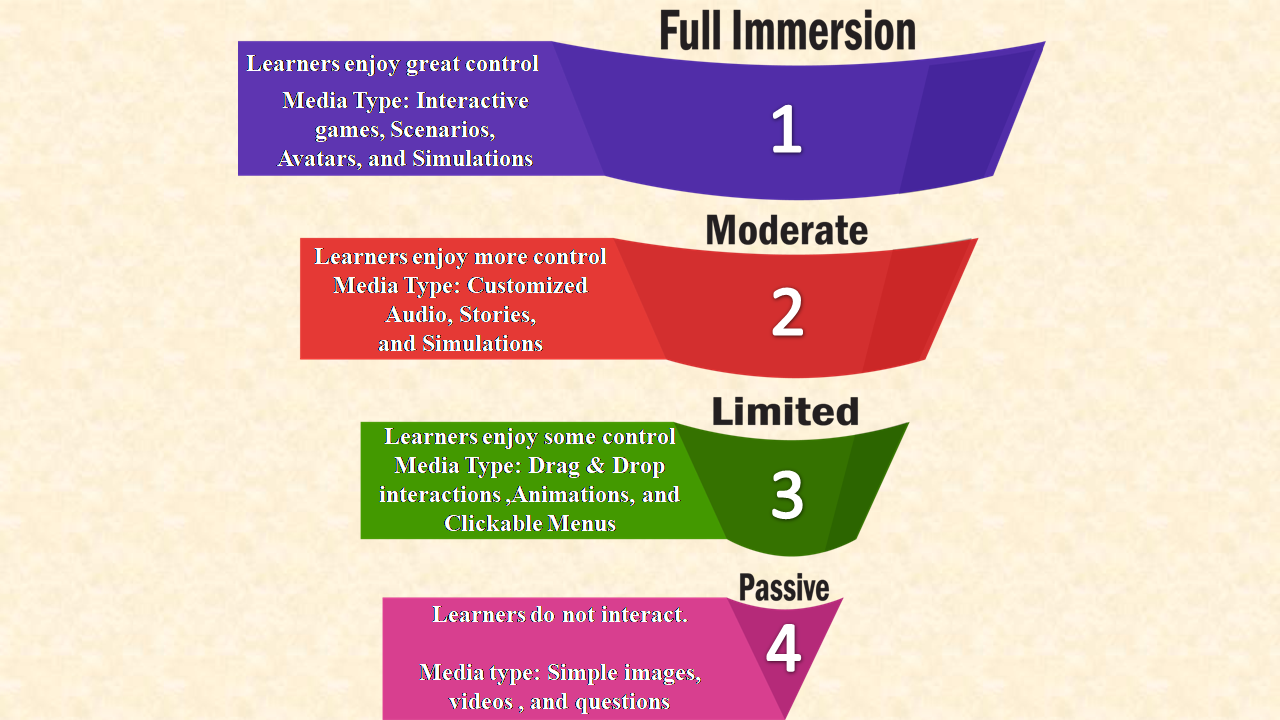
- Level of Interactivity: Online education should essentially be dialogic learning, that is, there must be an exchange of ideas between the instructor and the learners. This enables learners to form original ideas, track progress, and provide feedback. Learner interactions take the shape of quizzes, simulations, and videos; all of which assess knowledge. Course-makers typically decide on the level of interactivity that an eLearning module should incorporate. Ranging from passive engagement to maximum interaction, there are four levels of interactivity. The diagram below summarizes them:
2. Budget and Ease of Usage: It is crucial to consider how much money is going to be spent while purchasing a specific authoring tool. Therefore, to avoid incurring losses with the purchase, one must weigh in the following points:
- Which features are on offer?
- Does the software have built-in templates and audio-visual aids?
- Is technical support readily available?
- Does the company offer tutorials and other resources to enable ease of usage?
A recent review report of costs and pricing run by PcMag showed that among the most expensive eLearning tools are Elucidat and Shift eLearning, whereas software like Camtasia and Active Presenter are comparatively inexpensive, with a host of free features.
The usability of software is additionally determined by the availability of resources, readymade templates, and video tutorials. All of these certainly allow technologically inept users to design courses with ease. For starters, choosing software that have a convenient user interface (UI) is recommended. However, other tech-savvy course-makers may want more creative control. In that case, they may opt for software that offers a complex and customizable user interface, where the user controls every aspect of the product.
3. Publishing Format: A novel feature of online learning that tells it apart from traditional learning is the option to upload content over an LMS (learning management system). To clarify, the obvious advantage of LMS is that remote learners can access assets and also keep a track of their learning without geographic barriers. While selecting the right authoring tool for an online course, we must consider whether we will be uploading the course to an LMS or make them available personally to clients. Finally, to publish the course to an LMS, a software that permits publishing to SCORM, TinCan API, or AICC is necessary.
Some eLearning Authoring Tools Suited for Different Purposes
A curated list of authoring tools according to a variety of media requirements, for instance, graphics, assessments, audio, and so on, is available below.
Free Software for Graphics:
Graphics cover charts, infographics, or visual aids. The use of informative graphics can effectively make a course come alive. Some of the best free graphics tools ordered according to the ease of usage are:
- Canva: Create collages, charts, marketing promotions, or infographics with their easy-to-use software.
- Easel.ly: Design and share visual infographics online.
- Gliffy: Create up to five public diagrams, flowcharts, or charts a month for free.
- Google Charts: Turn the data into powerful charts and graphs.
- Pixlr: Edit any photos or graphics for free.
Free software for audio:
Audio tools allow users to record, mix, edit, and also to download audio clips. We can add them to eLearning courses to enhance the power of text-heavy courses. Some free tools, for instance, are:
- Ardour: To record, edit, and mix audio files on all platforms
- Audacity: This software has been in the market for years due to its resilient build. In the same vein, it is an open-source recording, editing, and sharing tool.
- Voki: Incorporating speaking characters into teaching courses is made easy with customizable avatars on offer at Voki.
- vozMe: An immensely useful text-to-speech tool
Free eLearning tools for animation:
To make eLearning courses come alive, animation is the key. Incorporating video clips is also a great idea to elucidate complex ideas. Some popular choices in this domain include:
- Camtasia: Videos are created using their drag-and-drop video editing tools. Moreover, special effects and graphics can be added to them.
- Screencast-O-Matic: It allows the recording of voice-overs of up to 15 minutes for on-screen activities or short tutorial videos.
- Snagit: It enables the creation and editing of videos or converting them into GIFs.
Free eLearning authoring software:
Some exceptional authoring tools allow the creation of customized eLearning courses. A few of these software provide all the necessary tools. For instance, screen casting, adding videos/images, including interactive features, publishing options, and others.
- iSpring: It links PowerPoint presentations to learning management systems or content management systems to publish them.
- Easygenerator: If users do not wish to buy a paid subscription for this software, the free option allows users to create up to ten online courses that come with pre-installed packages and the option to publish over cloud.
- Udutu: It offers a host of options, such as ready templates, assessment tools, interactive features, and the option to convert courses to the SCORM format. Moreover, this eLearning tool is absolutely free.
- LCDS by Microsoft: It offers users Microsoft Silverlight Learning Snacks, which is a free browser plug-in that offers interactive media experience, business, and mobile applications.
Our previous blog “steps of creating e-learning courses” in the eLearning archives sets out precise objectives that every online course should be able to fulfil.
To explore more about e-learning, visit our blog.
Create. Engage. Inspire.
The post Effective E-learning Tools: Determinants and Options appeared first on Test.Evelyn.
]]>The post Creating Video-Based Educational Courses appeared first on Test.Evelyn.
]]>Steps to Create a Video-Based Education Course
Step-1: Identify the Learning Goals
Identification of the learning goals is the first step for creating a video-based course or lesson. Educators must first determine what the learners wish to achieve through a lesson/course. This helps identify the appropriate teaching methodology that aligns with the teaching and learning goals.
Educators can also consult a subject-matter expert or a graphic designer for professional advice on creating a video-based course.
Step-2: Choose the Correct Authoring Tools
To use the video-based education method, educators must be familiar with different authoring tools and their use. These authoring tools assist in creating digital content for various purposes. They also allow educators to develop various forms of digital content with ease. This digital content covers everything from a simple MS Word document to video lessons on complex STEM concepts. Thus, choosing the correct authoring tool that enables video editing along with screen recording becomes essential.
Several authoring tools on the Internet offer these features for free or with a minimum fee to access certain features. For instance, Camtasia Recorder allows educators to create different types of videos with pre-built templates. It also provides video recording and editing. Khan Academy uses Camtasia Recorder to create and edit educational videos.
Other options include SmoothDraw3, Articulate 360, Adobe Captivate, Lectora, and so on.
Step-3: Provide Instructions in Chunks
An average learner’s attention span is about 8 seconds, which is a short period. Expecting young learners to sit for a 90-minute video lesson is out of the question. Also, learners find it difficult to follow a large set of instructions in one go. A well-organized class with crisp and meaningful chunks of information works better to engage learners.
Moreover, learners prefer several small videos instead of a single long video. Some platforms that offer video-based learning include Khan Academy, Lynda, Udemy, Coursera, TED-Ed, and more.
Step-4: Build Video-Ready Slides
Presentation is the key to engaging learners. It provides better learning outcomes as learners immerse themselves in the learning process. Educators often use digital means to supplement in-class learning. However, presentations are not sufficient for video-based education because the supplementary material contains more textual information, which the teacher explains. However, in video-based education, educators do not involve themselves directly in the class. The entire process of learning takes place through on-screen videos. Thus, it becomes difficult to capture learner attention with text-only slides. Therefore, educators must include more visuals and other interactive elements like quizzes and puzzles instead of text.
For instance, a science lesson on Resonance Structures of Benzene containing visuals that include chemical compound structure is easier to understand than just plain text. Text-only information on such complex topics can confuse the learners. Also, learners are likely to be uninterested in learning such complicated concepts through text. As a result, video-based courses also affect learning outcomes.
Step-5: Stick to the Time Limit
As mentioned earlier, a typical learners’ attention span is small. This signifies that they cannot sit and watch educational videos for long. Consequently, it is crucial to stick to the time limit while creating video-based lessons. Educators can use different strategies like micro-learning and gamification to improve learner engagement. Additionally, eLearning localization is an excellent strategy to cater to the learning needs of diverse learners.
Moreover, several small videos with digestible chunks of information are better than longer ones. Khan Academy presents the most significant example of this form of learning. They offer lessons in the form of short videos with relevant information about the topic.
Step-6: Record and Include Interactions
Recording a lesson is an essential part of creating a video-based course. Various tools available on the Internet allow educators to perform different functions of video-based education. These functions range from recording and screencasting to video editing.
Additionally, including interactions in the form of references, assessments, and feedback is essential. Such forms of interaction help create a link between learners and the concepts they are learning. It eventually renders better learning outcomes.
Step-7: Follow Up
The final step is to follow up with learners about what they have learned. This step includes tracking the results based on their performance in the assessment tests. Also, follow-up helps educators decide whether the teaching methodology applied is fruitful or not. Moreover, it provides a clear picture of the learner’s performance throughout the course.
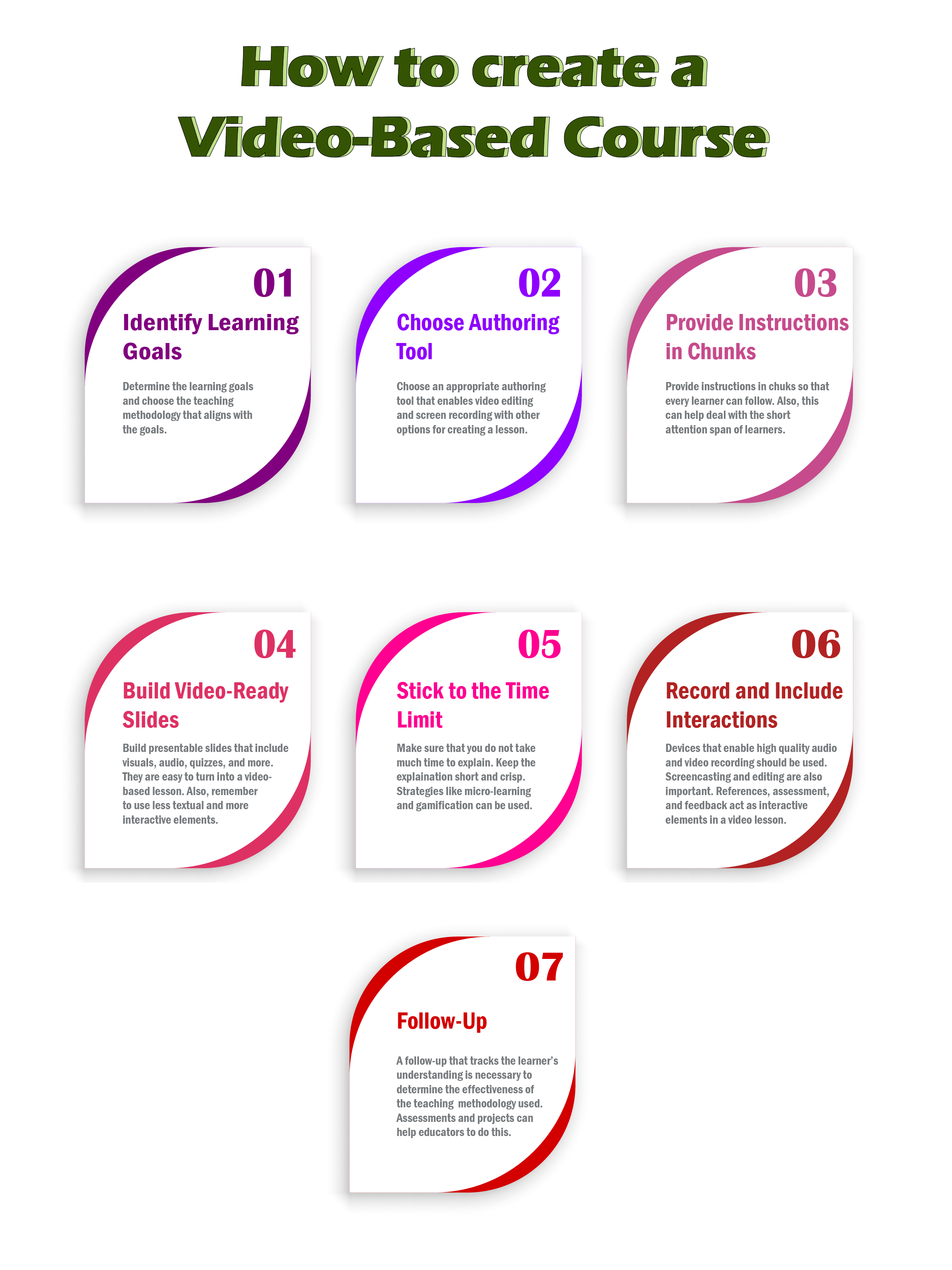
The steps and guidelines mentioned for creating video-based education courses can help educators establish useful video-based lessons/courses. Above all, a crucial step to follow is to be genuine while delivering the lesson. The impact of the educator’s personality leaves a significant mark on learners and their learning.
Moreover, educators must know the essentials of delivering an e-lesson before they work with video-based education. This can help provide the initial experience required to teach a lesson/course effectively.
Reference Websites: Edutopia and ELearning Industry
Images: Shutterstock and Freepik
To explore more e-learning options, visit our blog.
Create. Engage. Inspire.
The post Creating Video-Based Educational Courses appeared first on Test.Evelyn.
]]>